
BuildRunKit Projects: Milestones Sub-Section
BuildRunKit Projects: Milestones Sub-Section
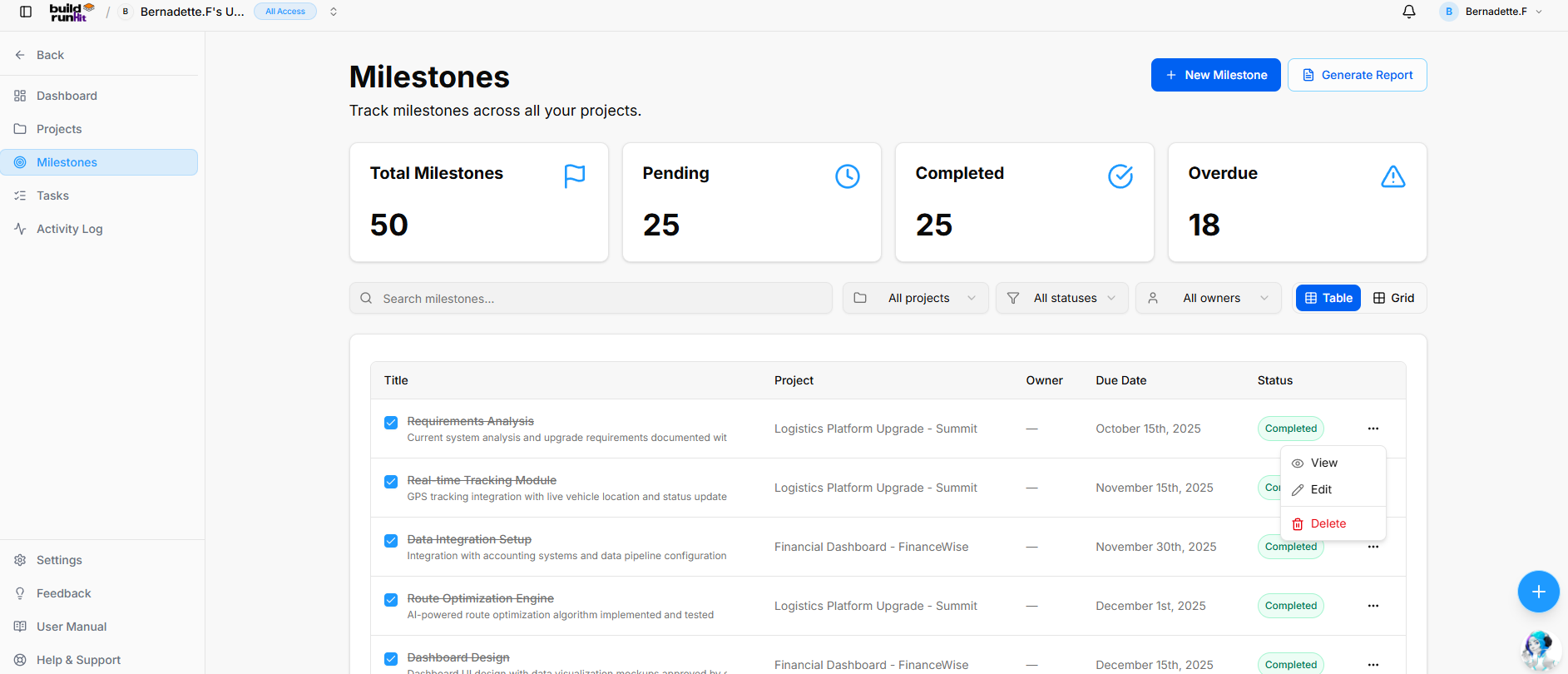
Location & Header
-
Page Heading: Milestones
-
Sub-description: "Track milestones across all your projects."
-
Header Actions:
-
+ New Milestone: Primary action button to create a new project milestone entry.
-
Generate Report: Opens the Milestones Report export modal.
-
Top Metric Summary Cards
-
Total Milestones: Displays total logged project milestones (e.g.,
50). -
Pending: Tracks upcoming or active milestones in progress (e.g.,
25). -
Completed: Counts finalized milestones (e.g.,
25). -
Overdue: Highlights past-due milestones requiring immediate attention (e.g.,
18).
Search, Filter, and Layout Controls
-
Search Field: Text input (
Search milestones...) for instant keyword filtering across titles and descriptions. -
Project Filter: Dropdown selector to filter milestones by a specific project (All projects).
-
Status Filter: Dropdown selector to filter by progress state (All statuses).
-
Owner Filter: Dropdown selector to filter by assigned team member (All owners).
-
View Switcher: Toggle buttons to switch between Table view (Active) and Grid view.
Milestones Data Table
-
Title: Displays the milestone name, completion checkbox indicator, and supporting description text (e.g., Requirements Analysis, Real-time Tracking Module, Data Integration Setup, Route Optimization Engine, Dashboard Design).
-
Project: Name of the associated parent project (e.g., Logistics Platform Upgrade - Summit, Financial Dashboard - FinanceWise).
-
Owner: Assigned team member (e.g.,
—). -
Due Date: Target deadline date (e.g., October 15th, 2025, November 15th, 2025).
-
Status: Badge displaying current state (e.g., Completed).
-
Row Actions (
...): Context menu providing options to edit or delete the milestone record.
Milestones Report Modal
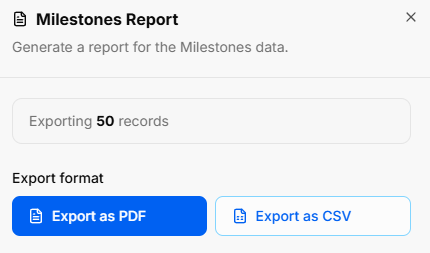
Clicking Generate Report opens the report export utility:
-
Modal Title: Milestones Report
-
Modal Sub-text: "Generate a report for the Milestones data."
-
Export Scope Indicator: Displays total count of records included in the output (e.g., Exporting 50 records).
-
Export Format Actions:
-
Export as PDF: Primary blue button to download a formatted PDF file.
-
Export as CSV: Secondary outline button to export raw CSV structured data.
-
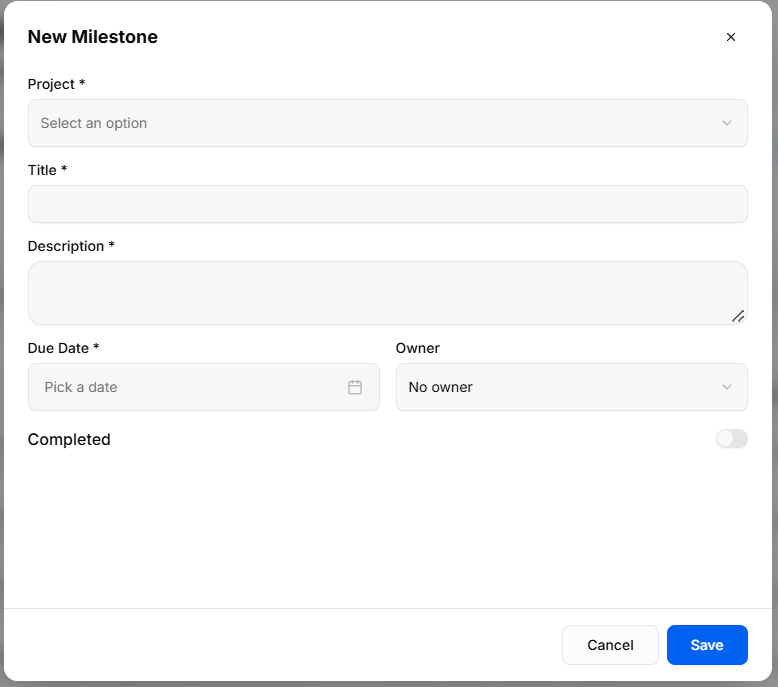
BuildRunKit Projects: New Milestone Modal
Modal Setup
-
Trigger Action: Clicking the blue + New Milestone button on the Milestones view opens the New Milestone creation modal.
-
Modal Header: New Milestone title with an x close icon in the top-right corner to exit without saving.
Field Specifications & Layout
-
Project *: Required dropdown selector (
Select an option) to link the milestone to a specific parent project. -
Title *: Required single-line text field to name the milestone.
-
Description *: Required multi-line text box to outline milestone objectives and scope.
-
Due Date *: Required date picker field (
Pick a date) to establish the target target completion date. -
Owner: Dropdown selector to assign responsibility to a workspace team member (No owner by default).
-
Completed: Toggle switch to manually mark the milestone status as complete upon creation.
Modal Actions
-
Cancel: Discards all entries and closes the overlay without saving.
-
Save: Validates required inputs, creates the milestone record, and updates the project milestone metrics.
No comments to display
No comments to display