
Business Coach Dashboard Overview
Business Coach Dashboard Overview
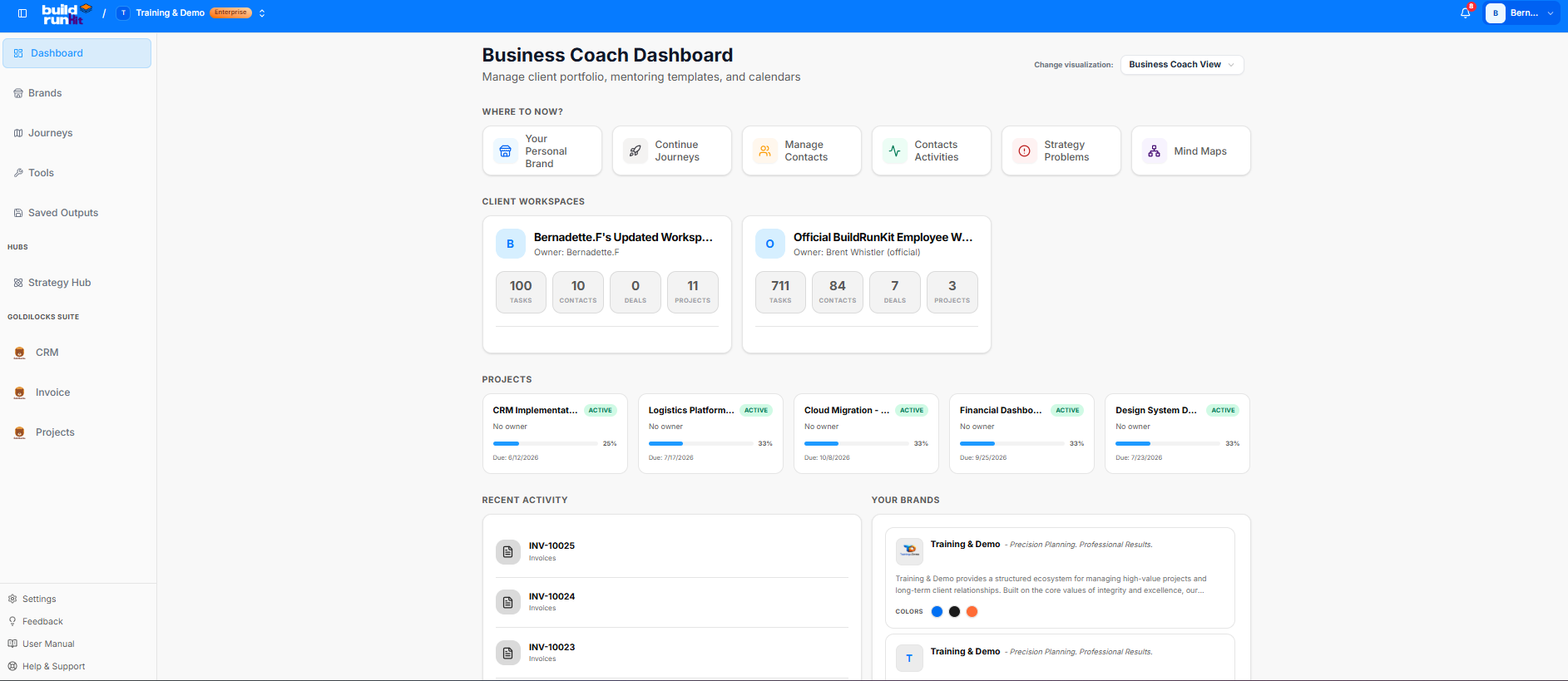
The Business Coach Dashboard gives mentors a high-level view to track client portfolios, monitor project statuses, and jump into core strategic planning tools from a single workspace.
Visualization Switching
-
Change Visualization: Located in the upper right-hand corner, this dropdown utility allows you to switch between operational views. Select Business Coach View to manage client environments and track high-level metrics across different workspaces.
"Where to Now?" Action Cards
Quick-access action buttons are lined up at the top of the workspace layout to launch your key routines:
-
Your Personal Brand: Customize your core agency data and setup profiles.
-
Continue Journeys: Pick up right where you left off on ongoing branding and strategic tracks.
-
Manage Contacts: Jump into the CRM directory to audit and update client records.
-
Contacts Activities: View a chronological history of client communications and outreach metrics.
-
Strategy Problems: Access the problem-tracking view to break down business challenges.
-
Mind Maps: Launch the visualization board to map out workflows and business frameworks.
Client Workspaces Grid
This section displays overview summary cards for individual client environments under your management:
-
Bernadette.F's Updated Workspace: Tracks real-time active metrics including 100 Tasks, 10 Contacts, 0 Deals, and 11 Projects.
-
Official BuildRunKit Employee Workspace: Tracks high-volume metrics across the team environment, including 711 Tasks, 84 Contacts, 7 Deals, and 3 Projects.
Projects Monitoring Panel
Track active client initiatives, progress bars, and approaching deadlines at a glance:
-
CRM Implementation: Tracks the development progress, operational setup, and deployment timeline for the client's customer relationship management database.
-
Logistics Platform: Monitors the structural roadmap, transit modules, and tracking milestones for the incoming supply chain and shipping software deployment.
-
Cloud Migration: Measures the active migration progress of transferring local company data tables, configurations, and core digital assets over to secure cloud infrastructure.
-
Financial Dashboard: Coordinates the building and deployment of central accounting widgets, billing logs, and revenue overview panels for active financial monitoring.
-
Design System Deployment: Oversees the rollout of unified branding variables, interface layouts, and asset kits across all user-facing digital application pages.
Activity & Brand Assets Logs
The lower portion of the layout balances short-key tracking with brand assets:
-
Recent Activity: Chronologically lists recent invoice generations, billing logs, and systemic status transformations.
-
Your Brands: Displays active white-label configurations, specific color codes, mission tags, and profile criteria for environments like Training & Demo.
-
Your Brands / Dynamic Branding Profile: Displays active white-label configurations, specific color codes, mission tags, and profile criteria for environments like Training & Demo. The application automatically pulls and applies these layout settings and custom logo files immediately upon system load.
-
Top-Down Messaging Streams: Features a non-threaded, chronological communication layout. Coaches can drop instructions, direct next actions, or digital certificates of completion straight into a client’s workspace in descending order
No comments to display
No comments to display