
BuildRunKit Projects: Tasks Sub-Section
BuildRunKit Projects: Tasks Sub-Section
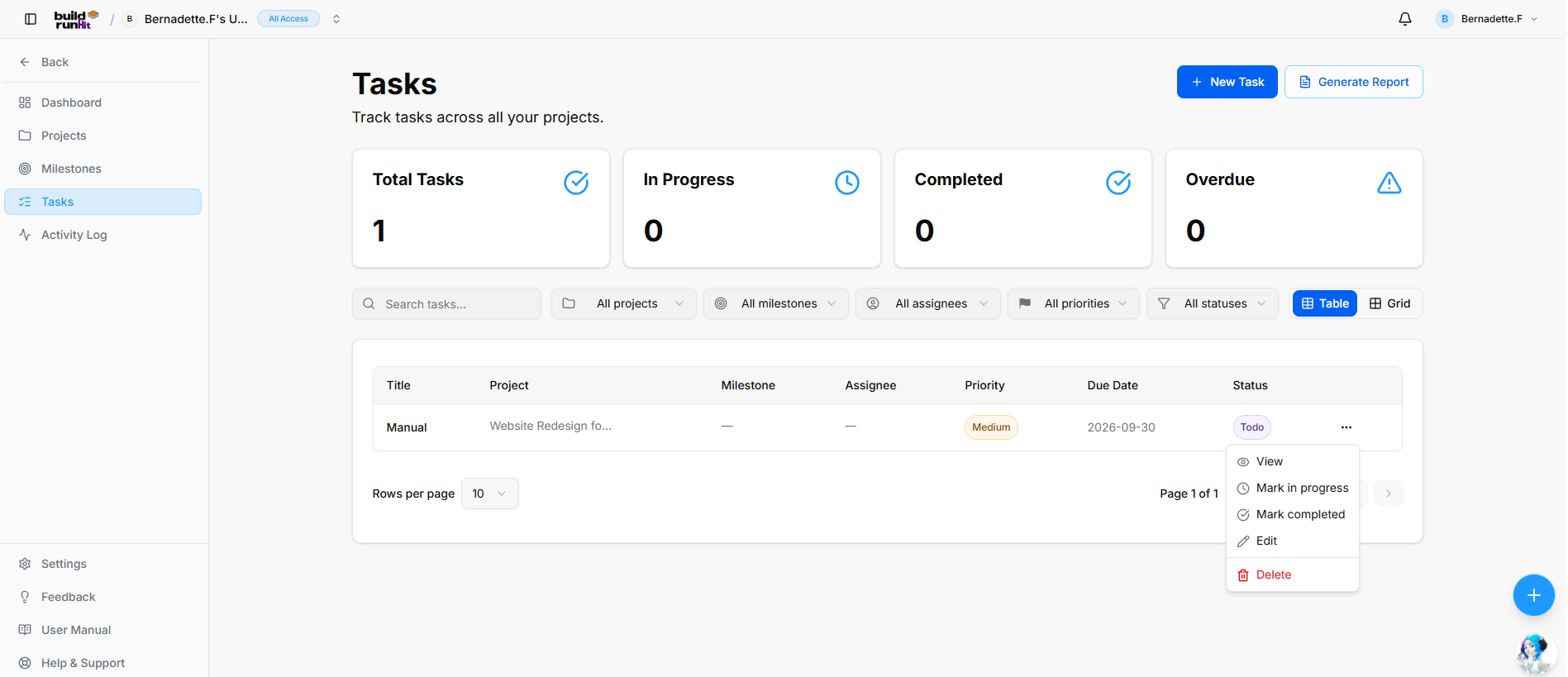
Location & Header
-
Page Heading: Tasks
-
Sub-description: "Track tasks across all your projects."
-
Header Actions:
-
+ New Task: Primary action button to create a new task record.
-
Generate Report: Opens the Project Tasks Report export modal.
-
Top Metric Summary Cards
-
Total Tasks: Tracks overall task volume across projects (e.g.,
1). -
In Progress: Counts active tasks currently being worked on (e.g.,
0). -
Completed: Counts finished tasks (e.g.,
0). -
Overdue: Highlights past-due tasks requiring immediate attention (e.g.,
0).
Search, Filter, and Layout Controls
-
Search Field: Text input (
Search tasks...) for keyword filtering. -
Project Filter: Dropdown selector to scope tasks by parent project (All projects).
-
Milestone Filter: Dropdown selector to filter by linked milestone (All milestones).
-
Assignee Filter: Dropdown selector to filter by assigned team member (All assignees).
-
Priority Filter: Dropdown selector to filter by urgency level (All priorities).
-
Status Filter: Dropdown selector to filter by progress state (All statuses).
-
View Switcher: Toggle buttons to switch between Table view (Active) and Grid view.
Tasks Data Table
-
Title: Name of the task entry (e.g., Manual).
-
Project: Name of the associated parent project (e.g., Website Redesign fo...).
-
Milestone: Linked milestone record (e.g.,
—). -
Assignee: Assigned team member (e.g.,
—). -
Priority: Urgency badge indicator (e.g., Medium).
-
Due Date: Target completion deadline date (e.g., 2026-09-30).
-
Status: Badge displaying current state (e.g., Todo).
-
Row Actions (
...): Context menu providing the following quick options:-
View: Opens task detail panel.
-
Mark in progress: Updates status directly to In Progress.
-
Mark completed: Updates status directly to Completed.
-
Edit: Opens the editing wizard.
-
Delete: Removes the task entry.
-
-
Table Pagination Controls: Page size selector (
Rows per page 10), page status indicator (Page 1 of 1), and navigation controls.
Project Tasks Report Modal
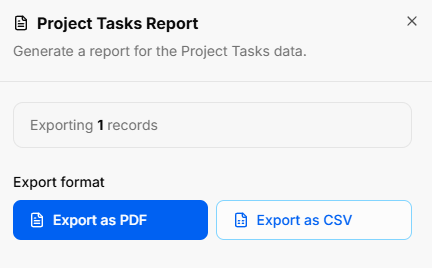
Clicking Generate Report opens the task export utility overlay:
-
Modal Title: Project Tasks Report
-
Modal Sub-text: "Generate a report for the Project Tasks data."
-
Export Scope Indicator: Displays total count of task records included (e.g., Exporting 1 records).
-
Export Format Actions:
-
Export as PDF: Primary blue button to download a formatted PDF report.
-
Export as CSV: Secondary outline button to export structured CSV raw data.
-
BuildRunKit Projects: New Task Modal
Modal Setup
-
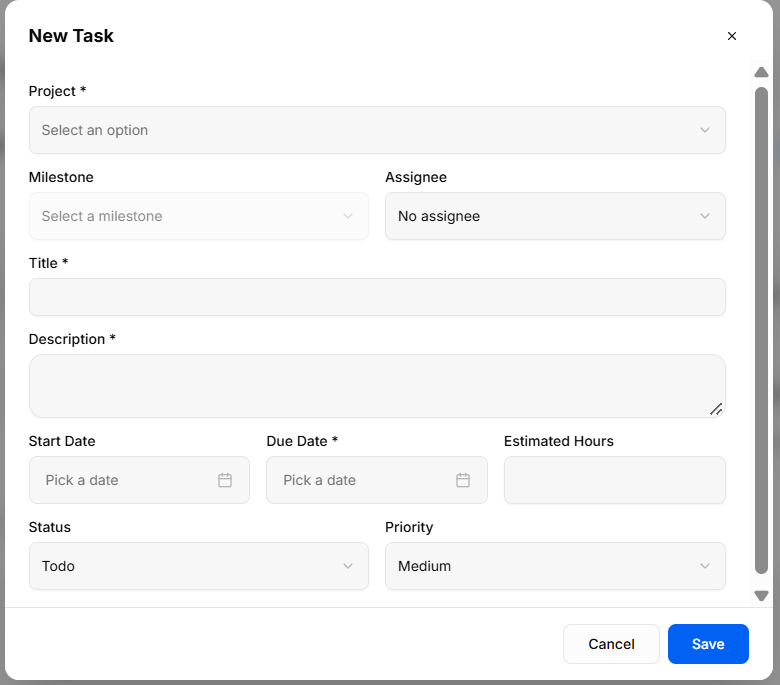
Trigger Action: Clicking the blue + New Task button on the Tasks view opens the New Task creation modal.
-
Modal Header: New Task title with an x close icon in the top-right corner to exit without saving.
Field Specifications & Layout
-
Project *: Required dropdown selector (
Select an option) to assign the task to a parent project. -
Milestone: Optional dropdown selector (
Select a milestone) to link the task to a specific project milestone. -
Assignee: Optional dropdown selector to assign responsibility to a workspace team member (No assignee by default).
-
Title *: Required single-line text input field for the task name.
-
Description *: Required multi-line text field to detail task expectations and notes.
-
Start Date: Optional date picker field (
Pick a date) to schedule task commencement. -
Due Date *: Required date picker field (
Pick a date) to establish completion deadline. -
Estimated Hours: Optional numeric input field to track allocated work hours.
-
Status: Dropdown selector to set initial progress state (Todo by default).
-
Priority: Dropdown selector to set urgency level (Medium by default).
Modal Actions
-
Cancel: Discards all entered values and closes the overlay.
-
Save: Validates required inputs, stores the task record, and updates dashboard and list counters.
No comments to display
No comments to display