
BuildRunKit CRM Dashboard Overview
BuildRunKit CRM Dashboard Overview
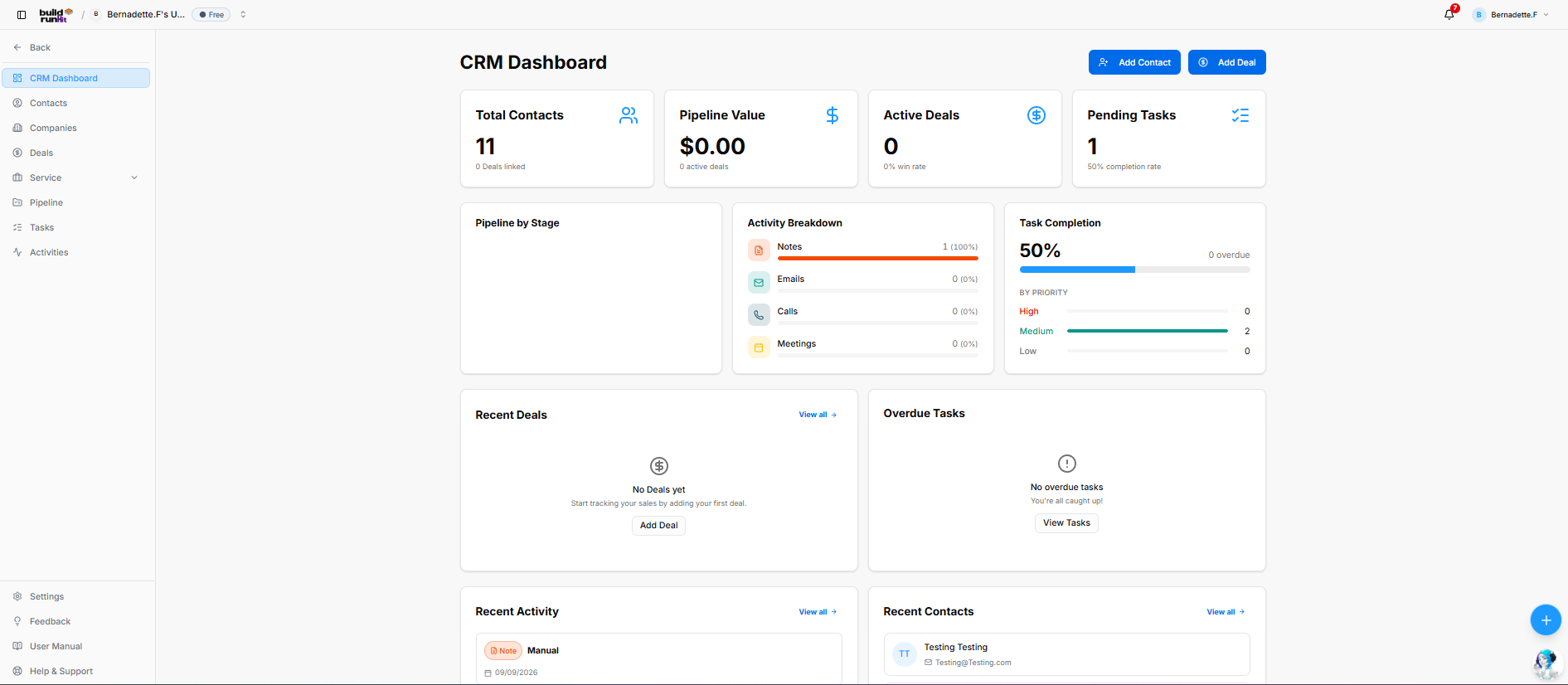
The BuildRunKit CRM Dashboard provides a high-level overview of contacts, deals, pipeline activity, tasks, and recent CRM updates.
Left Navigation Sidebar
The sidebar provides access to:
- CRM Dashboard
- Contacts
- Companies
- Deals
- Service: Disabled by default. To use it, enable the module in Settings > Modules & Features.
- Pipeline
- Tasks
- Activities
- Settings, Feedback, User Manual, and Help & Support
Header & Quick Action Controls
- Workspace header: Displays the workspace name and plan.
- Notification bell: Displays a notification indicator when there are notifications.
- User profile: Shows the signed-in user.
- Add Contact: Opens the contact creation form.
- Add Deal: Opens the deal creation form.
Key Performance Indicator (KPI) Summary Cards
The dashboard displays:
- Total Contacts: The number of contacts, with an indicator for linked deals.
- Pipeline Value: The value associated with the sales pipeline.
- Active Deals: The number of active deals and the win-rate percentage.
- Pending Tasks: The number of pending tasks and the task completion percentage.
These figures reflect workspace data and may change over time.
Middle Analytics & Tracking Panels
- Pipeline by Stage: Displays deal distribution across pipeline stages.
- Activity Breakdown: Summarizes Notes, Emails, Calls, and Meetings.
- Task Completion: Displays task completion progress, overdue task count, and task counts by High, Medium, and Low priority.
Bottom Monitoring Grid
- Recent Deals: Provides a preview of recent deals and a View all link. When there are no deals, the panel displays an empty-state message and an Add Deal action.
- Overdue Tasks: Highlights overdue tasks and provides a View Tasks link. When there are no overdue tasks, the panel displays an empty-state message.
- Recent Activity: Shows recent CRM activity and a View all link.
- Recent Contacts: Shows a preview of recently added contacts, including available contact details, with a View all link.
Floating Action Utility & Assistant
- Quick Actions (+): Opens shortcuts for creating records across CRM, Projects, and Strategy Hub.
- BuildRunKit Chatbot Assistant: The floating assistant button opens the chatbot.
No comments to display
No comments to display