BuildRunKit CRM Dashboard Overview
BuildRunKit CRM Dashboard Overview
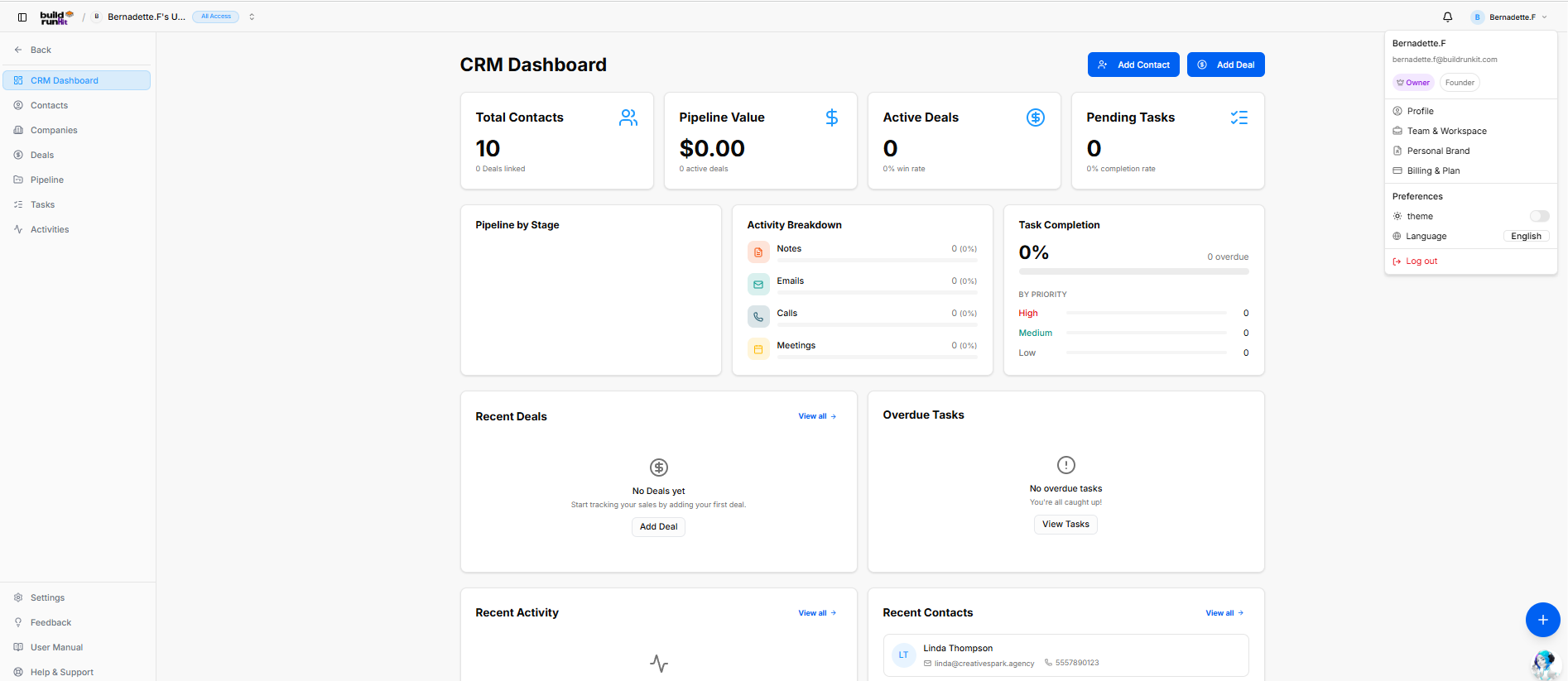
The BuildRunKit CRM Dashboard provides an high-level view of your sales pipeline, contact metrics, task progression, and recent client activity.
Left Navigation Sidebar
-
CRM Dashboard: The main metrics and activity hub.
-
Contacts: Manage individual client and lead records.
-
Companies: Manage parent organization profiles and associated contact groups.
-
Deals: Track sales opportunities and revenue targets.
-
Pipeline: Visual pipeline stage manager.
-
Tasks: Track and manage assigned client action items.
-
Activities: Log and review communications (notes, emails, calls, meetings).
-
System Utilities (Bottom Bar): Quick links for Settings, Feedback, User Manual, and Help & Support.
Header & Quick Action Controls
Located at the top right of the screen layout:
-
Workspace Context Switcher: Displays the currently active workspace name and access permissions in the top left header bar.
-
Notification Bell: Clickable bell icon located in the top right utility area to view real-time system alerts, task assignments, and activity updates.
-
User Profile Menu: Displays active account details, role status, and quick preferences (theme toggle, language selection, and log out options).
-
Add Contact: Direct action button to open the contact creation modal.
-
Add Deal: Direct action button to launch the new deal configuration window.
Key Performance Indicator (KPI) Summary Cards
The top metrics bar displays primary performance statistics:
-
Total Contacts: Shows total active contacts and linked deal count (e.g., 10 Contacts).
-
Pipeline Value: Tracks the cumulative monetary value of active deals in the sales pipeline.
-
Active Deals: Displays open deal count and win-rate percentage.
-
Pending Tasks: Tracks total open task volume and task completion percentage.
Middle Analytics & Tracking Panels
-
Pipeline by Stage: Visual breakdown showing deal distribution across active pipeline stages.
-
Activity Breakdown: Tracks logging percentages for Notes, Emails, Calls, and Meetings.
-
Task Completion: Displays overall completion percentage alongside priority breakdown levels (High, Medium, Low) and overdue task counters.
Bottom Monitoring Grid
-
Recent Deals: Lists recently created deals with quick action to add new records.
-
Overdue Tasks: Highlights urgent action items requiring immediate attention with direct link to view all tasks.
-
Recent Activity: Logs sequential updates across contacts, deals, and communication streams.
-
Recent Contacts: Displays recently added contacts with direct contact details (e.g., Linda Thompson).
Floating Action Utility & Assistant
-
Quick Shortcuts Plus Button (+): Located at the bottom-right corner directly above the chatbot, providing instant floating shortcuts to create records across:
-
CRM
-
Projects
-
Strategy Hub
-
-
BuildRunKit Chatbot Assistant: Floating AI assistant launcher positioned directly in the bottom-right corner.
No comments to display
No comments to display