
BuildRunKit CRM: Deals Sub-Section
BuildRunKit CRM: Deals Sub-Section
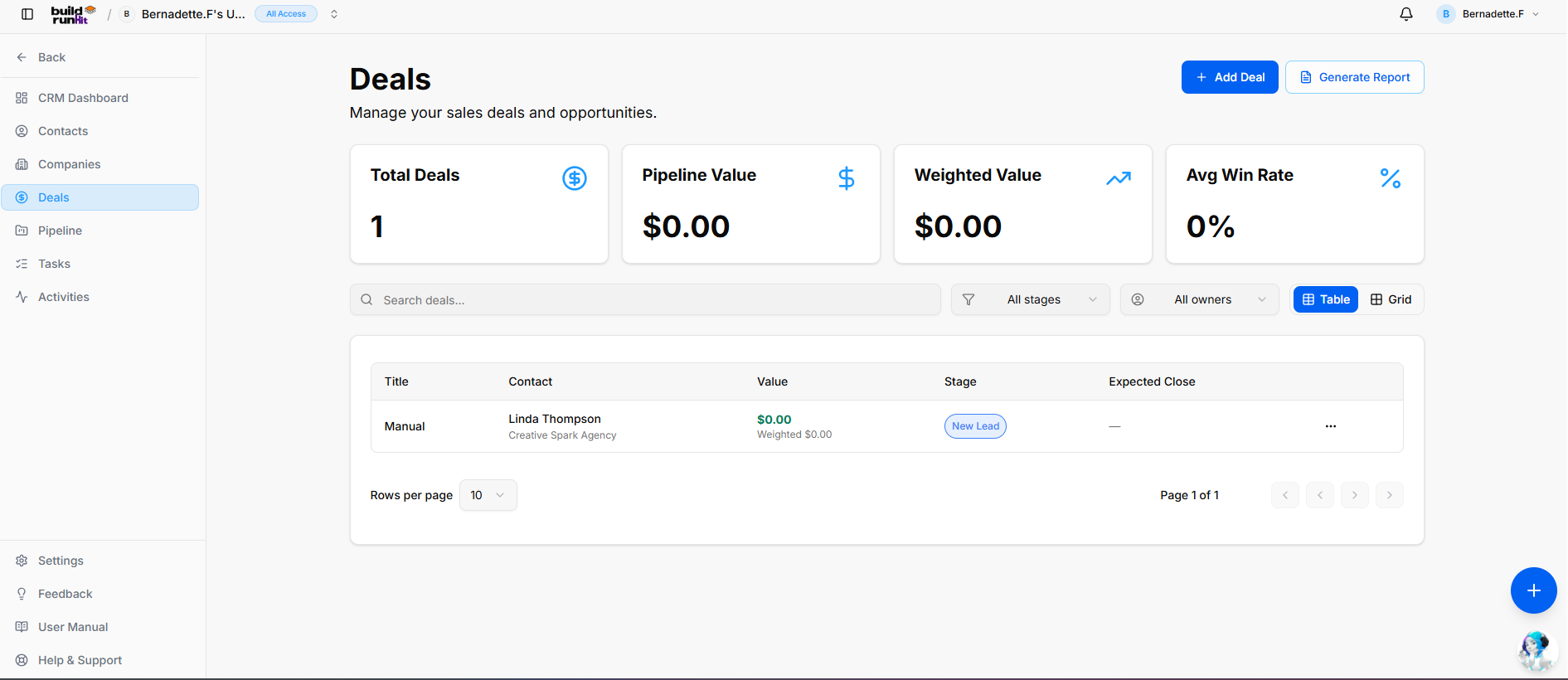
The Deals sub-section provides central pipeline tracking to manage active sales opportunities, forecast revenue, and monitor deal conversion metrics.
Header & Action Buttons
-
+ Add Deal: Direct action button to open the new deal creation modal.
-
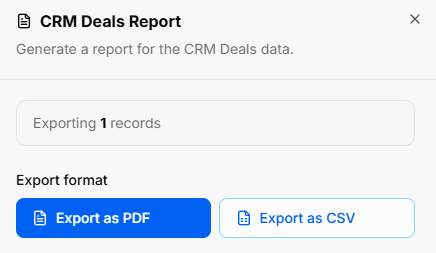
Generate Report: Opens the CRM Deals Report export modal:
-
Export Count: Displays total targeted deal records (e.g., Exporting 1 records).
-
Export Format Options: Download data instantly as Export as PDF or Export as CSV.
-
Deal Summary Metrics
Top KPI cards display key revenue and pipeline performance metrics:
-
Total Deals: Counts all active sales opportunities logged in the system.
-
Pipeline Value: Displays the total unweighted monetary value of all active pipeline opportunities.
-
Weighted Value: Calculates projected revenue weighted by win probability percentages across current stages.
-
Avg Win Rate: Tracks the overall historical deal conversion percentage.
Directory Controls & Search Bar
-
Search deals...: Global text search input to locate opportunities by title or keyword.
-
All stages Dropdown: Filter opportunities by pipeline status (e.g., New Lead, Proposal Sent).
-
All owners Dropdown: Filter deals by assigned internal account managers.
-
View Switches: Toggle view modes between Table (list view) and Grid (card view).
-
Rows per page & Pagination: Dropdown menu and directional controls to navigate multi-page lists.
Deals Table Data Columns
-
Title: The primary name assigned to the sales opportunity.
-
Contact: Associated primary contact name and parent organization profile.
-
Value: Total deal monetary value alongside calculated weighted revenue value.
-
Stage: Current pipeline status badge (e.g., New Lead).
-
Expected Close: Target completion date for closing the sale.
-
Row Actions Menu (
...): Context menu providing direct View, Edit, and Delete options for individual deal records.
BuildRunKit CRM: Adding a New Deal
Clicking the + Add Deal button opens the creation modal divided into two tabs:
1. Details Tab
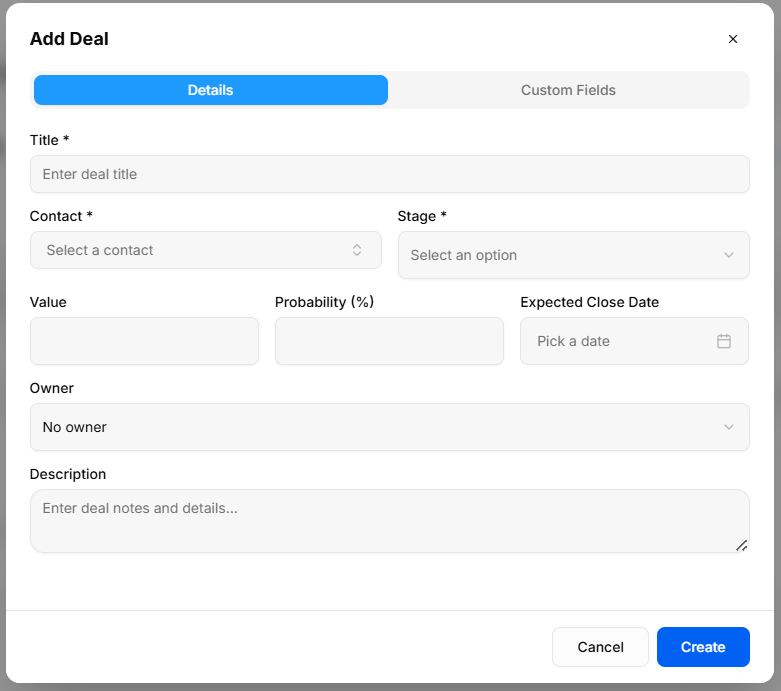
Captures primary deal parameters and financial forecasts:
-
Title *: Required field to enter the opportunity name.
-
Contact *: Required dropdown selector to associate the deal with an existing contact record.
-
Stage *: Required dropdown selector to set the initial position within your sales pipeline.
-
Value: Monetary worth of the opportunity.
-
Probability (%): Estimated likelihood percentage of winning the deal, used to compute weighted pipeline value.
-
Expected Close Date: Date picker input to target target contract execution or closing.
-
Owner: Dropdown menu to assign deal management responsibility to a workspace team member.
-
Description: Multi-line text field to enter context, negotiation notes, and opportunity details.
2. Custom Fields Tab
-
Tailored Deal Data: Dynamic inputs populated from Settings > Custom Fields to capture business-specific deal properties.
-
Modal Actions: Click Cancel to discard inputs or Create to record the deal in your pipeline.
No comments to display
No comments to display