
Mentor Alliance Business Coach Kit – Dashboard
Mentor Alliance Business Coach Kit – Dashboard
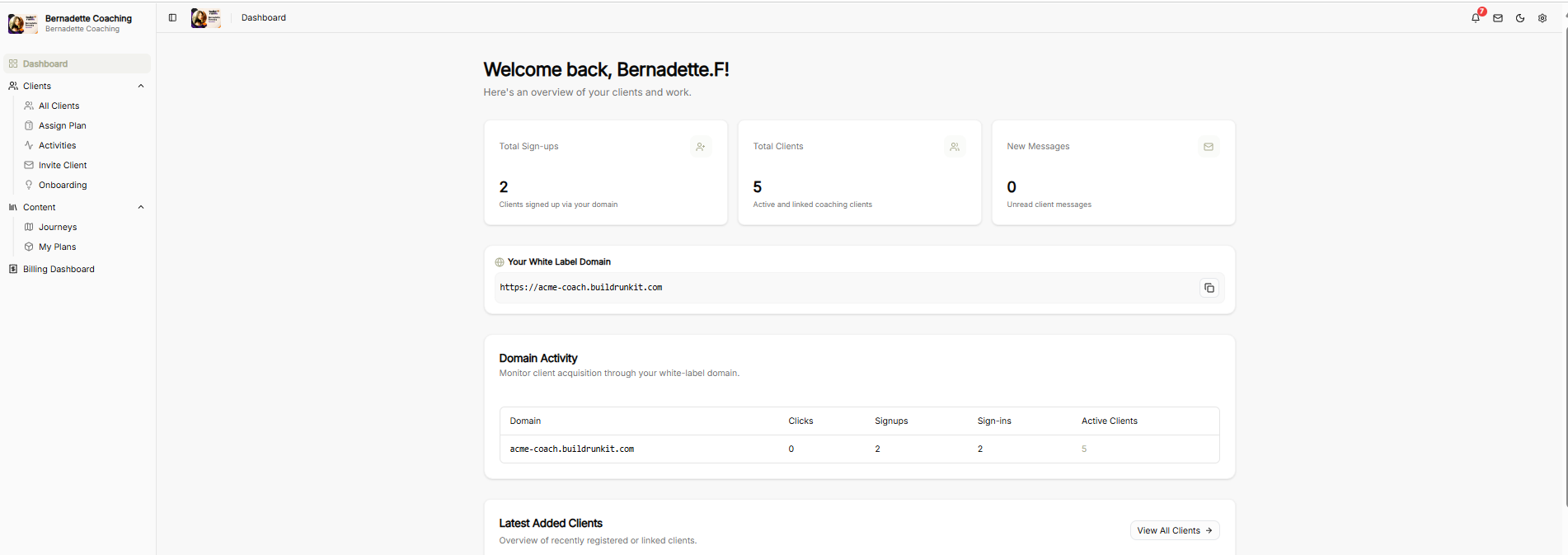
The Mentor Alliance Business Coach Dashboard serves as the central operational hub for coaches to monitor client onboarding, manage custom plans, track white-label domain performance, and access administrative settings.
Top Utility Navigation
-
Notification Bell: Red alert badge icon displaying active workspace alerts and platform updates.
-
Client Messaging Envelope: Quick-access shortcut button to compose and send messages directly to clients.
-
Theme Toggle (Moon Icon): One-click visual control switch to toggle between Light Mode and Dark Mode display themes.
-
Settings Gear: Instant menu access to update account preferences, profile details, and system configurations.
Sidebar Navigation Bar
-
Organization Profile: Displays the active coaching brand name.
-
Dashboard: Home view displaying key metrics, domain activity, and client progress overviews.
-
Clients Group:
-
All Clients: Directory of all linked and active coaching clients.
-
Assign Plan: Interface for assigning custom coaching plans or business journeys to specific clients.
-
Activities: Log of recent client actions, progress milestones, and platform engagements.
-
Invite Client: Onboarding tool to send direct invitations or referral links to new clients.
-
Onboarding: Management flow for guiding new clients through initial profile and business setup.
-
-
Content Group:
-
Journeys: Access and manage built-in and custom coaching frameworks.
-
My Plans: Library of tailored coaching blueprints and action plans.
-
-
Billing Dashboard: Direct link to client billing settings, active subscriptions, and invoicing data.
Dashboard Metrics & Operations
Top Summary Metric Cards
-
Total Sign-ups: Displays the total count of clients who registered using your white-label domain.
-
Total Clients: Active and linked coaching clients currently managed within your workspace.
-
New Messages: Unread client message notifications.
Your White Label Domain
-
Domain Input Block: Displays your custom sub-domain URL alongside a one-click copy button for quick sharing across channels.
Domain Activity Table
Monitors real-time client acquisition and traffic metrics across your white-label URL:
-
Domain: Active custom URL.
-
Clicks: Total unique link visits.
-
Signups: Total registrations recorded through the domain.
-
Sign-ins: Total active client sign-ins logged.
-
Active Clients: Current total of retained active clients.
Latest Added Clients
-
Client Overview Feed: Displays a stream of recently registered or linked clients, with a View All Clients → quick navigation button to jump directly to the full directory.
No comments to display
No comments to display