
BuildRunKit Projects: Tasks Sub-Section
ManagingBuildRunKit YourProjects: Tasks Sub-Section
Location & Header
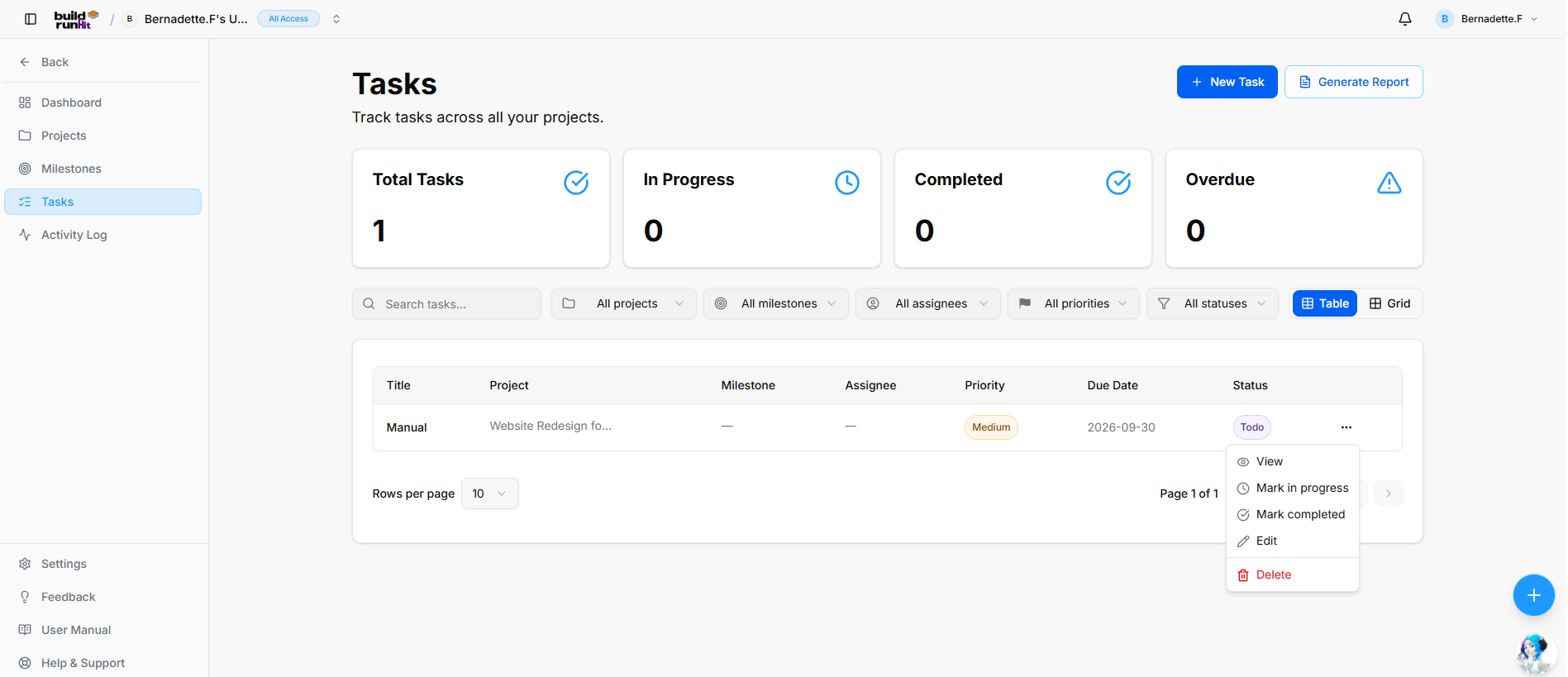
ThePage Heading: Tasks
Sub-description: you"Track managetasks individualacross work items to ensureall your projects stay on schedule. This section provides a centralized view of all to-dos across your various initiatives.projects."
Managing
TheHeader Tasks page allows you to organize and filter your workload to stay focused on high-priority items:Actions:
-
Navigation:+ClickNewonTask:TasksPrimaryinactionthe left-hand sidebarbutton toviewcreateandamanagenewalltasktasks across your workspace.record. -
StatusGenerateOverview:Report:Four status cards atOpens thetopProject Tasks Report export modal.
Top Metric Summary Cards
Total Tasks: Tracks overall task volume across projects (e.g., 1).
In Progress: Counts active tasks currently being worked on (e.g., 0).
Completed: Counts finished tasks (e.g., 0).
Overdue: Highlights past-due tasks requiring immediate attention (e.g., 0).
Search, Filter, and Layout Controls
Search Field: Text input (Search tasks...) for keyword filtering.
Project Filter: Dropdown selector to scope tasks by parent project (All projects).
Milestone Filter: Dropdown selector to filter by linked milestone (All milestones).
Assignee Filter: Dropdown selector to filter by assigned team member (All assignees).
Priority Filter: Dropdown selector to filter by urgency level (All priorities).
Status Filter: Dropdown selector to filter by progress state (All statuses).
View Switcher: Toggle buttons to switch between Table view (Active) and Grid view.
Tasks Data Table
Title: Name of the pagetask provideentry a(e.g., real-timeManual).
Project: Name of yourthe tasks:associated parent project (e.g., Website Redesign fo...).
Milestone: Linked milestone record (e.g., —).
Assignee: Assigned team member (e.g., —).
Priority: Urgency badge indicator (e.g., Medium).
Due Date: Target completion deadline date (e.g., 2026-09-30).
Status: Badge displaying current state (e.g., Todo).
Row Actions (...): Context menu providing the following quick options:
-
AllView:Tasks:OpensTotaltasknumberdetailof work items.panel. -
ToMarkDo:inTasksprogress:thatUpdateshavestatusnotdirectlyyettobeenInstarted.Progress. -
InMarkProgress:completed:TasksUpdatescurrentlystatusbeingdirectlyworkedtoon.Completed. -
Done:Edit:CompletedOpenstasks.the editing wizard.
Delete: Removes the task entry.
SearchTable &Pagination Filters:Controls: YouPage cansize searchselector for(Rows ), specificper taskspage by10namepage orstatus descriptionindicator (Page 1 of 1), and filternavigation controls.
Project Tasks Report Modal
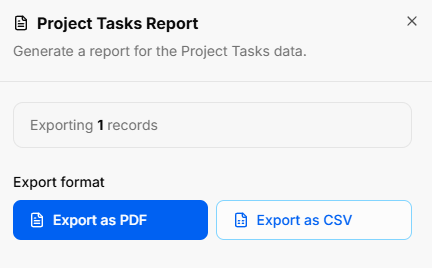
Clicking Generate Report opens the listtask byexport Project,utility Milestone,overlay:
Modal Status.Title: Project Tasks Report
ViewModal Options:Sub-text: Toggle between"Generate a Tablereport orfor Cardsthe viewProject toTasks change how tasks are displayed.data."
Important:Export Scope Indicator:BeforeDisplayscreatingtotaltasks,countyou first need to create a project. All tasks must be assigned to an existing project to ensure they are properly tracked and organized.
Tabbed Task Modals

Theof task viewrecords layout inside Projects utilizes a clean, three-tab modular interface to separate operational info:
Details: Manage target parameters, due dates, descriptions, and assign External Assigneesincluded (optimizede.g., forExporting mobile1 screen responsiveness)records).
Comments:Export CentralizesFormat ongoingActions:
Export andas feedback.PDF: Primary blue button to download a formatted PDF report.
Attachments:Export Housesas allCSV: uploadedSecondary filesoutline and documents linkedbutton to theexport task.structured CSV raw data.
HowBuildRunKit toProjects: Create aNew Task Modal
To
Modal add a new work item, click the brown "+ Add Task" button in the top right corner to open the creation form:Setup
-
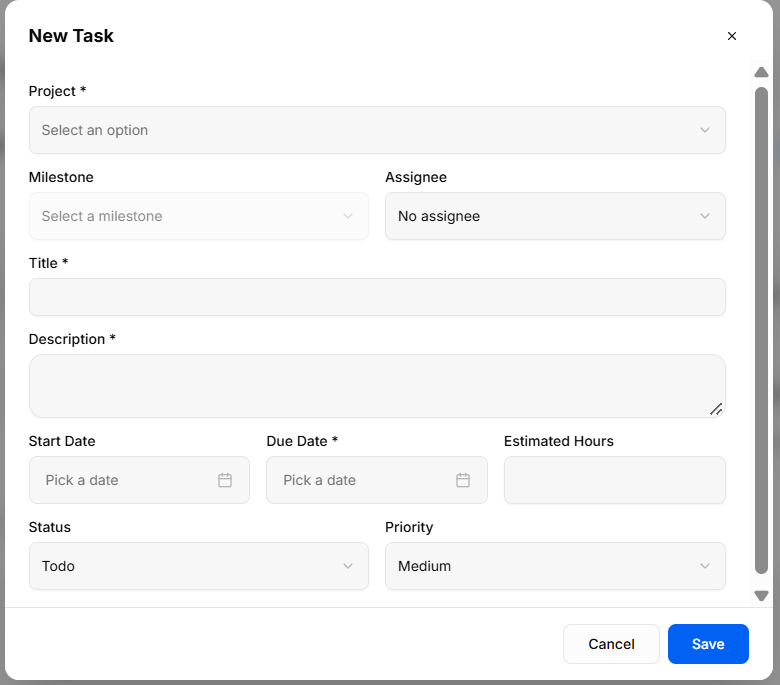
TitleTrigger*Action:Enter a clear name forClicking thetaskblue(Required).+ New Task button on the Tasks view opens the New Task creation modal. -
Description:ModalProvideHeader:detailsNewaboutTaskwhattitleneedswith an x close icon in the top-right corner tobeexitdone.without saving.
Field Specifications & Layout
Project *: Required dropdown selector (Select an option) to assign the task to a parent project.
Assignee:Milestone: Use theOptional dropdown toselector select which team member is responsible for the task.
Project *: (Select ) tothea project this task belongsmilestone (Required).
Milestone: Optionally link the task to a specific project milestone.
Due Date *Assignee: SelectOptional thedropdown deadlineselector forto thisassign taskresponsibility to a workspace team member (Required)No assignee by default).
EstimatedTitle Hours:*: EnterRequired single-line text input field for the predictedtask time required to complete the task.name.
Priority:Description Set*: theRequired urgencymulti-line leveltext field to detail task expectations and notes.
Start Date: Optional date picker field (e.g.,Pick ) Low,a Medium,dateHigh)to schedule task commencement.
Due Date *: Required date picker field (Pick a date) to establish completion deadline.
Estimated Hours: Optional numeric input field to track allocated work hours.
Status: Dropdown selector to set initial progress state (Todo by default).
Status:Priority: SetDropdown selector to set urgency level (Medium by default).
Modal Actions
Cancel: Discards all entered values and closes the current phase of the task (e.g., To Do, In Progress).overlay.
CreateSave: TaskValidates Button:required Clickinputs, the brown button to savestores the task torecord, yourand project.updates dashboard and list counters.
" Note: Clear visual indicators are present for all mandatory fields. If any required fields are missing, the form validation feedback will explicitly show you what needs to be completed instead of letting the window freeze or hang in a loading state.
Exporting Task Data
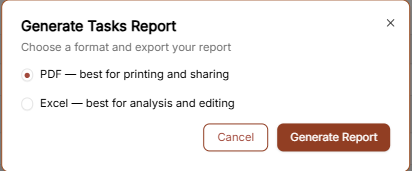
Click the "Generate Report" button to export your task list. You can choose between two formats:
PDF: Best for printing and sharing task summaries.
Excel: Best for detailed analysis and manual editing of task data.