
BuildRunKit Invoices: Invoices Sub-Section
GoldilocksBuildRunKit InvoiceInvoices: DashboardInvoices Sub-Section
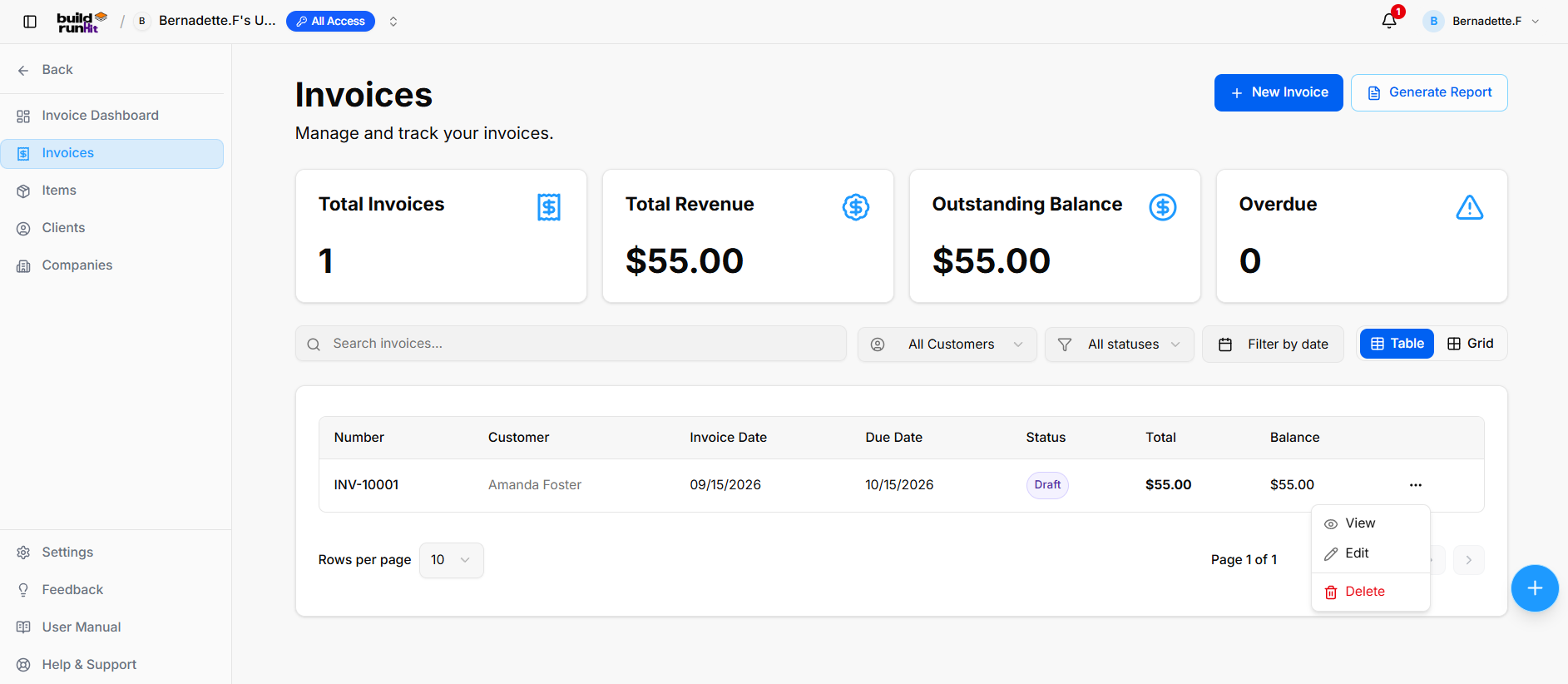
OnceThe youInvoices havesub-section successfullyprovides signedcentral in,management youfor willcreating, betracking, greeted by the Dashboard. This page is designed to give you a "at a glance" view of your latest activityfiltering, and providereporting faston jumpsall into your most importantcustomer billing workflows.
Managingpayment Your Workspace
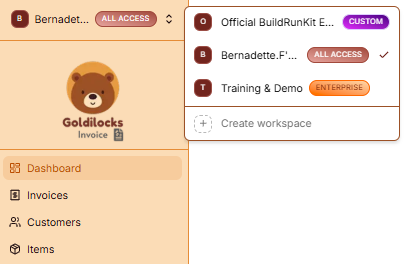
At the very top of the left sidebar, you will see your current workspace name. BuildRunKit allows you to manage multiple business environments from a single account.statuses.
HowInvoice toSummary SwitchMetrics Workspaces:Top KPI cards display key billing breakdown totals:
-
ClickTotal Invoices: Tracks theWorkspaceoverallSelector: Click on the workspace name at the topnumber oftheregisteredsidebar.invoice records. -
SelectTotalfromRevenue:theDisplaysList:totalAgrossdropdownrevenue collected across paid invoices.
-
Outstanding Balance: Displays total unpaid balances across active invoices.
Overdue: Highlights past-due invoices requiring immediate collection.
Directory Controls & Search Bar
Search invoices...: Global filter input for locating records by number, customer, or details keywords.
All Customers: Dropdown menu willto appearfilter showingrecords allby workspacesspecific youclient.
All statuses: Dropdown menu to filter records by status (suchDraft, asSent, "OfficialPaid, BuildRunKit Employee Workspace" or "Training & Demo"Overdue).
InstantFilter Switch:by Clickdate: onDate thepicker desired namecontrol to instantlyisolate switchbilling allrecords datawithin (Invoices,specific Customers,date and Items) to that workspace.ranges.
CreateView New:Switcher: YouToggle canviewing alsomodes clickbetween "+Table Create(list workspace"layout) atand theGrid bottom(card of this menu to start a brand new business environment.layout).
Company Management
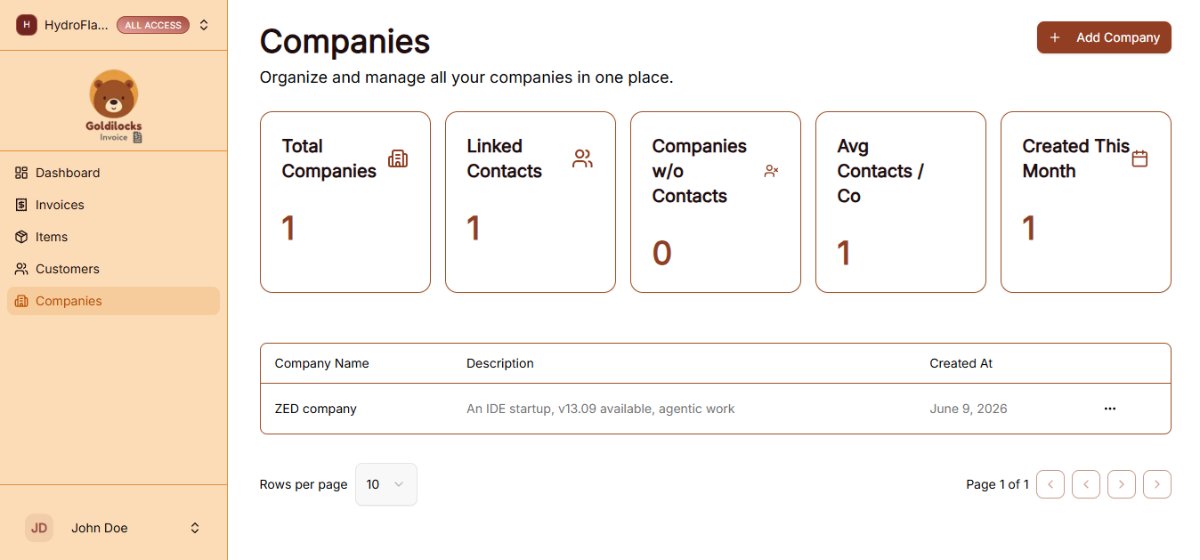
Pagination: Standard directional controls to step through invoice pages.
Invoices Table Data Columns
-
DedicatedNumber:NavigationUniqueTab:systemAccessinvoicealltrackingcompany profiles and administrative records using a standalone management tab built directly into the Invoices dashboard menu layout.code. -
ResponsiveCustomer:LayoutNameTables:ofView,thesort,billedandclientprocessorcorporateorganization.billing
Invoice mobile-responsiveDate: dataDate tablesof andinvoice structuralissuance.
Due Date: Payment deadline date.
Status: Badge displaying current state.
Total: Full invoice amount billed.
Balance: Remaining unpaid balance due.
Activity
The(...)
-
Invoices:View:TotalOpenscounttheofdedicatedrecentinvoicebillablepreviewdocuments.and line item details. -
Customers:Edit:TotalOpensnumbertheofsetupclientseditorintoyourupdatedatabase.billing details, line items, or customer assignment. -
Items:Delete:TotalRemovesnumbertheofinvoicesavedrecordservices/productsfromintheyourInvoicescatalog.directory.
Quick
Header & Action SectionsButtons
-
Recent+Invoices:NewViewInvoice:yourDirectlatestactiondrafts or sent items. Click "Create your first invoice"button tostartopenathenewinvoicebill.setup modal. -
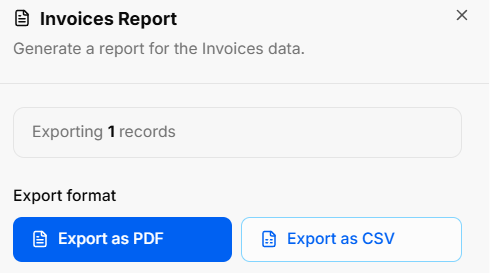
RecentGenerateCustomers:Report:SeeOpensnewlytheaddedInvoicescontacts.ReportClickexport"Createmodal:yourfirst -
customer"Export
toCount:addDisplaysatotalnewtargetedclient.invoice records (e.g., Exporting 1 records). -
RecentExportItems:FormatViewOptions:recentlyAllowssavedinstantservices.downloadsClickvia"CreateExportyourasfirstPDFitem"ortoExportexpandasyour service catalog.CSV.
NavigationBuildRunKit SidebarInvoices: Creating a New Invoice
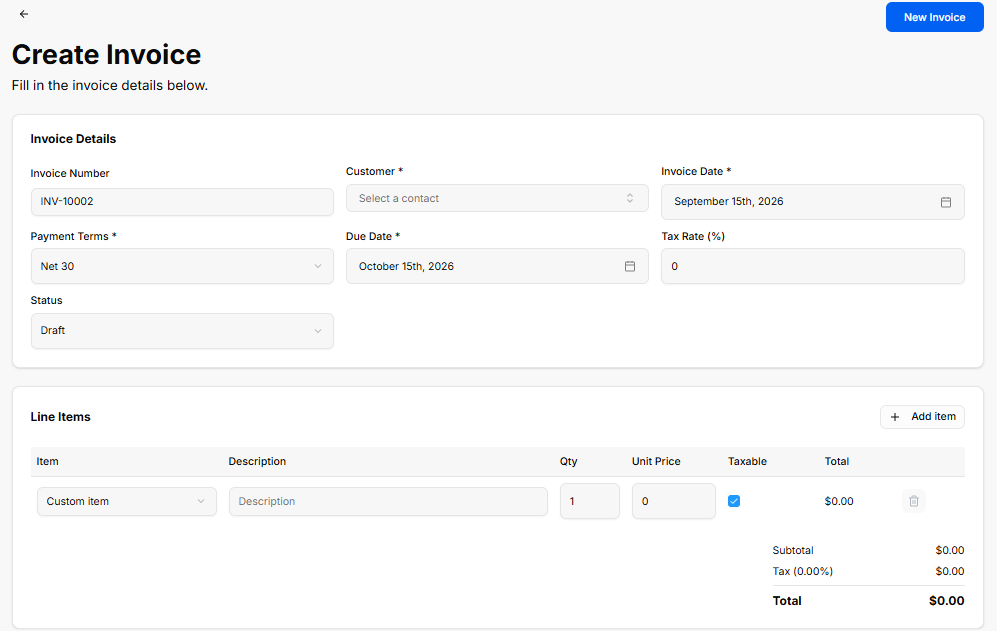
The sidebarCreate Invoice view provides quicka linkssetup to:interface for generating custom client invoices, configuring payment terms, applying tax rates, and adding line items.
Invoice Details Panel
Invoice Number: Auto-generated tracking code (e.g., INV-10002).
Customer *: Required dropdown selector to assign a contact profile (Select a contact).
Invoice Date *: Date picker field for the issue date (e.g., September 15th, 2026).
Payment Terms *: Dropdown selector for payment terms (e.g., Net 30).
Due Date *: Date picker field for the payment deadline (e.g., October 15th, 2026).
Tax Rate (%): Numeric input field to specify applicable tax percentage (e.g., 0).
Status: Dropdown selector to set the initial state (Draft).
Line Items Panel
+ Add item: Action button to add additional row items to the invoice.
Item Table Columns & Inputs:
-
Dashboard:Item:ReturnsDropdownyouselector tothischooseoverviewapage.pre-saved item or custom entry (Custom item). -
Invoices:Description:ViewTextyourfieldfullforhistorylineofitemsent,detailspaid,orand overdue bills.notes. -
Customers:Qty:AccessNumericyourinputfullforclientquantitydirectory.ordered (e.g.,1). -
Items:UnitManagePrice:yourNumericfullinputlibraryforofpricebillableperproductsunitand(e.g.,services.0).
Taxable: Checkbox toggle to apply tax to the line item.
Total: Calculated row total (e.g., $0.00).
Delete (Trash Icon): Action button to remove the line item row.
Totals Summary:
Subtotal: Calculated sum of all line items before tax (e.g., $0.00).
Tax (0.00%): Calculated tax amount based on selected rate (e.g., $0.00).
Total: Final calculated invoice total (e.g., $0.00).
Header & Action Buttons
Back Arrow (<-): Returns to the main Invoices list view.
New Invoice: Primary blue button to save and generate the invoice record.