
BuildRunKit CRM: Tasks Sub-Section
GoldilocksBuildRunKit CRM: Tasks Sub-Section
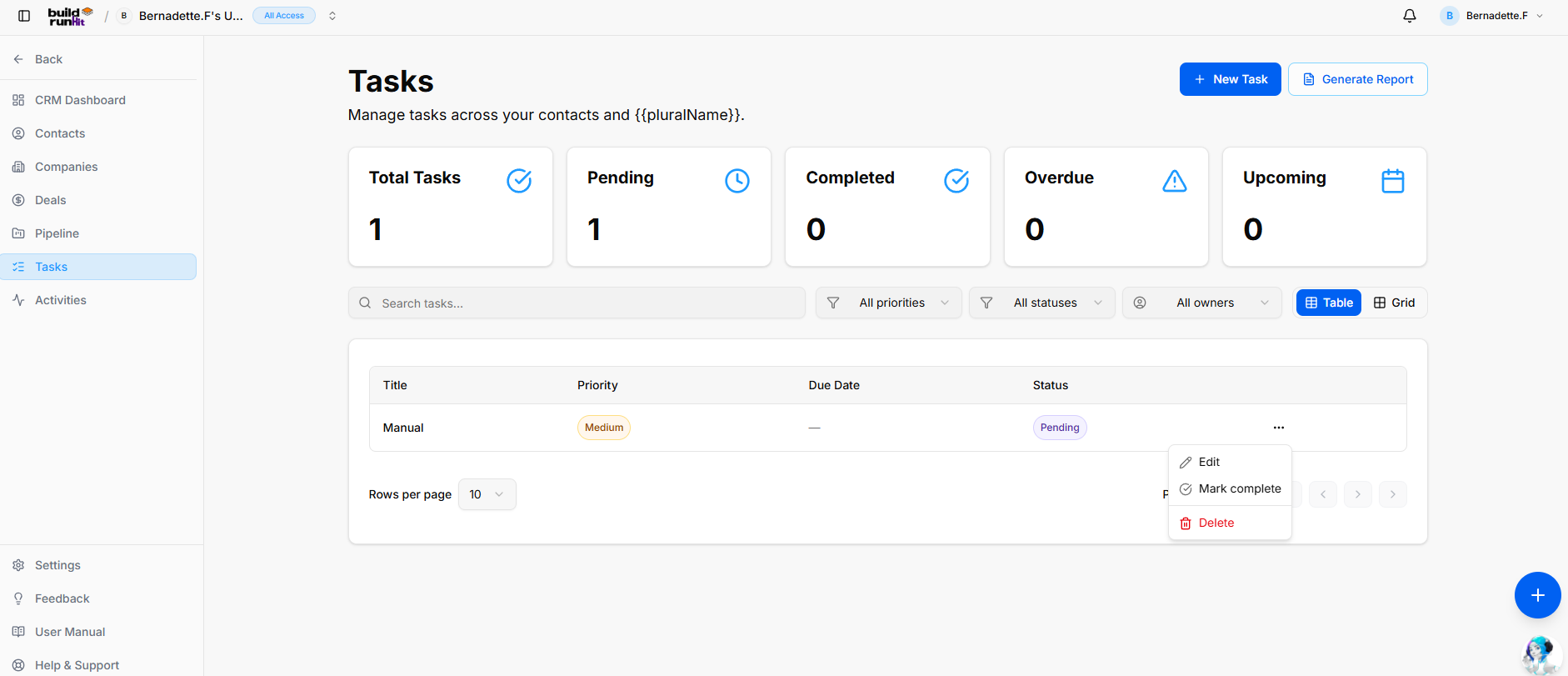
The Tasks modulesub-section allowshelps you toorganize manageaction youritems, dailyset to-dofollow-up listsdeadlines, and staytrack onexecution topacross ofall importantCRM projectcontact deadlines.records and sales opportunities.
Tasks
Header Dashboard& OverviewAction
The main dashboard provides a high-level summary of your current workload through five key metric cards:Buttons
-
Total:+TheNewoverallTask: Direct action button to open the task creation modal.
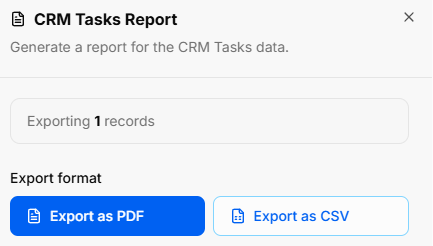
Generate Report: Opens the CRM Tasks Report export window:
Export Count: Indicates total targeted task entries (e.g., Exporting 1 records).
Export Format Options: Download task lists via Export as PDF or Export as CSV.
Task Summary Metrics Top KPI cards highlight workload and deadline urgency:
Total Tasks: Displays the cumulative count of all taskslogged assignedtask to you.records.
Pending:Pending: Tasks that are currentlyTracks open andaction items awaiting action.
Completed:Completed: ACounts countresolved oftasks allmarked finalizedas tasks.done.
Overdue:Overdue: TasksHighlights that have passed their assigned past-due dateaction withoutitems beingrequiring completed.immediate attention.
Upcoming:Upcoming: ADisplays look-aheadscheduled atfuture tasks scheduledwith forapproaching thetarget near future.dates.
Managing
Directory YourControls Task& ListSearch
You can organize and find specific tasks using the following tools:Bar
-
Search
Bar:tasks...:LocateText input field to locate task items by title or keyword.
All priorities Dropdown: Filter tasks quicklyby urgency level (e.g., High, Medium, Low).
All statuses Dropdown: Filter by searchingexecution forstate their(e.g., title,Pending, description,In orProgress, theCompleted).
All owners Dropdown: Filter tasks by assigned team member.
Filtering:View NarrowSwitches: yourToggle viewdisplay byformat usingbetween theTable All(list Prioritiesview) orand DueGrid Date(card dropdown menus.view).
QuickRows Viewper Tabs:page Switch& betweenPagination: status-specificAdjust lists,visible includingitems Allper Tasks, Pending, Completed, Overdue,page and Upcoming.step through task lists.
Adding
Tasks aTable NewData Task
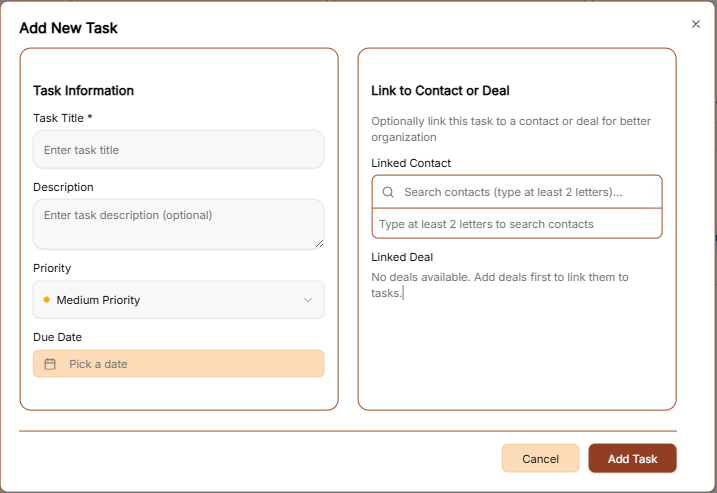
To create a new entry, click the brown + Add Task button at the top right of the screen. This opens the Add New Task window:
Task Information:Columns
-
TaskTitle:Title:NameEnterandasummaryclear, concise name forof thetask.action item. -
Description:Priority:AddVisualoptionalurgencydetails or specific instructions for the task.
Priority: Use the dropdown to set the importance levelbadge (e.g., Medium Priority)).
Due Date:Date: ClickTargeted completion deadline.
Status: Current progress indicator (e.g., Pending).
Row Actions Menu (...): Quick management options for individual rows:
Edit: Opens the calendarsetup iconeditor to pickadjust atask specificdetails, deadline.deadlines, or priority.
Mark complete: Instantly toggles status to completed.
Delete: Removes the task entry from your workspace.
BuildRunKit CRM: Creating a New Task
Connections & Finalization: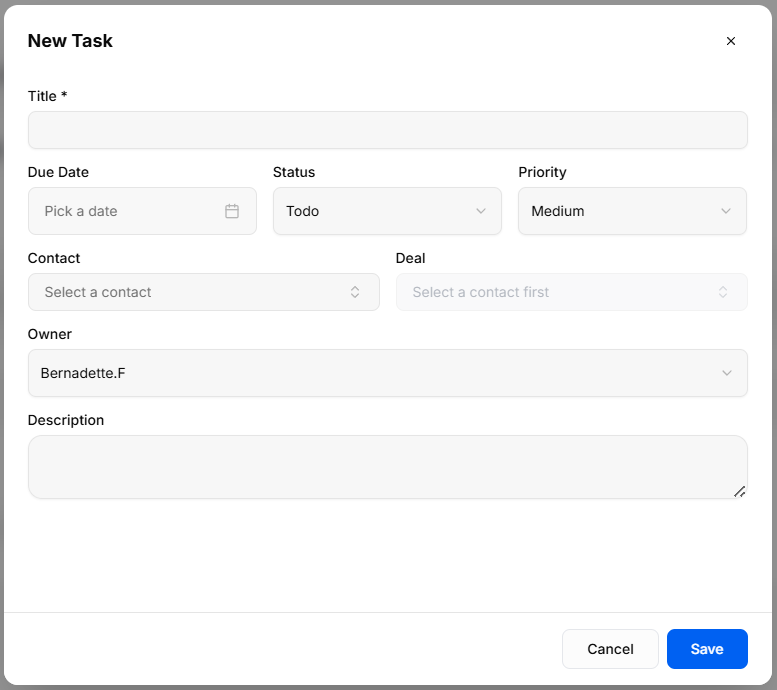
Clicking
-
LinkTitle *: Required text field toContactenter the task name orDeal:coreOptionallyaction.
Due Date: Date picker input to assign a completion deadline.
Status: Dropdown selector to set current progress state (Todo, In Progress, Complete, or Cancelled).
Priority: Dropdown selector to set urgency (Low, Medium, High).
Contact: Dropdown menu to link the task to a specific personclient or sales opportunity for better organization.record.
Save:Deal: ClickDropdown the brown Add Task button at the bottom rightmenu to saveassociate the task to your list.
Generatingwith a Tasksspecific Report
sales 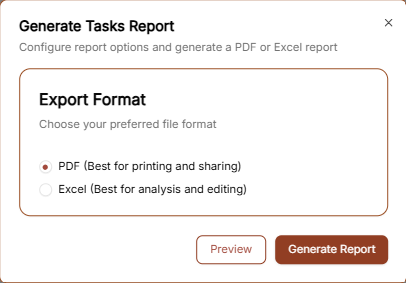
To export your current task data, click the Generate Report link in the top right corner.
Choose Format: Select either PDFopportunity (bestrequires forselecting printing/sharing)a orcontact Excel (best for data analysis)first).
Finalize:Owner: Dropdown selector to assign task responsibility to a team member in your workspace.
Description: Multi-line text field for additional context, steps, or execution notes.
Modal Actions: Click PreviewCancel to checkdiscard or Save to create the layouttask or Generate Report to download the file.record.