
Goldilocks CRM: Overview and Account Setup
GoldilocksBuildRunKit CRM:CRM IntroductionDashboard Overview
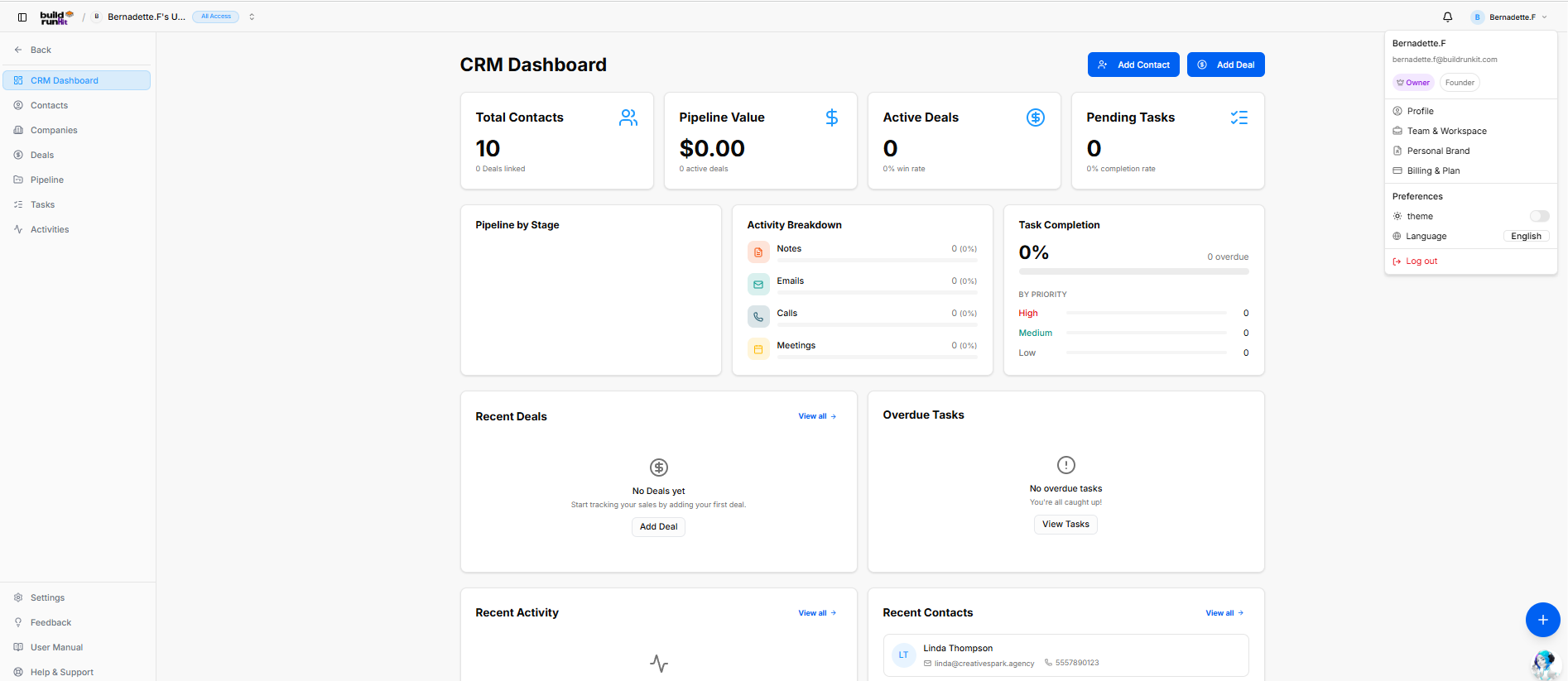
GoldilocksThe BuildRunKit CRM is the customer relationship and sales management module within the BuildRunKit ecosystem. Designed specifically for founders and small businesses, itDashboard provides aan simplehigh-level yetview powerful interface to track leads, manage deals, and organizeof your sales pipelinepipeline, withoutcontact themetrics, cluttertask of enterprise-level software.
Getting Started
BuildRunKit is a unified workspace designed to help you plan, build,progression, and runrecent yourclient business.activity.
Left accountNavigation Sidebar
user Exploring the Platform Before signing in, you can use the landing page to explore the resources available to your business:preferences:
-
NavigationCRMMenu:Dashboard:UseThethemaintop links to view Features, the Platform overview, Pricing tiers, Contact Us details,metrics andtheactivityBlog.hub. -
Call-to-Contacts: Manage individual client and lead records.
Companies: Manage parent organization profiles and associated contact groups.
Deals: Track sales opportunities and revenue targets.
Pipeline: Visual pipeline stage manager.
Tasks: Track and manage assigned client action items.
Activities: Log and review communications (notes, emails, calls, meetings).
System Utilities (Bottom Bar): Quick links for Settings, Feedback, User Manual, and Help & Support.
Header & Quick Action Buttons:Buttons
Top Header Controls: Displays workspace context, notifications, and active user profile menu.
Primary Action Buttons:
-
GetAddStarted:Contact:ClickDirectlythis to beginlaunches theregistrationcontactandcreationonboarding process.modal. -
SeeAddPlans:Deal:ReviewOpenssubscriptionthelevelsnewanddealfeatureconfigurationlimits.window.
Key
AccessingPerformance YourIndicator Account
(KPI) Summary Cards
Oncetop youmetrics havebar createddisplays yourprimary account,performance you can enter your workspace directly from the main landing page.
Entry Pointsstatistics:
-
GoTotaltoContacts:App:ShowsClicktotaltheactivebrowncontactsbuttonandatlinkedthedealtopcountright(e.g.,of10the screen to launch the CRM application.Contacts). -
LanguagePipelineSelection:Value:UseTracks theENcumulativedropdownmonetarytovaluechooseofyouractivepreferreddealsinterfaceinlanguage.the sales pipeline. -
ThemeActiveToggle:Deals:ClickDisplaystheopenMoondealIcon next to the language settings to switch between Lightcount andDarkwin-ratemodes.percentage.
Pending Tasks: Tracks total open task volume and task completion percentage.
AlternativeMiddle LoginAnalytics Options& Tracking Panels
If you registered using a third-party account, you can log in instantlyPipeline by clicking:Stage: Visual breakdown showing deal distribution across active pipeline stages.
Activity Breakdown: Tracks logging percentages for Notes, Emails, Calls, and Meetings.
Task Completion: Displays overall completion percentage alongside priority breakdown levels (High, Medium, Low) and overdue task counters.
Bottom Monitoring Grid
Recent Deals: Lists recently created deals with quick action to add new records.
Overdue Tasks: Highlights urgent action items requiring immediate attention with direct link to view all tasks.
Recent Activity: Logs sequential updates across contacts, deals, and communication streams.
Recent Contacts: Displays recently added contacts with direct contact details (e.g., Linda Thompson).
Floating Action Utility & Assistant
Quick Shortcuts Plus Button (+): Located at the bottom-right corner directly above the chatbot, providing instant floating shortcuts to create records across:
-
GoogleCRM -
GitHubProjects
Strategy Hub
Note:BuildRunKit IfChatbot youAssistant: areFloating onAI thisassistant pagelauncher bypositioned mistakedirectly and need to register, clickin the "Create one for free" link at the top bottom-right of the login box.corner.