
BuildRunKit Projects: Milestones Sub-Section
ManagingBuildRunKit YourProjects: Milestones Sub-Section
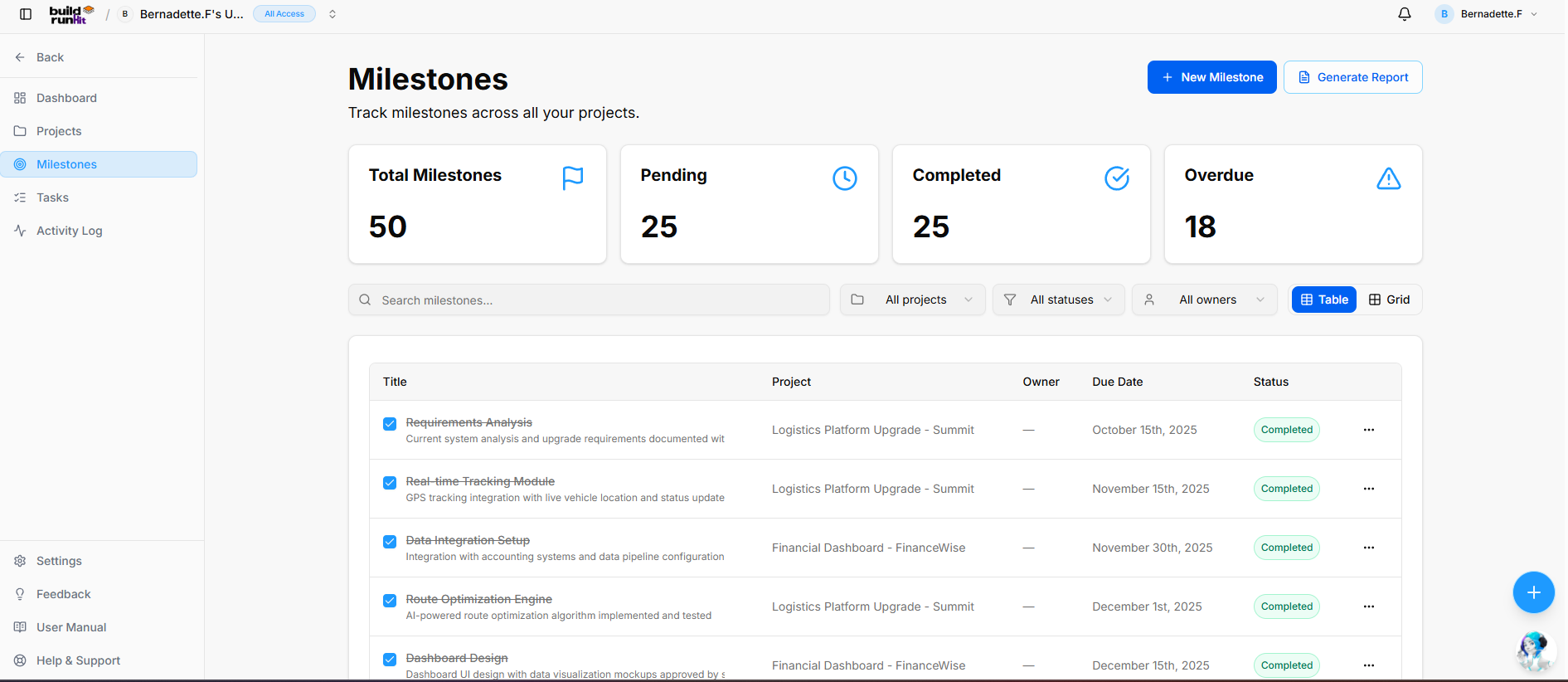
Location & Header
ThePage Heading: Milestones
Sub-description: to"Track track major goals and key phasesmilestones across your various projects. This ensures that high-level targets are visible and manageable.
Managing Your Milestones
The Milestones page is designed to give you a clear view ofall your projectprojects."
Header deadlines.Actions:
-
Navigation:+ClickNewonMilestone:MilestonesPrimaryinactionthe left-hand sidebarbutton toviewcreateandamanagenewallprojectmilestonesmilestoneacross your workspace.entry. -
CentralizedGenerateView:Report:From this screen, you can monitorOpens thestatusMilestonesofReporteveryexportmajor goal you have set, ensuring no critical phase of a project is overlooked.modal.
Important:Top Metric Summary Cards Before you can create a milestone, you first need to create a project. BuildRunKit requires a project to act as the "home" for any milestone you define. If no projects exist in your workspace, the platform will prompt you to create your first project before proceeding.
How to Create a Milestone
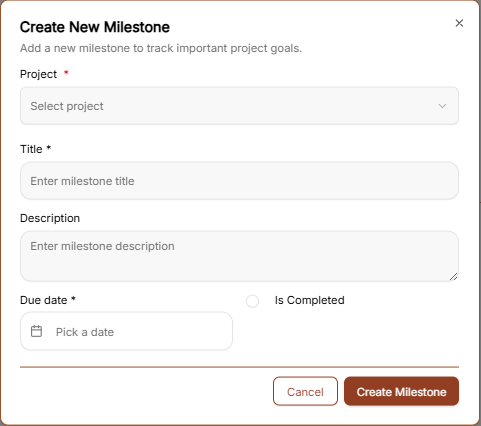
To define a new project goal, click the brown "Create Milestone →" button to open the configuration window:
-
ProjectTotal*Milestones:UseDisplaysthetotaldropdown menu to select the specificlogged projectthis milestone belongs tomilestones (Required)e.g.,50). -
Title *Pending:EnterTracksaupcomingclearornameactiveformilestonestheinmilestoneprogress (e.g.,"Beta Launch" or "Design Approval"25)(Required). -
Description: Provide a detailed summary of what this milestone entails.
Due Date *Completed: SelectCounts thefinalized target deadline for reaching this milestonemilestones (Required)e.g., 25).
IsOverdue: Completed:Highlights Apast-due milestones requiring immediate attention (e.g., 18).
Search, Filter, and Layout Controls
Search Field: Text input (Search milestones...) for instant keyword filtering across titles and descriptions.
Project Filter: Dropdown selector to filter milestones by a specific project (All projects).
Status Filter: Dropdown selector to filter by progress state (All statuses).
Owner Filter: Dropdown selector to filter by assigned team member (All owners).
View Switcher: Toggle buttons to switch between Table view (Active) and Grid view.
Milestones Data Table
Title: Displays the milestone name, completion checkbox usedindicator, and supporting description text (e.g., Requirements Analysis, Real-time Tracking Module, Data Integration Setup, Route Optimization Engine, Dashboard Design).
Project: Name of the associated parent project (e.g., Logistics Platform Upgrade - Summit, Financial Dashboard - FinanceWise).
Owner: Assigned team member (e.g., —).
Due Date: Target deadline date (e.g., October 15th, 2025, November 15th, 2025).
Status: Badge displaying current state (e.g., Completed).
Row Actions (...): Context menu providing options to edit or delete the milestone record.
Milestones Report Modal
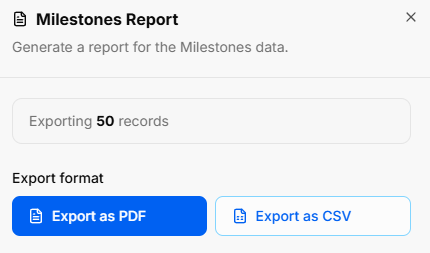
Clicking Generate Report opens the report export utility:
Modal Title: Milestones Report
Modal Sub-text: "Generate a report for the Milestones data."
Export Scope Indicator: Displays total count of records included in the output (e.g., Exporting 50 records).
Export Format Actions:
Export as PDF: Primary blue button to download a formatted PDF file.
Export as CSV: Secondary outline button to export raw CSV structured data.
BuildRunKit Projects: New Milestone Modal
Modal Setup
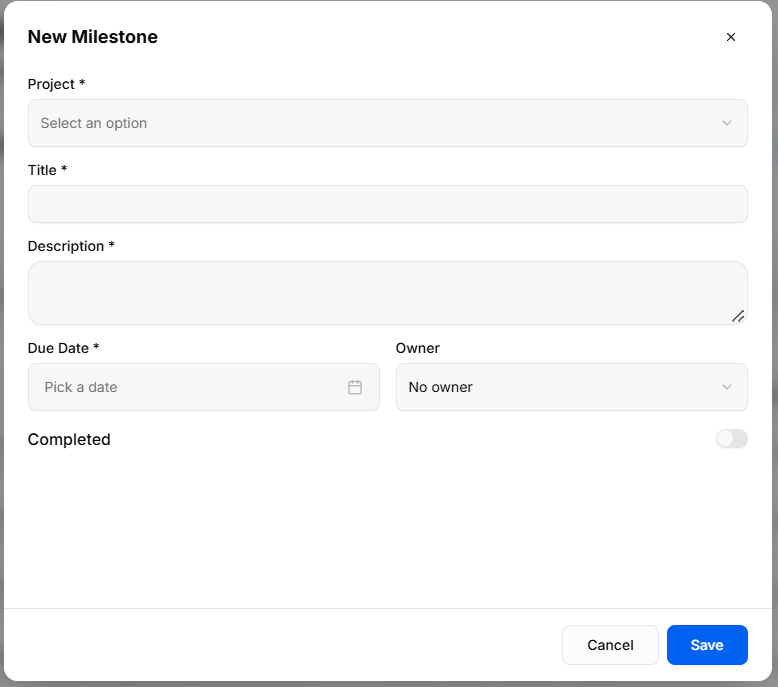
Trigger Action: Clicking the blue + New Milestone button on the Milestones view opens the New Milestone creation modal.
Modal Header: New Milestone title with an x close icon in the top-right corner to exit without saving.
Field Specifications & Layout
Project *: Required dropdown selector (Select an option) to link the milestone to a specific parent project.
Title *: Required single-line text field to name the milestone.
Description *: Required multi-line text box to outline milestone objectives and scope.
Due Date *: Required date picker field (Pick a date) to establish the target target completion date.
Owner: Dropdown selector to assign responsibility to a workspace team member (No owner by default).
Completed: Toggle switch to manually mark the milestone status as finishedcomplete onceupon creation.
Modal Actions
Cancel: Discards all entries and closes the goaloverlay iswithout met.saving.
CreateSave: MilestoneValidates Button:required Clickinputs, the brown button at the bottom to savecreates the milestone torecord, yourand updates the project roadmap.
Milestone Progress Tracking
Milestone Task Toggles: Inside your milestones view, you can now turn on a dedicated toggle mode. This instantly displays all tasks that are explicitly linked to that specific milestone right on the screen, making progress tracking much more intuitive.metrics.