
BuildRunKit Projects: Activity Log Sub-Section
ManagingBuildRunKit YourProjects: ActivitiesActivity Log Sub-Section
The
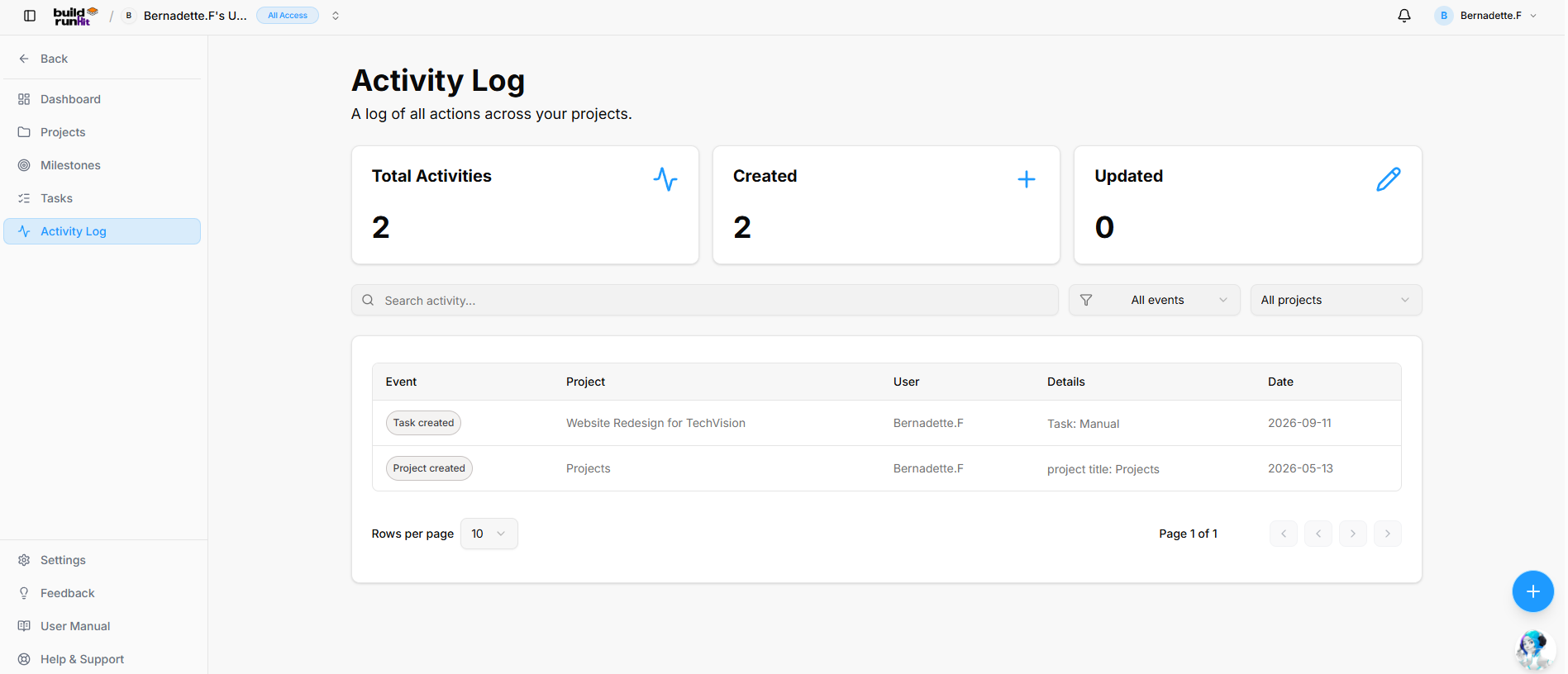
Location Activities& module provides a complete audit trail for your workspace, allowing you to track all project-related changes and team interactions in real time.
Managing Your Activities
The Activities page serves as a centralized log to help you monitor productivity and workspace history:
-
Navigation:PageClickHeading:onActivityActivities in the left-hand sidebar to access the activity log.
Log -
ActivitySub-description:Overview"ACards:logThreeofcardsallatactionstheacrosstopyourprovideprojects."quick
Top Metric Summary Cards
-
Total
Activities:Activities:TheTrackscumulativetotalnumberrecordedofsystem actionsrecordedacrossinalltheprojectworkspace.entities (e.g.,2). -
Today'sCreated:Activities:CountsThetotalnumbercreationofeventsactionsrecordedperformed(e.g.,within the last 24 hours.2). -
ActiveUpdated:Users:CountsThetotalcountrecordofmodificationteameventsmembersrecordedwho(e.g.,have performed actions.0).
Search &and Filters:Filter Narrow down the activity log using the following tools:Controls
-
Search
Bar:Field: Text input (Search activity...) forspecificinstantentrieskeywordbyfilteringproject,acrossuser,events,orusers,actionandtype.details. -
All Projects Dropdown:Event Filter:activitiesDropdownbelongingselector toafilter audit logs by specificinitiative.action type (All events). -
All Activity Types Dropdown:Project Filter: Dropdown selector to scope audit logs bytheanaturedesignatedofparenttheprojectchange(All projects).
Activity Log Data Table
Event: Action type badge indicator (e.g., "Created,"Task "Updated"created, Project created).
Log Table: The main table displays the following data columns:
Project: The initiative where the change occurred.
User:Project: The name and emailName of the personassociated whoparent performedproject the(e.g., action.Website Redesign for TechVision, Projects).
ActivityUser: Type:Workspace Ateam labeledmember tagwho indicatinginitiated the action (e.g., a green "created" tag)Bernadette.F).
Date:Details: TheBrief contextual summary of the specific datechange and(e.g., timeTask: theManual, actionproject wastitle: logged.
Table Customization: * Columns Dropdown: Use the "Columns" menu to show or hide specific data fields like Project title, User, Event type, or Created at.
Rows per page: Adjust how many log entries are visible at once.
Exporting Activities Data
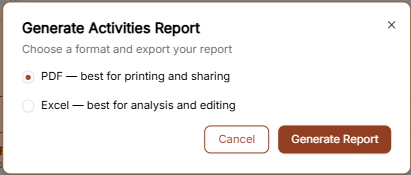
Click the "Generate Report" button in the top right corner to export the audit log. You can select your preferred format in the pop-up window:
PDF: Recommended for printing and sharing official workspace audits.Projects).
Excel:Date: RecommendedTimestamp forrecording detailedwhen datathe analysisaction occurred (e.g., 2026-09-11, 2026-05-13).
Table Pagination Controls: Rows selector (Rows per page 10), status indicator (Page 1 of 1), and filtering.navigation controls.