Mentor Alliance Business Coach Kit – Client Activity
Mentor Alliance Business Coach Kit – Client Activity
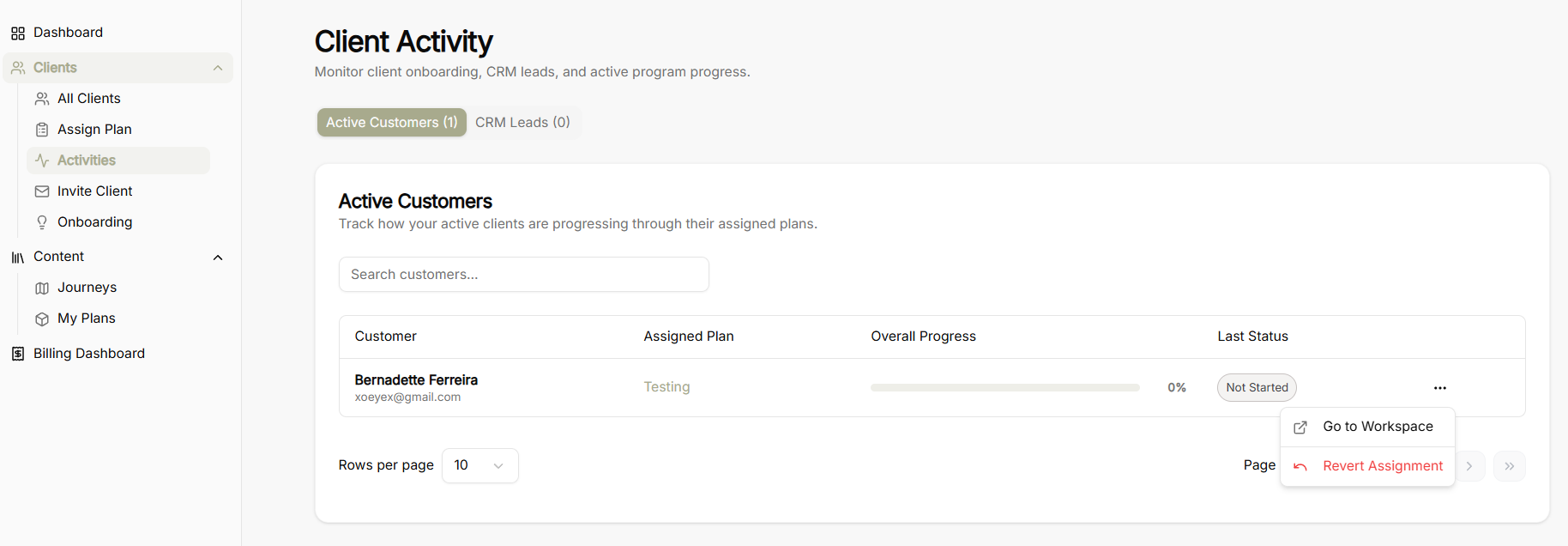
The Client Activity screen allows coaches to monitor client onboarding, track CRM leads, and keep tabs on active program progress across assigned coaching plans.
Activity Category Tabs
-
Active Customers: Displays clients who are currently enrolled and tracking progress through an assigned coaching plan.
-
CRM Leads: Tracks prospective clients and leads currently in the onboarding pipeline.
Active Customers View & Controls
-
Search Bar: Input field to search and filter active customers by name or keyword.
-
Rows Per Page Selector: Dropdown menu to adjust the number of visible customer rows per page.
-
Pagination Controls: Page navigation controls to cycle through larger lists of active clients.
Customer Progress Table & Actions
Table Columns
-
Customer: Displays customer name and registered email address.
-
Assigned Plan: The specific coaching plan or framework assigned to the client.
-
Overall Progress: Visual progress bar accompanied by a percentage indicator showing completion level.
-
Last Status: Status badge indicating active state or milestone completion status.
Row Action Menu (...)
-
Go to Workspace: Direct shortcut to open and inspect the client's dedicated workspace.
-
Revert Assignment: Option to unassign or roll back the current coaching plan from the client's profile.