# The Strategy Hub Dashboard

## The Strategy Hub Dashboard  
 

<div drawio-diagram="318"><img src="https://library.buildrunkit.com/uploads/images/drawio/2026-05/drawing-4-1779191062.png" alt=""/></div>


[![Screenshot 2026-05-19 133542.png](https://library.buildrunkit.com/uploads/images/gallery/2026-05/scaled-1680-/screenshot-2026-05-19-133542.png)](https://library.buildrunkit.com/uploads/images/gallery/2026-05/screenshot-2026-05-19-133542.png)

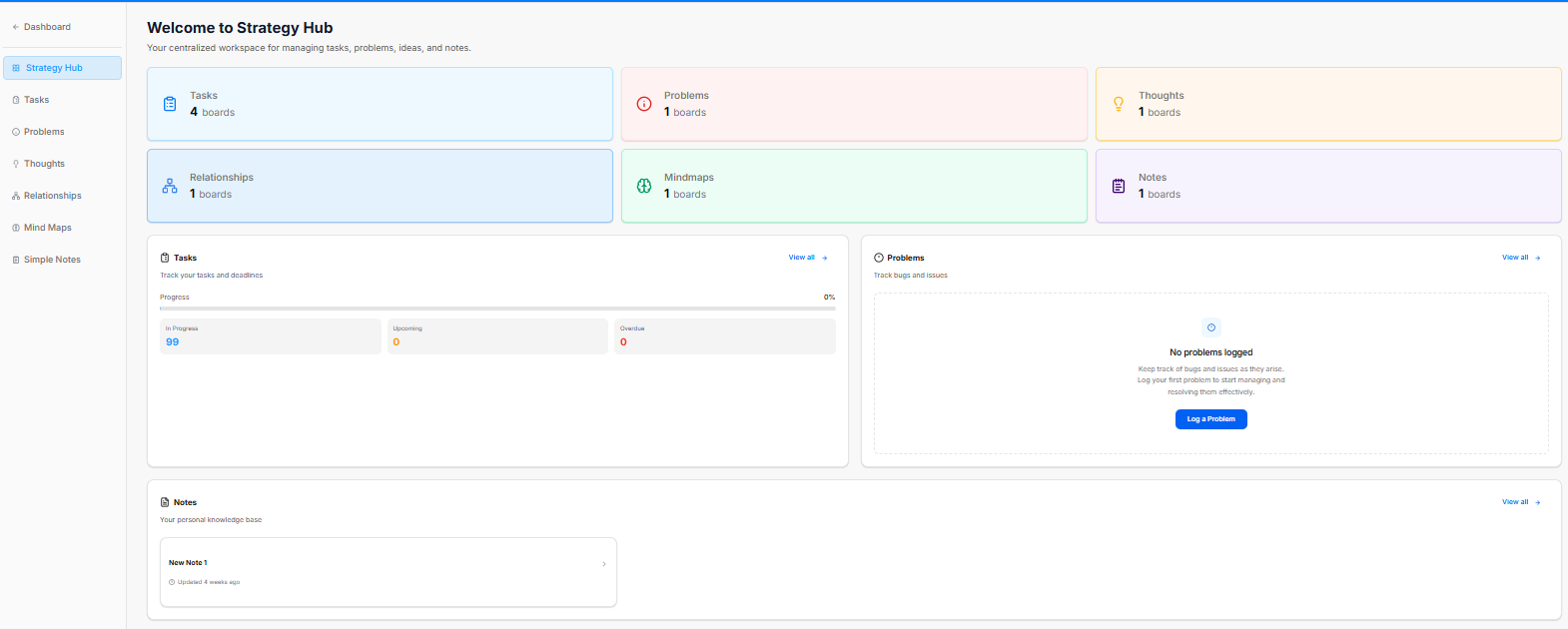
The Strategy Hub dashboard serves as your centralized workspace for managing tasks, problems, ideas, and notes. It provides a high-level view of your active boards and tracks real-time progress across key workflow segments.

<div _ngcontent-ng-c2372931610="" class="container" id="bkmrk--5"><div _ngcontent-ng-c2383366420="" aria-busy="false" aria-live="polite" class="markdown markdown-main-panel enable-updated-hr-color" dir="ltr" inline-copy-host="">---

</div></div>### Overview Cards

The top metric cards show the total number of active tracking boards within each core strategic category:

<div _ngcontent-ng-c2372931610="" class="container" id="bkmrk-tasks%3A-displays-the-"><div _ngcontent-ng-c2383366420="" aria-busy="false" aria-live="polite" class="markdown markdown-main-panel enable-updated-hr-color" dir="ltr" inline-copy-host="">- Tasks: Displays the total number of task boards active in your workspace (e.g., 4 boards).
- Problems: Tracks active issue or bug logging boards (e.g., 1 boards).
- Thoughts: Aggregates brainstorms, ideas, and strategic thoughts (e.g., 1 boards).
- Relationships: Manages network, partner, or team connection boards (e.g., 1 boards).
- Mindmaps: Provides quick access to visual brainstorming or mind mapping workspaces (e.g., 1 boards).
- Notes: Collects knowledge base and documentation folders (e.g., 1 boards).

---

</div></div>### Dashboard Trackers &amp; Widgets

The lower half of the dashboard features dedicated summary panels to track your items and jump directly into deep-dive views:

**Tasks Panel**

This section helps you track your tasks and deadlines.

<div _ngcontent-ng-c2372931610="" class="container" id="bkmrk-progress-bar%3A-displa"><div _ngcontent-ng-c2383366420="" aria-busy="false" aria-live="polite" class="markdown markdown-main-panel enable-updated-hr-color" dir="ltr" inline-copy-host="">- Progress Bar: Displays a total visual percentage completion rate of your combined task workload.
- In Progress: Counts active tasks currently being worked on.
- Upcoming: Lists scheduled or future action items.
- Overdue: High-priority alert counting tasks that have passed their set deadlines.
- View all: Click the blue View all <span class="math-inline" data-index-in-node="34" data-math="\rightarrow"><span class="katex"><span aria-hidden="true" class="katex-html"><span class="base"><span class="mrel">→</span></span></span></span></span> link to manage your complete task records.

</div></div>Problems Panel

A dedicated tracking area to monitor workspace bugs and issues.

<div _ngcontent-ng-c2372931610="" class="container" id="bkmrk-log-a-problem%3A-if-no"><div _ngcontent-ng-c2383366420="" aria-busy="false" aria-live="polite" class="markdown markdown-main-panel enable-updated-hr-color" dir="ltr" inline-copy-host="">- Log a Problem: If no items are listed, click the blue Log a Problem button to record a new bug or block.
- View all: Click the blue View all <span class="math-inline" data-index-in-node="34" data-math="\rightarrow"><span class="katex"><span aria-hidden="true" class="katex-html"><span class="base"><span class="mrel">→</span></span></span></span></span> link to navigate directly to the dedicated Problems module.

</div></div>**Notes Panel**

Acts as your personal knowledge base framework directly on the main dashboard layout.

<div _ngcontent-ng-c2372931610="" class="container" id="bkmrk-quick-access-blocks%3A"><div _ngcontent-ng-c2383366420="" aria-busy="false" aria-live="polite" class="markdown markdown-main-panel enable-updated-hr-color" dir="ltr" inline-copy-host="">- Quick Access Blocks: Lists your recent documents, displaying individual row titles and their last updated relative timestamp (e.g., *Updated 4 weeks ago*).
- View all: Click the blue View all <span class="math-inline" data-index-in-node="34" data-math="\rightarrow"><span class="katex"><span aria-hidden="true" class="katex-html"><span class="base"><span class="mrel">→</span></span></span></span></span> link to open up the complete knowledge module.

---

</div></div>### Left Navigation Sidebar

Quickly navigate between specific strategic tools via the left-side index:

<div _ngcontent-ng-c2372931610="" class="container" id="bkmrk-dashboard%3A-jumps-bac"><div _ngcontent-ng-c2383366420="" aria-busy="false" aria-live="polite" class="markdown markdown-main-panel enable-updated-hr-color" dir="ltr" id="bkmrk-dashboard%3A-jumps-bac-1" inline-copy-host="">- Dashboard: Jumps back to your global dashboard hub.
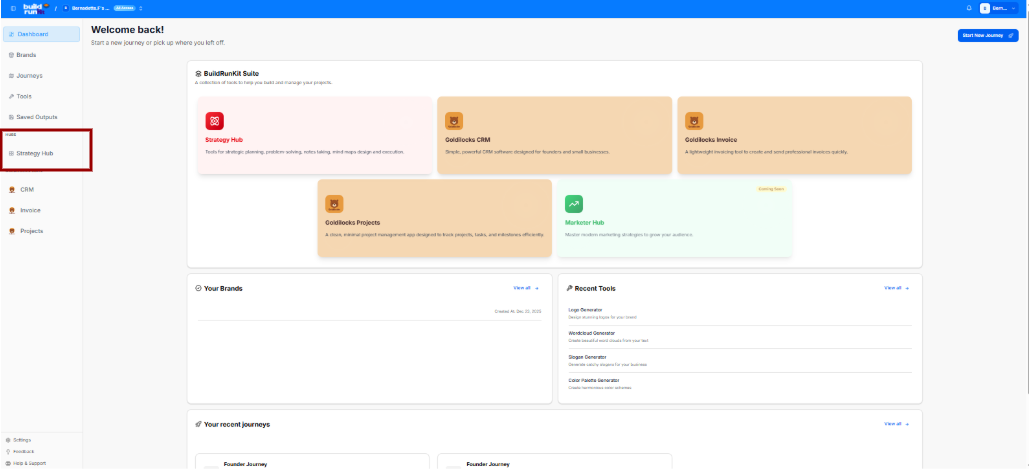
- Strategy Hub: Refreshes or returns you to this primary workspace layout.
- Tasks: Direct link to your expanded task listings.
- Problems: Opens your complete workspace issue tracker.
- Thoughts: Accesses your logged ideas and concepts.
- Relationships: Opens your contact network maps.
- Mind Maps: Launches your visual planning boards.
- Simple Notes: Links to your full documentation knowledge base.
</div></div>