# Strategy Relationship Sub-Section

## **Strategy Relationship Sub-Section**

**[![Screenshot 2026-09-15 153451.png](https://library.buildrunkit.com/uploads/images/gallery/2026-09/scaled-1680-/screenshot-2026-09-15-153451.png)](https://library.buildrunkit.com/uploads/images/gallery/2026-09/screenshot-2026-09-15-153451.png)**
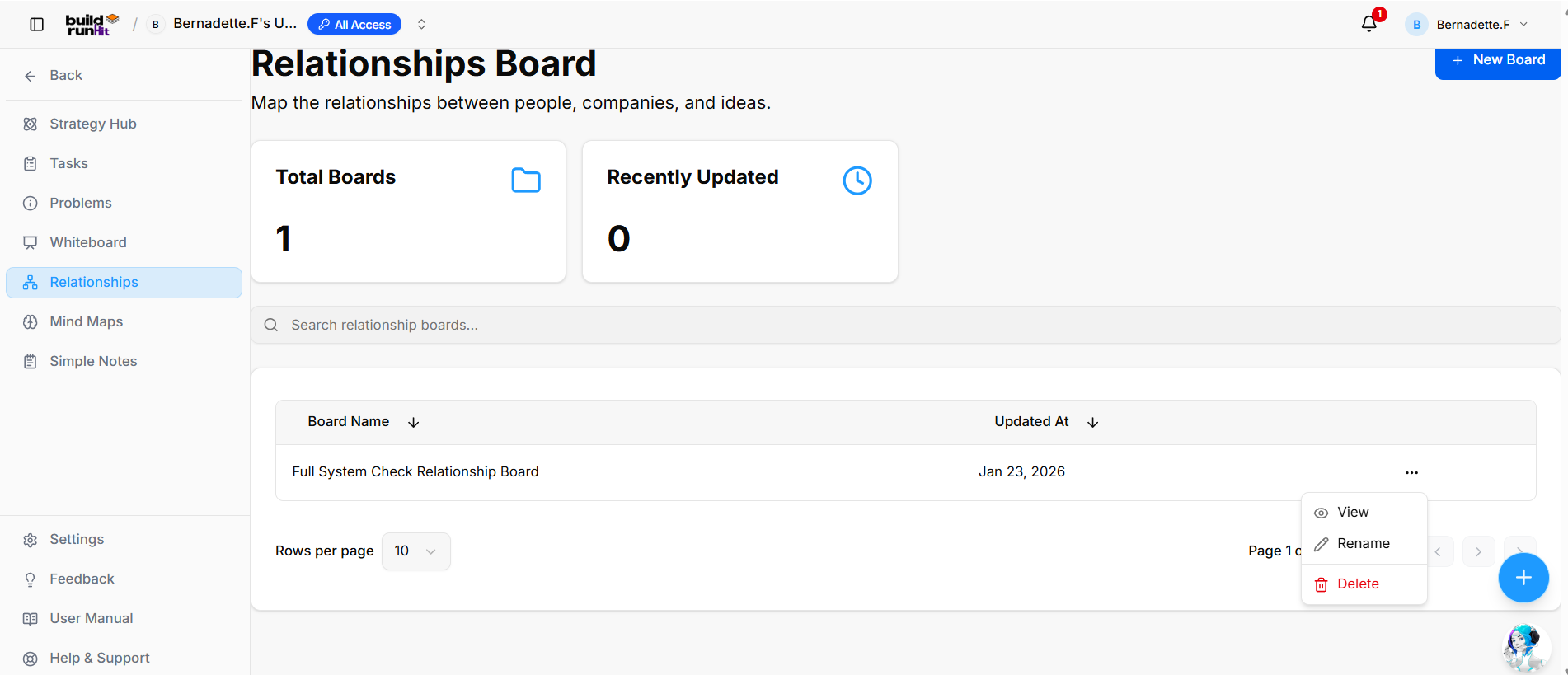
The **Strategy Relationship** sub-section allows you to map connections between people, companies, and ideas across your workspace.

**Create New Relationship Board**

**[![Screenshot 2026-09-15 153516.png](https://library.buildrunkit.com/uploads/images/gallery/2026-09/scaled-1680-/screenshot-2026-09-15-153516.png)](https://library.buildrunkit.com/uploads/images/gallery/2026-09/screenshot-2026-09-15-153516.png)**
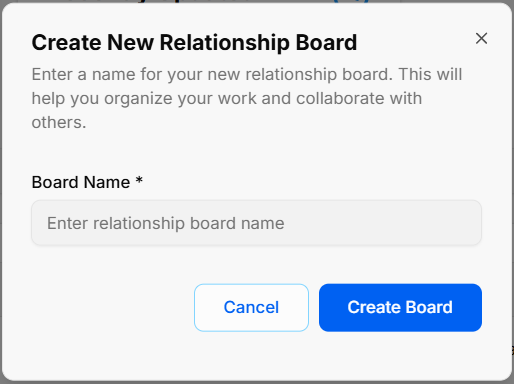
<div _ngcontent-ng-c3804843358="" class="container" id="bkmrk-open-modal%3A-click-th"><div _ngcontent-ng-c3047769669="" aria-busy="false" aria-live="polite" class="markdown markdown-main-panel md-content enable-luminous-fast-follows enable-updated-hr-color tutor-markdown-rendering" dir="ltr" inline-copy-host="">- **Open Modal**: Click the blue **+ New Board** button at the top right of the directory view.
- **Enter Board Name**: Type your title into the required **Board Name \*** field (*Enter relationship board name*).
- **Confirm Creation**: Click **Create Board** to generate your board canvas, or select **Cancel** to close without saving.

</div></div>**Overview Metrics &amp; Search**

<div _ngcontent-ng-c3804843358="" class="container" id="bkmrk-total-boards%3A-displa"><div _ngcontent-ng-c3047769669="" aria-busy="false" aria-live="polite" class="markdown markdown-main-panel md-content enable-luminous-fast-follows enable-updated-hr-color tutor-markdown-rendering" dir="ltr" inline-copy-host="">- **Total Boards**: Displays the total count of relationship boards created in your workspace.
- **Recently Updated**: Displays the number of relationship boards recently updated.
- **Search Bar**: Input field (*Search relationship boards...*) to filter boards by name.

</div></div>**Board Directory Table**

<div _ngcontent-ng-c3804843358="" class="container" id="bkmrk-table-columns%3A-displ"><div _ngcontent-ng-c3047769669="" aria-busy="false" aria-live="polite" class="markdown markdown-main-panel md-content enable-luminous-fast-follows enable-updated-hr-color tutor-markdown-rendering" dir="ltr" inline-copy-host="">- **Table Columns**: Displays existing boards organized under **Board Name** and **Updated At** headers (with sorting arrows).
- **Row Quick Menu (`...`)**: Context menu on board rows providing options to:
    
    
    - **View**: Open the selected relationship board.
    - **Rename**: Change the title of the relationship board.
    - **Delete**: Permanently remove the relationship board.
- **Pagination Controls**: Adjust items displayed per page via the **Rows per page** dropdown or step through pages using the pagination arrows.

</div></div>### **Strategy Relationship** 

**[![Screenshot 2026-09-16 105215.png](https://library.buildrunkit.com/uploads/images/gallery/2026-09/scaled-1680-/screenshot-2026-09-16-105215.png)](https://library.buildrunkit.com/uploads/images/gallery/2026-09/screenshot-2026-09-16-105215.png)**

#### **Board Header &amp; Controls**

- **Relationship Boards Selector**: Dropdown menu displaying the current active board (*Full System Check Relationship Board*), with an option to select **+ Create new board**.

[![Screenshot 2026-09-16 105243.png](https://library.buildrunkit.com/uploads/images/gallery/2026-09/scaled-1680-/screenshot-2026-09-16-105243.png)](https://library.buildrunkit.com/uploads/images/gallery/2026-09/screenshot-2026-09-16-105243.png)

- **Style Selector**: Dropdown menu to customize the visual theme of the diagram (*Classic*, *Modern*, *Minimal*, *Corporate*, *Playful*).
- **+ Add Node**: Primary button to add a standalone position or entity card to the canvas.
- **Export Options**: Action buttons to download the relationship diagram as **Export PNG** or **Export PDF**.

#### **Node Elements &amp; Action Controls**

**[![Screenshot 2026-09-16 105321.png](https://library.buildrunkit.com/uploads/images/gallery/2026-09/scaled-1680-/screenshot-2026-09-16-105321.png)](https://library.buildrunkit.com/uploads/images/gallery/2026-09/screenshot-2026-09-16-105321.png)**

- **Position Card**: Represents individual entities, displaying a title (*New Position*) and subtitle (*Department*).
- **Delete Node (`×`)**: Red button at the top right of a node card to remove the item from the canvas.
- **Edit Node (Pencil Icon)**: Located at the bottom right of a node card to update position and department labels.
- **Add Child Node (`+`)**: Green plus icon at the bottom left of a node card to attach nested or subordinate nodes directly underneath.

<div _ngcontent-ng-c3804843358="" class="container" id="bkmrk--5"><div _ngcontent-ng-c3047769669="" aria-busy="false" aria-live="polite" class="markdown markdown-main-panel md-content enable-luminous-fast-follows enable-updated-hr-color tutor-markdown-rendering" dir="ltr" id="bkmrk-table-columns%3A-displ-1" inline-copy-host=""></div></div>