# Strategy Hub: Strategy Whiteboard Sub-Section
## **Strategy Hub: Strategy Whiteboard Sub-Section**
**[](https://library.buildrunkit.com/uploads/images/gallery/2026-09/screenshot-2026-09-15-152034.png)**
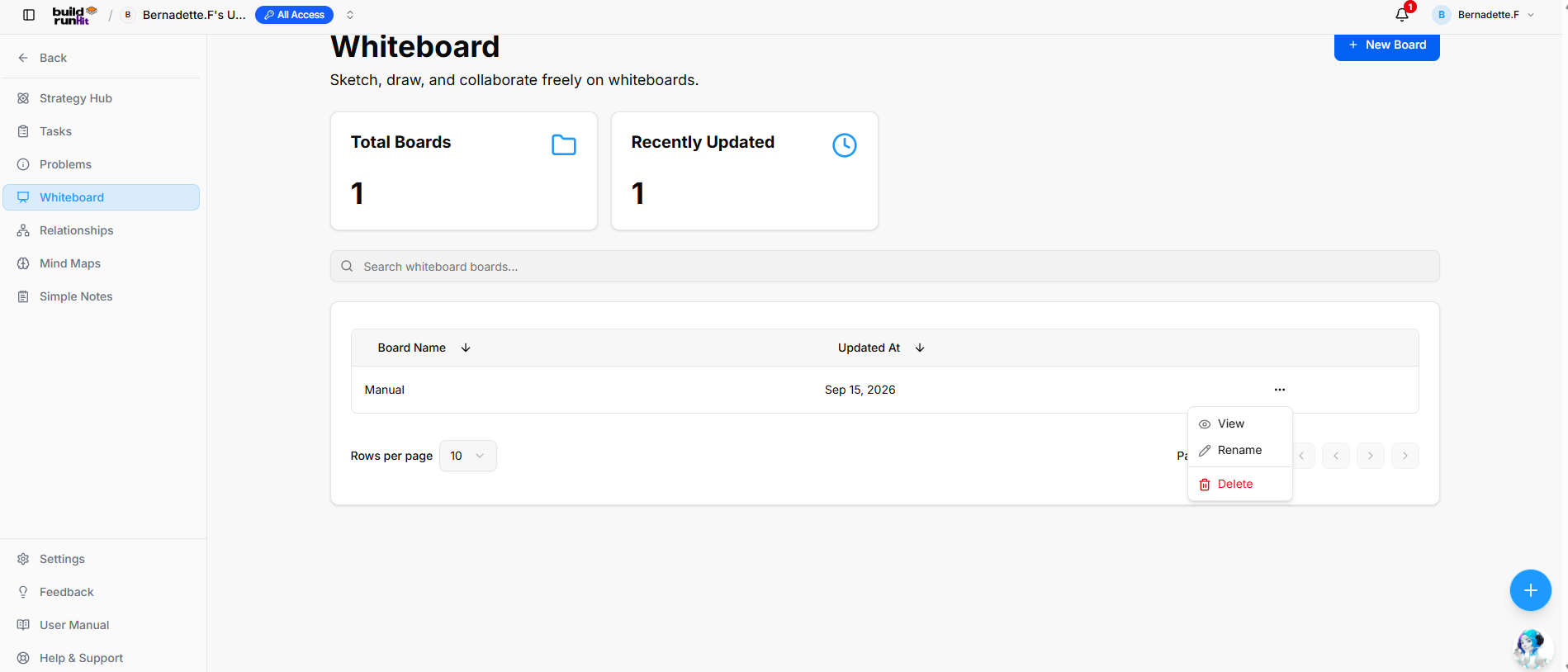
The **Strategy Whiteboard** sub-section provides a freeform canvas to sketch, draw, and collaborate visually with your team.
#### **Create New Whiteboard Board**
**[](https://library.buildrunkit.com/uploads/images/gallery/2026-09/screenshot-2026-09-15-152055.png)**
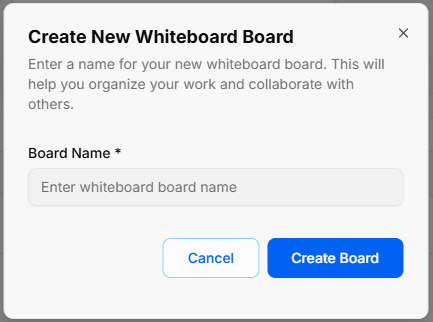
- **Open Modal**: Click the blue **+ New Board** button at the top right of the main directory view.
- **Enter Board Name**: Type your desired title into the required **Board Name \*** field (*Enter whiteboard board name*).
- **Confirm Creation**: Click **Create Board** to generate your canvas, or select **Cancel** to close the pop-up without saving.
#### **Overview Metrics & Search**
- **Total Boards**: Displays the total count of existing whiteboard boards in your workspace.
- **Recently Updated**: Displays the number of board canvases updated recently.
- **Search Bar**: Input field (*Search whiteboard boards...*) to filter boards by title.
#### **Board Directory Table**
- **Table Columns**: Organizes saved canvases under **Board Name** and **Updated At** headers (both support column sorting).
- **Row Quick Menu (`...`)**: Options accessible directly on individual board rows:
- **View**: Open the selected whiteboard canvas.
- **Rename**: Update the whiteboard board title.
- **Delete**: Permanently remove the whiteboard board.
- **Pagination Controls**: Adjust items shown via **Rows per page** dropdown or step through pages using the navigation arrows.
### **Strategy Whiteboard**
**[](https://library.buildrunkit.com/uploads/images/gallery/2026-09/screenshot-2026-09-15-152315.png)**
#### **Top Navigation & Canvas Controls**
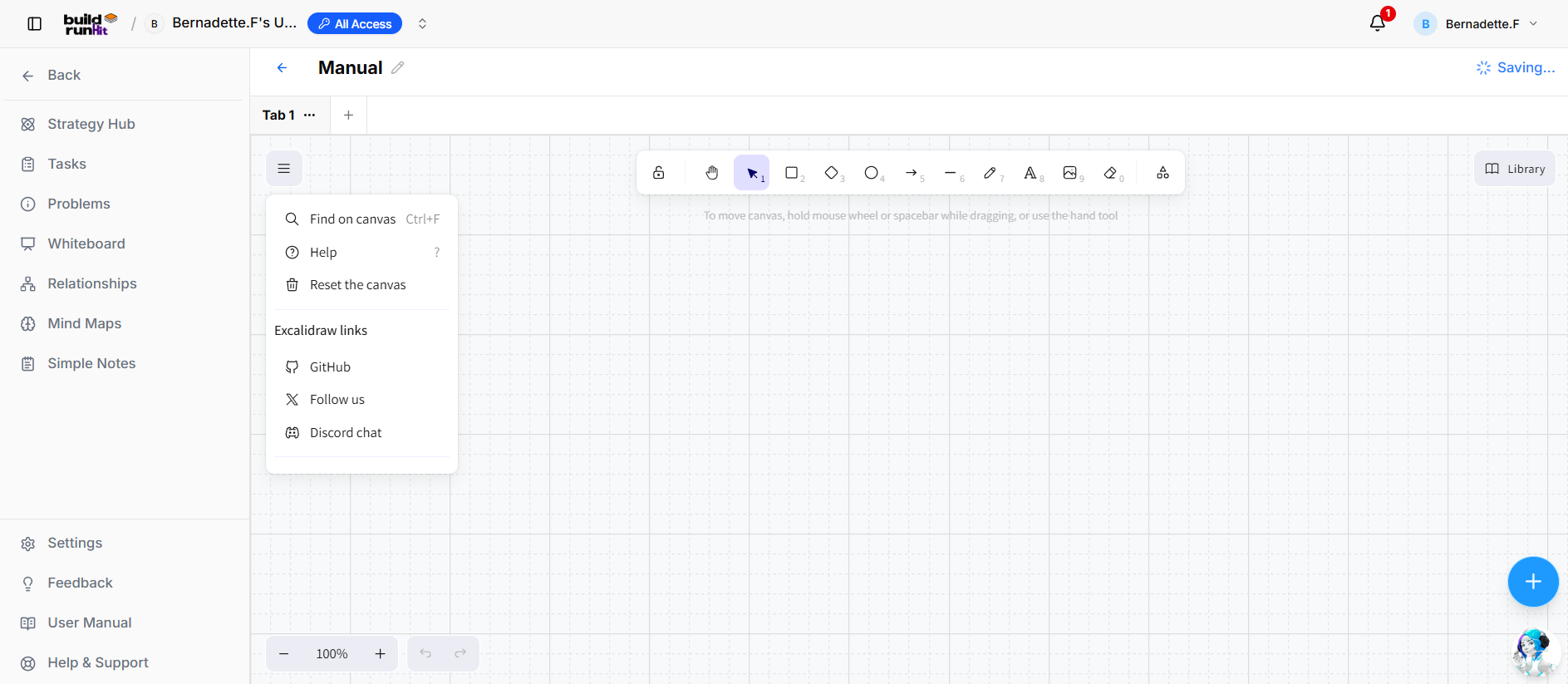
- **Menu Drawer (`☰`)**: Opens canvas options including **Find on canvas** (`Ctrl+F`), **Help** (`?`), **Reset the canvas**, and links to GitHub, social media, or Discord support.
- **Canvas Title**: Displays board name with edit capabilities.
- **Tabs & Navigation**: Switch between canvas tabs or select **+** to open a new tab.
- **Zoom & Undo**: Bottom control panel with zoom percentage buttons, zoom slider, and **Undo** / **Redo** arrows.
#### **Floating Main Toolbar & Shortcuts**
**[](https://library.buildrunkit.com/uploads/images/gallery/2026-09/screenshot-2026-09-15-152423.png)**
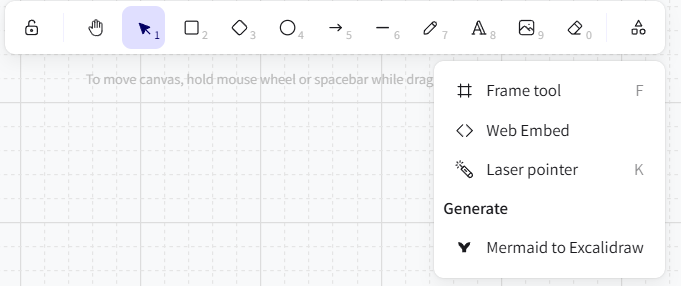
- **Keep Selected Tool Active**: Lock icon to maintain tool selection after drawing.
- **Hand (Panning Tool)** (`H`): Click and drag to move freely around the canvas layout.
- **Selection** (`V` or `1`): Select, move, and edit elements.
- **Rectangle** (`R` or `2`): Draw square and rectangular shapes.
- **Diamond** (`D` or `3`): Draw diamond and decision shapes.
- **Ellipse** (`O` or `4`): Draw circles and ovals.
- **Arrow** (`A` or `5`): Connect elements with directional arrows.
- **Line** (`L` or `6`): Draw straight connecting lines.
- **Draw** (`P` or `7`): Freehand sketching and drawing pencil.
- **Text** (`T` or `8`): Insert text fields directly on the board.
- **Insert Image** (`9`): Upload image files onto the canvas.
- **Eraser** (`E` or `0`): Click or drag to delete canvas elements.
- **More Tools**: Access additional drawing tools:
- **Frame tool** (`F`): Group elements inside labeled frames.
- **Web Embed**: Embed external web content or media directly onto the board.
- **Laser pointer** (`K`): Highlight areas during live presentations.
- **Mermaid to Excalidraw**: Generate visual diagrams from Mermaid syntax.
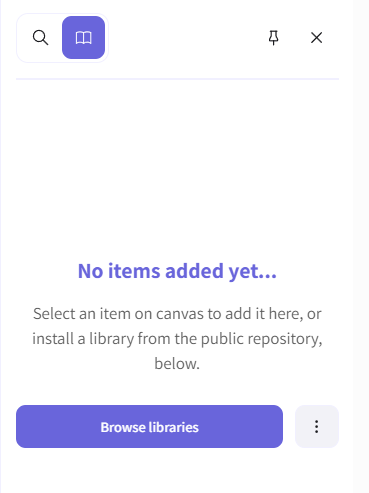
#### **Library Panel**
**[](https://library.buildrunkit.com/uploads/images/gallery/2026-09/screenshot-2026-09-15-152355.png)**
- **Library Toggle**: Open the sidebar panel to access reusable components and shapes.
- **Browse Libraries**: Search and import asset packages from the public repository.
- **Pin / Unpin**: Keep the library panel fixed or floating on the canvas.