Goldilocks CRM Deals
Goldilocks CRM Deals Dashboard
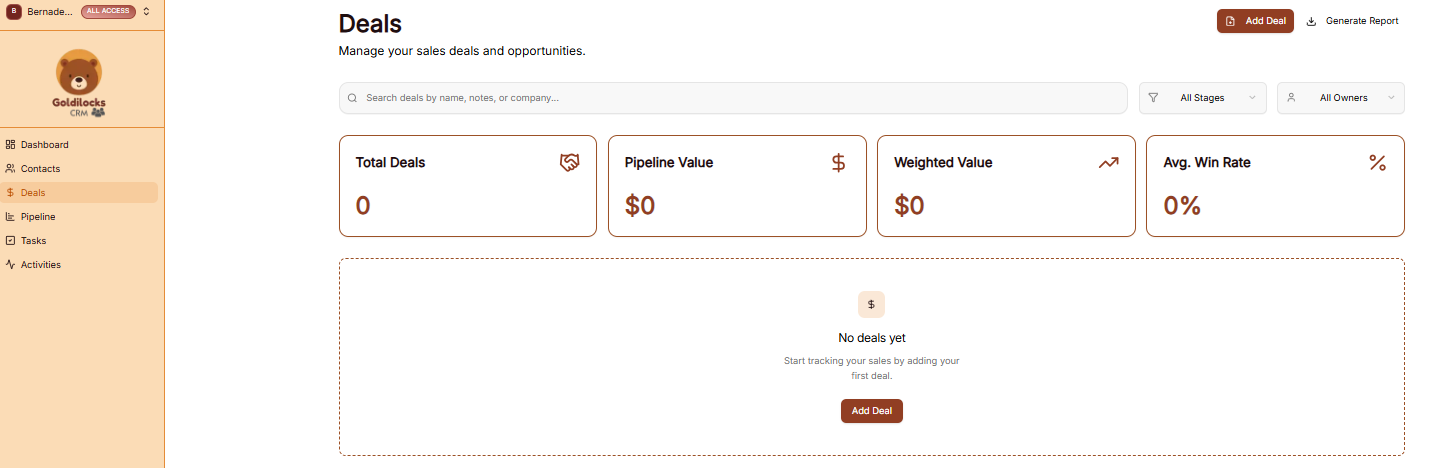
The Deals module is where you track revenue opportunities and their progress through your sales cycle. The dashboard provides four high-level metrics to monitor your sales health:
-
Total Deals: The total number of opportunities currently in your system.
-
Pipeline Value: The combined financial value of all active deals.
-
Avg Deal Size: The average value of your open opportunities.
-
Win Rate: The percentage of deals successfully closed.
How to Add a Deal
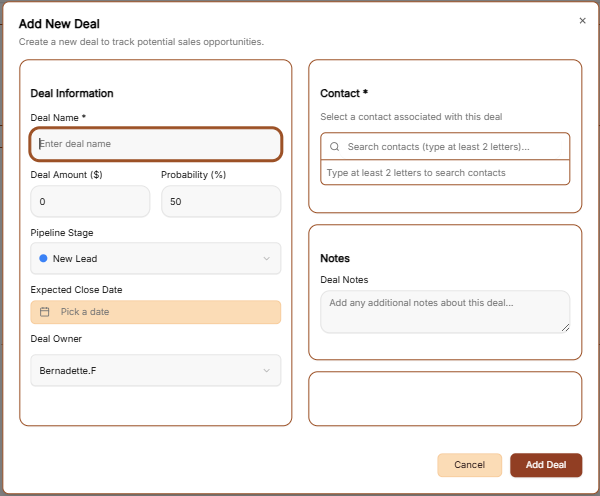
To record a new sales opportunity, click the brown + Add Deal button at the top right of the screen. This opens a form with the following fields:
-
Basic Information: Enter the Deal Name and the expected Amount.
-
Customer & Timeline: Select the associated Customer from your contacts and set an estimated Close Date.
-
Pipeline Placement: Assign the deal to a specific Pipeline and Stage (e.g., New Lead, Discovery, Proposal).
-
Ownership & Priority: Designate a Deal Owner and set a Priority level (Low, Medium, or High).
-
Tags & Notes: Categorize the deal with Tags and include any background context in the Notes section.
-
Finalize: Click the brown Add Deal button to save the record.
Generate Report
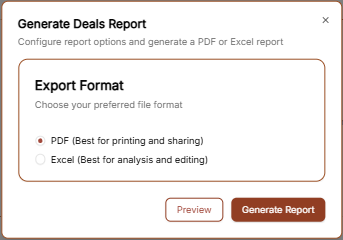
You can export your deal data by clicking the Generate Report link in the top right corner.
-
Export Format: Choose your preferred file type.
-
PDF: Best for sharing a visual summary of your sales performance.
-
Excel: Best for calculating commissions and detailed revenue forecasting.
-
-
Action: Select Preview to review the data or Generate Report to download the file immediately.