# BuildRunKit Strategy Hub: Strategy Dashboard

## **BuildRunKit Strategy Hub: Strategy Dashboard**

[![Screenshot 2026-11-16 132143.png](https://library.buildrunkit.com/uploads/images/gallery/2026-11/scaled-1680-/screenshot-2026-11-16-132143.png)](https://library.buildrunkit.com/uploads/images/gallery/2026-11/screenshot-2026-11-16-132143.png)
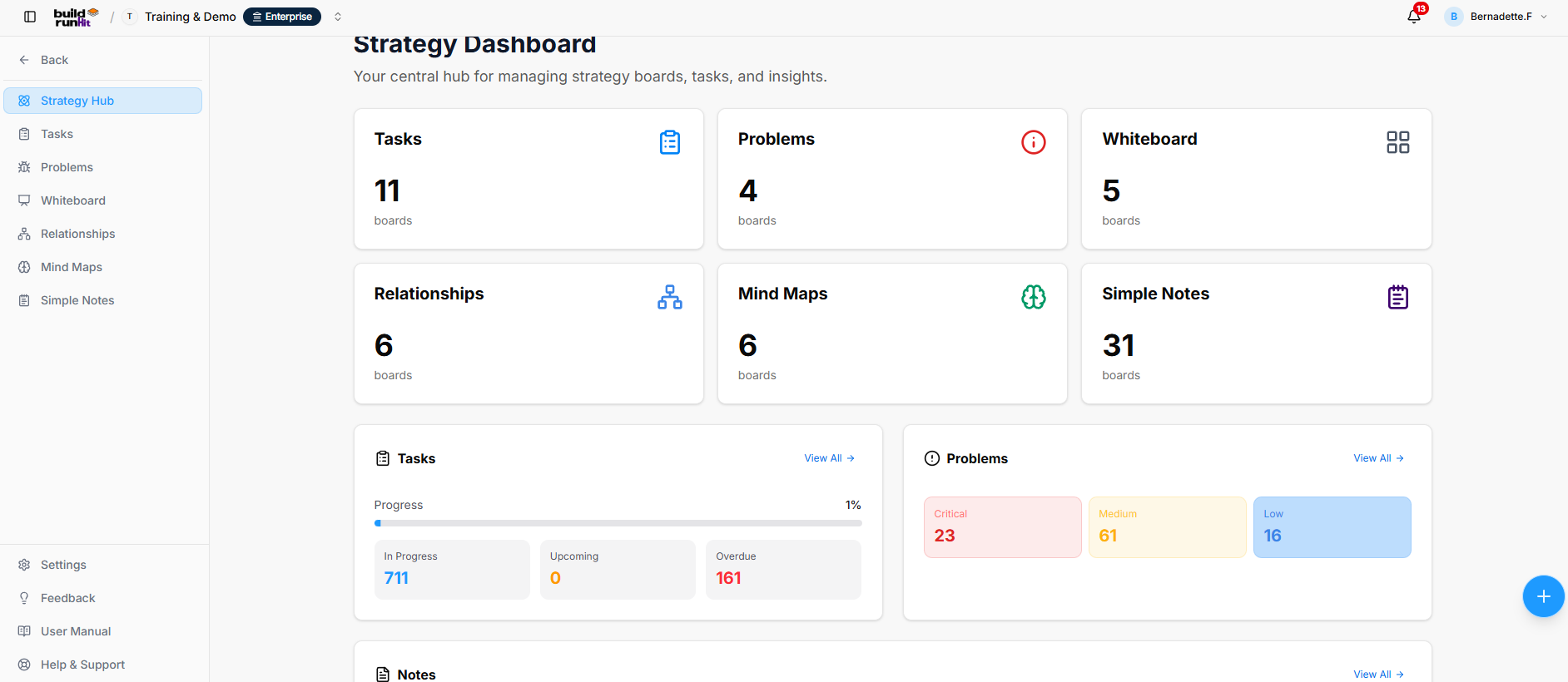
<div class="my-[1px] [li>&amp;:first-child]:mt-0 [li>&amp;:last-child]:mb-0" id="bkmrk-the-strategy-dashboa"><div class="py-[3px] [li>*:first-child>&amp;]:pt-0 [li>*:last-child>&amp;]:pb-0 whitespace-pre-wrap u-break-words">The Strategy Dashboard is the central hub for viewing strategy boards, tracking tasks, reviewing problem priorities, and accessing notes.</div></div>### **Location &amp; Navigation Sidebar**

<div class="my-[1px] [li>&amp;:first-child]:mt-0 [li>&amp;:last-child]:mb-0" id="bkmrk-the-sidebar-provides"><div class="py-[3px] [li>*:first-child>&amp;]:pt-0 [li>*:last-child>&amp;]:pb-0 whitespace-pre-wrap u-break-words">The sidebar provides access to:</div></div>

- Back: Returns to the main workspace navigation.
- Strategy Hub
- Tasks
- Problems
- Whiteboard
- Relationships
- Mind Maps
- Simple Notes

<div class="my-[1px] [li>&amp;:first-child]:mt-0 [li>&amp;:last-child]:mb-0" id="bkmrk-links-to-settings%2C-f"><div class="py-[3px] [li>*:first-child>&amp;]:pt-0 [li>*:last-child>&amp;]:pb-0 whitespace-pre-wrap u-break-words">Links to Settings, Feedback, User Manual, and Help &amp; Support appear at the bottom of the sidebar.</div></div>### **Header &amp; Quick Actions**

- Strategy Dashboard: Page title.
- Your central hub for managing strategy boards, tasks, and insights.: Page description.
- Quick Actions (+): Floating button at the lower-right of the page for creating records, including Strategy Hub tasks and problems.

### Strategy Board Cards

<div class="my-[1px] [li>&amp;:first-child]:mt-0 [li>&amp;:last-child]:mb-0" id="bkmrk-the-cards-show-the-n"><div class="py-[3px] [li>*:first-child>&amp;]:pt-0 [li>*:last-child>&amp;]:pb-0 whitespace-pre-wrap u-break-words">The cards show the number of boards in each category:</div></div>

- Tasks
- Problems
- Whiteboard
- Relationships
- Mind Maps
- Simple Notes

<div class="my-[1px] [li>&amp;:first-child]:mt-0 [li>&amp;:last-child]:mb-0" id="bkmrk-board-totals-change-"><div class="py-[3px] [li>*:first-child>&amp;]:pt-0 [li>*:last-child>&amp;]:pb-0 whitespace-pre-wrap u-break-words">Board totals change as boards are added or removed.</div></div>### **Activity &amp; Status Summary Panels**

#### **Tasks Panel**

<div class="my-[1px] [li>&amp;:first-child]:mt-0 [li>&amp;:last-child]:mb-0" id="bkmrk-the-tasks-panel-prov"><div class="py-[3px] [li>*:first-child>&amp;]:pt-0 [li>*:last-child>&amp;]:pb-0 whitespace-pre-wrap u-break-words">The Tasks panel provides a View All link to open the Tasks area. It displays overall progress and task counts by status:</div></div>

- In Progress
- Upcoming
- Overdue

#### **Problems Panel**

<div class="my-[1px] [li>&amp;:first-child]:mt-0 [li>&amp;:last-child]:mb-0" id="bkmrk-the-problems-panel-p"><div class="py-[3px] [li>*:first-child>&amp;]:pt-0 [li>*:last-child>&amp;]:pb-0 whitespace-pre-wrap u-break-words">The Problems panel provides a View All link to open the Problems area. It displays problem counts by severity:</div></div>

- Critical
- Medium
- Low

#### **Notes Panel**

<div class="my-[1px] [li>&amp;:first-child]:mt-0 [li>&amp;:last-child]:mb-0" id="bkmrk-the-notes-panel-prov"><div class="py-[3px] [li>*:first-child>&amp;]:pt-0 [li>*:last-child>&amp;]:pb-0 whitespace-pre-wrap u-break-words">The Notes panel provides a View All link to open the notes area.</div></div>