# BuildRunKit Settings Overview Sub-section

## **Settings Overview Sub-section**

<div drawio-diagram="609"><img src="https://library.buildrunkit.com/uploads/images/drawio/2026-09/drawing-4-1789551405.png" alt=""/></div>

[![Screenshot 2026-09-16 113352.png](https://library.buildrunkit.com/uploads/images/gallery/2026-09/scaled-1680-/screenshot-2026-09-16-113352.png)](https://library.buildrunkit.com/uploads/images/gallery/2026-09/screenshot-2026-09-16-113352.png)

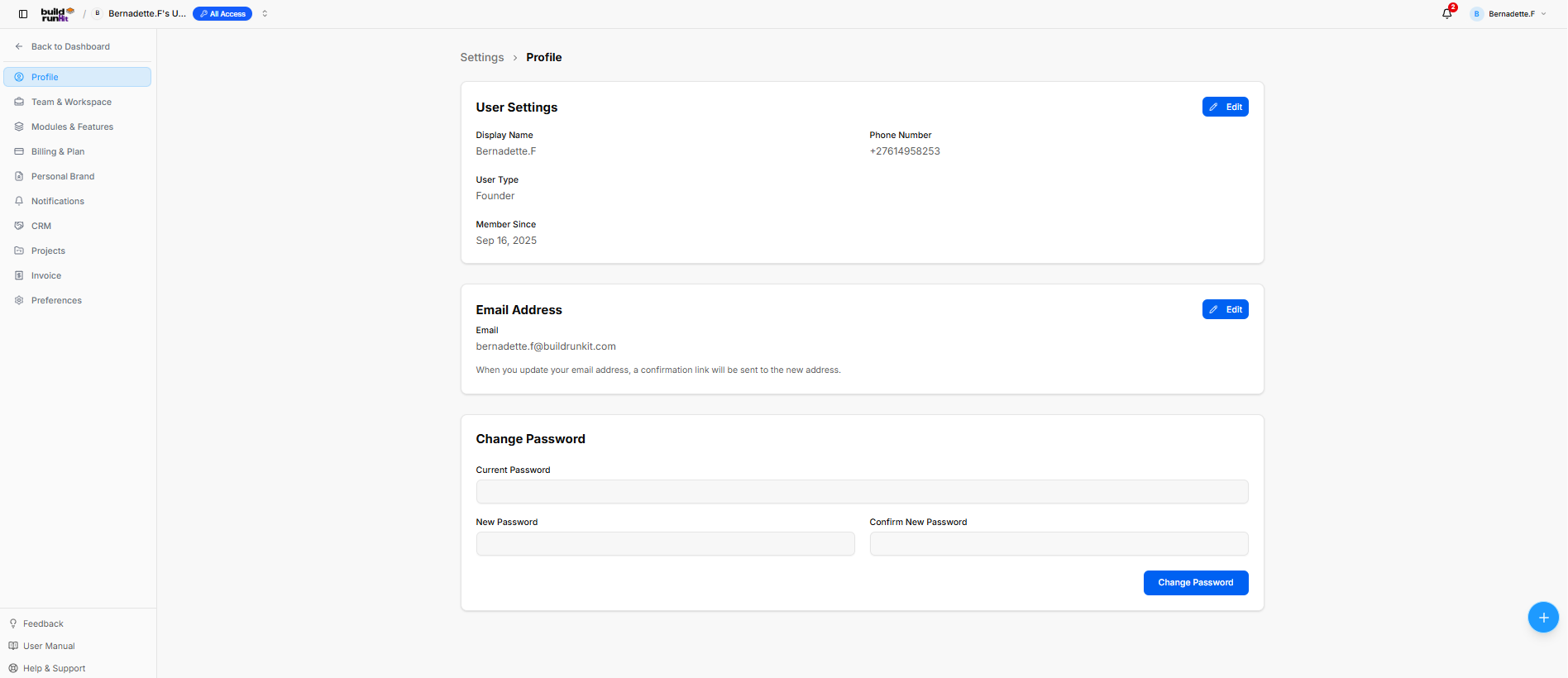
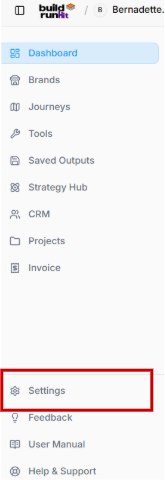
The **Settings** section manages user profile details, workspace management, security credentials, subscription billing, and module preferences through a dedicated secondary sidebar navigation menu.

#### **Settings Menu Navigation**

- **Profile**: View and update account credentials, contact information, and security settings.
- **Team &amp; Workspace**: Manage workspace settings, team members, and access roles.
- **Modules &amp; Features**: Toggle application modules and platform feature settings.
- **Billing &amp; Plan**: Manage account subscription plans, view invoices, and update payment methods.
- **Personal Brand**: Configure personal branding defaults and assets.
- **Notifications**: Set notification preferences and alert triggers.
- **CRM**: Manage customer relationship management module settings.
- **Projects**: Configure project management defaults and workflows.
- **Invoice**: Adjust invoicing templates and billing parameters.
- **Preferences**: Set global UI and account localization preferences.

#### **Profile Settings**

#### **User Settings Card**

- **Displayed Fields**: Shows **Display Name** (*Bernadette.F*), **Phone Number** (*+27614958253*), **User Type** (*Founder*), and account creation date under **Member Since** (*Sep 16, 2025*).
- **Edit Button**: Blue action button at the top right to update user details.

#### **Email Address Card**

- **Displayed Email**: Shows current account email (*bernadette.f@buildrunkit.com*).
- **Edit Button**: Blue action button at the top right to update the email address (triggers a confirmation link).

#### **Change Password Card**

- **Password Fields**: Contains input fields for **Current Password**, **New Password**, and **Confirm New Password**.
- **Change Password Button**: Blue submission button at the bottom right to apply new login security credentials.

### **Team &amp; Workspace Settings Sub-Section**

**[![Screenshot 2026-09-16 113913.png](https://library.buildrunkit.com/uploads/images/gallery/2026-09/scaled-1680-/screenshot-2026-09-16-113913.png)](https://library.buildrunkit.com/uploads/images/gallery/2026-09/screenshot-2026-09-16-113913.png)**

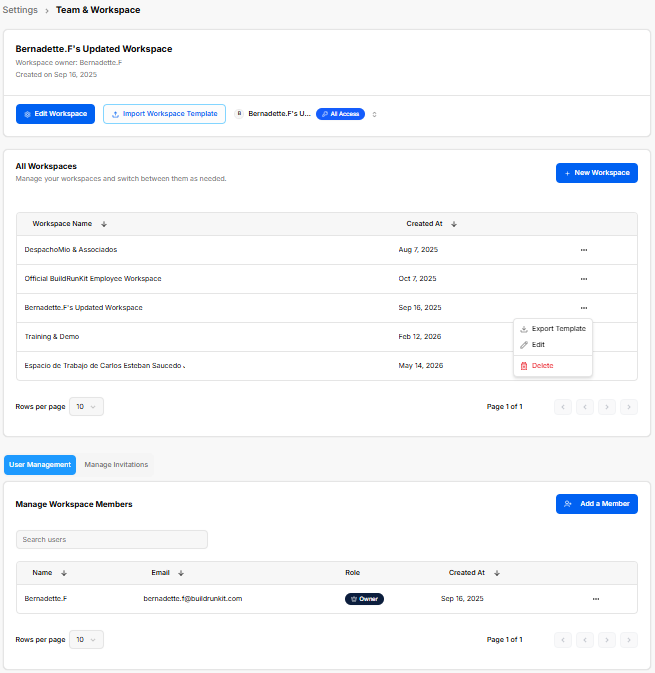
The **Team &amp; Workspace** settings section manages workspace creation, workspace switching, user memberships, and collaborator invitations across team environments.

#### **Active Workspace Controls**

<div _ngcontent-ng-c3108543318="" class="container" id="bkmrk-active-workspace-hea"><div _ngcontent-ng-c3262731227="" aria-busy="false" aria-live="polite" class="markdown markdown-main-panel md-content enable-luminous-fast-follows enable-updated-hr-color tutor-markdown-rendering" dir="ltr" inline-copy-host="">- **Active Workspace Header**: Displays current workspace details (*Bernadette.F's Updated Workspace*), owner name (*Bernadette.F*), and creation date (*Sep 16, 2025*).
- **Edit Workspace Button**: Opens a modal to update the current workspace title.

</div></div>[![Screenshot 2026-09-16 114016.png](https://library.buildrunkit.com/uploads/images/gallery/2026-09/scaled-1680-/screenshot-2026-09-16-114016.png)](https://library.buildrunkit.com/uploads/images/gallery/2026-09/screenshot-2026-09-16-114016.png)

<div _ngcontent-ng-c3108543318="" class="container" id="bkmrk-import-workspace-tem"><div _ngcontent-ng-c3262731227="" aria-busy="false" aria-live="polite" class="markdown markdown-main-panel md-content enable-luminous-fast-follows enable-updated-hr-color tutor-markdown-rendering" dir="ltr" inline-copy-host="">- **Import Workspace Template Button**: Allows importing workspace configurations from a template file.
- **Workspace Switcher Dropdown (Top Navigation Bar)**: Click the active workspace pill to search existing teams, view subscription tiers (*All Access*, *Enterprise*), or click **+ Create Team** to set up a shared environment.

</div></div>[![Screenshot 2026-09-16 114409.png](https://library.buildrunkit.com/uploads/images/gallery/2026-09/scaled-1680-/screenshot-2026-09-16-114409.png)](https://library.buildrunkit.com/uploads/images/gallery/2026-09/screenshot-2026-09-16-114409.png)

**Workspace Directory &amp; Management**

<div _ngcontent-ng-c3108543318="" class="container" id="bkmrk-%2B-new-workspace%3A-ope"><div _ngcontent-ng-c3262731227="" aria-busy="false" aria-live="polite" class="markdown markdown-main-panel md-content enable-luminous-fast-follows enable-updated-hr-color tutor-markdown-rendering" dir="ltr" inline-copy-host="">- **+ New Workspace**: Opens the **Create Workspace** modal with three options:
    
    
    - **New Workspace Tab**: Enter a required **Workspace Name \*** (*e.g., Acme Inc Workspace*) and click **Create**.
    - **From Existing Tab**: Duplicate settings from an active workspace.
    - **Import File Tab**: Upload workspace configuration files.

</div></div>[![Screenshot 2026-09-16 114433.png](https://library.buildrunkit.com/uploads/images/gallery/2026-09/scaled-1680-/screenshot-2026-09-16-114433.png)](https://library.buildrunkit.com/uploads/images/gallery/2026-09/screenshot-2026-09-16-114433.png)

<div _ngcontent-ng-c3108543318="" class="container" id="bkmrk-all-workspaces-table"><div _ngcontent-ng-c3262731227="" aria-busy="false" aria-live="polite" class="markdown markdown-main-panel md-content enable-luminous-fast-follows enable-updated-hr-color tutor-markdown-rendering" dir="ltr" inline-copy-host="">- **All Workspaces Table**: Lists workspaces by **Workspace Name** and **Created At**.
- **Row Context Menu (`...`)**:
    
    
    - **Export Template**: Downloads the workspace structure.
    - **Edit**: Opens the **Edit Workspace** modal to update the name.
    - **Delete**: Removes the workspace.

</div></div>**User Management Tab**

<div _ngcontent-ng-c3108543318="" class="container" id="bkmrk-manage-workspace-mem"><div _ngcontent-ng-c3262731227="" aria-busy="false" aria-live="polite" class="markdown markdown-main-panel md-content enable-luminous-fast-follows enable-updated-hr-color tutor-markdown-rendering" dir="ltr" inline-copy-host="">- **Manage Workspace Members Table**: Displays active members by **Name**, **Email**, **Role** (*Owner*, *Member*), and **Created At**.
- **Search Users**: Filters the member directory by name or email.
- **+ Add a Member**: Opens the **Invite a Member** modal to enter an **Email Address** (*collaborator@company.com*), assign a **Role** (*Member*), and click **Send Invitation**.

</div></div>[![Screenshot 2026-09-16 114111.png](https://library.buildrunkit.com/uploads/images/gallery/2026-09/scaled-1680-/screenshot-2026-09-16-114111.png)](https://library.buildrunkit.com/uploads/images/gallery/2026-09/screenshot-2026-09-16-114111.png)

<div _ngcontent-ng-c3108543318="" class="container" id="bkmrk-member-action-%28...%29%3A"><div _ngcontent-ng-c3262731227="" aria-busy="false" aria-live="polite" class="markdown markdown-main-panel md-content enable-luminous-fast-follows enable-updated-hr-color tutor-markdown-rendering" dir="ltr" inline-copy-host="">- **Member Action (`...`)**: Click to select **Remove User** and revoke workspace access.

</div></div>[![Screenshot 2026-09-16 113942.png](https://library.buildrunkit.com/uploads/images/gallery/2026-09/scaled-1680-/screenshot-2026-09-16-113942.png)](https://library.buildrunkit.com/uploads/images/gallery/2026-09/screenshot-2026-09-16-113942.png)

**Manage Invitations Tab**

**[![Screenshot 2026-09-16 114044.png](https://library.buildrunkit.com/uploads/images/gallery/2026-09/scaled-1680-/screenshot-2026-09-16-114044.png)](https://library.buildrunkit.com/uploads/images/gallery/2026-09/screenshot-2026-09-16-114044.png)**

<div _ngcontent-ng-c3108543318="" class="container" id="bkmrk-search-invitations%3A-"><div _ngcontent-ng-c3262731227="" aria-busy="false" aria-live="polite" class="markdown markdown-main-panel md-content enable-luminous-fast-follows enable-updated-hr-color tutor-markdown-rendering" dir="ltr" inline-copy-host="">- **Search Invitations**: Input field to filter sent invitations.
- **Invitations Table**: Lists sent invites by **Email**, **Status** (*Pending*), assigned **Role**, and **Expires At** timestamp.
- **Invitation Action (`...`)**: Select **Cancel Invitation** to revoke pending access.
</div></div>### **Modules &amp; Features Settings Sub-Section**

**[![Screenshot 2026-09-16 115717.png](https://library.buildrunkit.com/uploads/images/gallery/2026-09/scaled-1680-/screenshot-2026-09-16-115717.png)](https://library.buildrunkit.com/uploads/images/gallery/2026-09/screenshot-2026-09-16-115717.png)**

The **Modules &amp; Features** settings section enables workspace owners to toggle specific tools and navigation options on or off to customize the active workspace sidebar layout.

#### **Available Workspace Modules**

- **Journeys (Map Icon)**: Toggle on/off guided paths (*Go into guided journeys*).
- **Brands (Storefront Icon)**: Toggle on/off brand kit tools (*Manage your brand kits and identities*).
- **Outcomes (Save Icon)**: Toggle on/off generated output storage (*View and organize generated outcomes*).
- **CRM (People Icon)**: Toggle on/off contact and sales tools (*Contacts, deals, and pipeline management*).
- **Invoices (Dollar Ticket Icon)**: Toggle on/off billing tools (*Create and manage invoices and billing*).
- **Projects (Folder Icon)**: Toggle on/off task tracking (*Project management with tasks and milestones*).
- **Founder Tools (Wrench Icon)**: Toggle on/off founder startup journeys.
- **Strategy Hub (Atom Icon)**: Toggle on/off strategic planning features (*Strategic planning, tasks, and whiteboards*).

### **Billing &amp; Plan Settings Sub-Section**

**[![Screenshot 2026-09-16 120221.png](https://library.buildrunkit.com/uploads/images/gallery/2026-09/scaled-1680-/screenshot-2026-09-16-120221.png)](https://library.buildrunkit.com/uploads/images/gallery/2026-09/screenshot-2026-09-16-120221.png)**

The **Billing &amp; Plan** settings section provides visibility into active subscription tiers, core resource limits, usage metrics, and expansion add-ons across the workspace.

#### **Plan &amp; Limits Overview**

- **Current Plan Banner**: Displays active tier (*All access*) with controls to **Change Plan** or **Manage Subscription**.
- **Subscription Limits**: Tracks real-time resource allocation and consumption:
    
    
    - **Team Seats**: Shows active vs. max user seats (*2 / 2*).
    - **Storage**: Displays file storage usage (*0 / 1 GB*).
    - **AI Credits**: Tracks monthly AI balance (*0 / 3000 credits*).
- **Strategy Hub Usage**: Gauge meters displaying category usage percentages:
    
    
    - **Tasks Boards**: Usage status (*282 of 20 used - 100%*).
    - **Problems Boards**: Usage status (*57 of 20 used - 100%*).
    - **Thoughts Boards**: Usage status (*0 of 500 used - 0%*).
    - **Relationships Boards**: Usage status (*1 of 500 used - 0%*).
    - **Mind Maps**: Usage status (*1 of 500 used - 0%*).
    - **Notes**: Usage status (*1 of 500 used - 0%*).

#### **Add-ons &amp; Expansions**

**[![Screenshot 2026-09-16 120304.png](https://library.buildrunkit.com/uploads/images/gallery/2026-09/scaled-1680-/screenshot-2026-09-16-120304.png)](https://library.buildrunkit.com/uploads/images/gallery/2026-09/screenshot-2026-09-16-120304.png)**

- **Category Filters**: Quick-filter available expansions by tag (*AI &amp; Credits*, *CRM*, *Team*, *Invoicing*, *Projects*, *Storage*, *Strategy Hub*).
- **Add-on Marketplace**:
    
    
    - **AI Refill**: Adds 3,000 evergreen AI credits (*$3 one-off*).
    - **CRM Expansion**: Increases CRM capacity to 5,000 contacts, 1,000 deals, and 4,000 tasks (*$5/mo*).
    - **Extra Seat**: Adds an additional user seat to the workspace (*$3/mo*).
    - **Invoice Expansion**: Increases limit to 25,000 invoices per month (*$5/mo*).
    - **Projects Expansion**: Increases capacity to 2,000 projects, 10,000 milestones, and 25,000 tasks (*$5/mo*).
    - **Storage Pack (+5GB)**: Expands file storage capacity by 5 GB (*$3/mo*).
    - **Strategy Hub Expansion**: Increases limits to 20,000 tasks/problems, 2,000 thoughts, 2,000 mind maps, 2,000 relationships, and 2,000 notes (*$5/mo*).

#### **Subscription Tiers Comparison Modal** 

**[![Screenshot 2026-09-16 120343.png](https://library.buildrunkit.com/uploads/images/gallery/2026-09/scaled-1680-/screenshot-2026-09-16-120343.png)](https://library.buildrunkit.com/uploads/images/gallery/2026-09/screenshot-2026-09-16-120343.png)**

- **Billing Toggle**: Switch between **Monthly** and **Yearly** billing cycles.
- **Tier Options**:
    
    
    - **Free**: $0/mo for individual essentials (1 User, 1 Workspace, 500 AI credits, 100 MB storage).
    - **All Access (Recommended)**: $11.99/mo ($119.99/year) including 2 Users, 3,000 AI credits/mo, 1 GB storage, full Journeys, and expanded CRM/Project limits.
    - **Enterprise**: $39.99/mo ($399.99/year) including 5 Users, 10,000 AI credits/mo, 25 GB storage, 20,000 contacts, and 5x Strategy Hub limits.
    - **Custom**: Contact Sales for enterprise onboarding, dedicated support, and custom limits.

### **Personal Brand Settings Sub-Section**

**[![Screenshot 2026-09-16 120744.png](https://library.buildrunkit.com/uploads/images/gallery/2026-09/scaled-1680-/screenshot-2026-09-16-120744.png)](https://library.buildrunkit.com/uploads/images/gallery/2026-09/screenshot-2026-09-16-120744.png)**

The **Personal Brand** settings section configures core messaging, target demographics, tone of voice, and professional attributes used across platform-generated content and journeys.

**Identity &amp; Positioning**

- **Personal Brand Label**: Text input defining the brand title (*e.g., Test Personal Brand for QA*).
- **Mission Statement**: Multiline text area defining overall purpose (*e.g., To systematically test the BuildRunKit Founder Journey for quality assurance and bug reporting.*).
- **Target Audience**: Text input specifying primary demographic targets (*e.g., Product managers and developers of the BuildRunKit platform.*).

**Brand Voice Configuration**

- **Preset Voice Options**: Selectable tone tiles to define content style:
    
    
    - **Friendly**: Casual and approachable tone.
    - **Professional**: Formal and authoritative tone.
    - **Innovative**: Creative and forward-thinking tone.
    - **Luxurious**: High-end and exclusive tone.
    - **Playful**: Fun and light-hearted tone.
- **Custom Voice Input**: Field to type custom tone descriptors (*e.g., Professional yet approachable*) and click **Add**.

**Core Attributes &amp; Expertise**

**[![Screenshot 2026-09-16 121002.png](https://library.buildrunkit.com/uploads/images/gallery/2026-09/scaled-1680-/screenshot-2026-09-16-121002.png)](https://library.buildrunkit.com/uploads/images/gallery/2026-09/screenshot-2026-09-16-121002.png)**

- **Your Strengths**: Selectable badges (*Leadership*, *Communication*, *Problem Solving*, *Adaptability*, *Creativity*, *Teamwork*, *Analytical Thinking*, *Time Management*, *Technical Skills*, *Customer Focus*, *Strategic Planning*, *Negotiation*). Includes custom input to type a strength and click **Add**.
- **Your Skills**: Selectable badges (*Project Management*, *Software Development*, *UI/UX Design*, *Data Analysis*, *Marketing*, *Sales*, *Customer Support*, *Content Creation*, *SEO*, *Social Media Management*, *Business Development*, *Financial Management*). Includes custom input to type a skill and click **Add**.
- **Your Values**: Selectable badges (*Innovation*, *Integrity*, *Excellence*, *Collaboration*, *Sustainability*, *Transparency*, *Creativity*, *Empathy*, *Resilience*, *Accountability*, *Passion*, *Diversity*). Includes custom input to type a value and click **Add**.
- **Your Experience**: Selectable badges (*Leadership*, *Project Management*, *Customer Service*, *Conflict Resolution*, *Team Collaboration*, *Sales and Marketing*, *Technical Support*, *Data Analysis*, *Software Development*, *UI/UX Design*, *Content Creation*, *Financial Management*). Includes custom input to type experience and click **Add**.
- **Save Button**: Saves all profile configurations to the active workspace.

### **Notifications Settings Sub-Section**

**[![Screenshot 2026-09-16 121608.png](https://library.buildrunkit.com/uploads/images/gallery/2026-09/scaled-1680-/screenshot-2026-09-16-121608.png)](https://library.buildrunkit.com/uploads/images/gallery/2026-09/screenshot-2026-09-16-121608.png)**

The **Notifications** settings section allows users to configure delivery email destinations, toggle system email preferences, and set advance notice lead times for upcoming tasks, milestones, deals, and invoice deadlines.

#### **Notification Delivery &amp; Email Preferences**

- **Notification Email**: Input field to set the email address where notifications are sent (*defaults to registered account email*).
- **Daily Email Digest**: Toggle on/off to receive a single daily email summarizing unread notifications.
- **Marketing &amp; Promotions**: Toggle on/off for newsletters, special offers, and promotional updates.
- **Feature Announcements**: Toggle on/off for new modules, product updates, and platform improvements.

#### **Reminder Lead Times**

- **Strategy Hub Task**: Numeric field for advance warning days before a strategy hub task is due (*e.g., 3 days*).
- **Strategy Hub Problem**: Numeric field for advance warning days before a strategy hub problem is due (*e.g., 3 days*).
- **CRM Task**: Numeric field for advance warning days before a CRM task is due (*e.g., 1 day*).
- **CRM Deal Close**: Numeric field for advance warning days before a deal's close date (*e.g., 3 days*).
- **Invoice**: Numeric field for advance warning days before an invoice is due (*e.g., 2 days*).
- **Project Task**: Numeric field for advance warning days before a project task is due (*e.g., 1 day*).
- **Milestone**: Numeric field for advance warning days before a project milestone deadline (*e.g., 7 days*).
- **Project Due Date**: Numeric field for advance warning days before a project's final deadline (*e.g., 3 days*).
- **Save Button**: Updates and saves all notification settings.

### **CRM Settings Sub-Section**

**[![Screenshot 2026-09-16 122319.png](https://library.buildrunkit.com/uploads/images/gallery/2026-09/scaled-1680-/screenshot-2026-09-16-122319.png)](https://library.buildrunkit.com/uploads/images/gallery/2026-09/screenshot-2026-09-16-122319.png)**

The **CRM Settings** section under **Settings** allows workspace owners to configure deals, tags, sales pipelines, webforms, custom fields, and data import/export rules.

#### **CRM Settings Tabs**

- **Deals**: Customizes deal terminology, presets, singular/plural naming, display icons, and presents a **Live UI Preview** before saving changes.
- **Tags**: Manages category tags for filtering CRM records.
- **Pipeline**: Configures custom sales pipeline stages and progress workflows.
- **Webform**: Sets up lead capture forms for embedding or sharing.
- **Custom Fields**: Adds tailored data fields across contacts and deal profiles.
- **Import / Export**: Handles bulk CSV data backups and lead imports.
- **Detailed Module Guide**: For full step-by-step instructions and deeper breakdowns of each tab, see the **BuildRunKit CRM &gt; CRM Settings** section of this user guide.

### **Projects Settings Sub-Section**

**[![Screenshot 2026-09-16 122449.png](https://library.buildrunkit.com/uploads/images/gallery/2026-09/scaled-1680-/screenshot-2026-09-16-122449.png)](https://library.buildrunkit.com/uploads/images/gallery/2026-09/screenshot-2026-09-16-122449.png)**

The **Projects Settings** section allows workspace owners to manage project configurations, data backups, and CSV file migrations.

#### **Projects Import &amp; Export Controls**

- **Export Projects Data**: Downloads selected project items to CSV files archived in a ZIP folder.
    
    
    - **Export Options**: Select or deselect specific categories including **Projects**, **Milestones**, **Tasks**, and **Activities**.
    - **Exporting Button**: Initiates the export package generation.
- **Import Data**: Allows importing external project structures, milestones, and tasks via CSV uploads.
    
    
    - **Upload Files Button**: Opens the file picker to upload external CSV files into the workspace.
- **Detailed Module Guide**: For full step-by-step instructions and deeper breakdowns of project configurations, see the **BuildRunKit Projects &gt; Projects Settings** section of this user guide.

### **Invoice Settings Sub-Section**

**[![Screenshot 2026-09-16 122623.png](https://library.buildrunkit.com/uploads/images/gallery/2026-09/scaled-1680-/screenshot-2026-09-16-122623.png)](https://library.buildrunkit.com/uploads/images/gallery/2026-09/screenshot-2026-09-16-122623.png)**

The **Invoice Settings** section allows workspace owners to manage billing entities, invoice display parameters, default currencies, and financial settings.

#### **Invoice Settings Tabs**

- **Company**: Configures basic branding and sender details displayed under the "Bill From" section on outgoing invoices and statements.
    
    
    - **Logo**: Click **Select Image** to upload a company logo (*Max size: 5MB; Formats: JPG, PNG, GIF, WebP*).
    - **Company Name**: Input field for the business name (*e.g., My Company*).
    - **Address Fields**: Form fields for **Street**, **Number**, **ZIP Code**, **City**, **State**, and **Country**.
    - **Save Button**: Stores company identity and location updates.
- **Invoices**: Controls default payment terms, invoice prefixing, numbering sequences, and notes.
- **Finances**: Manages accepted payment gateways, tax percentages, and default currency formats.
- **Import / Export**: Handles invoice history backups and CSV data migrations.
- **Detailed Module Guide**: For full step-by-step instructions and detailed explanations of all invoice options, see the **BuildRunKit Invoice &gt; Invoice Settings** section of this user guide.

### **Preferences Settings Sub-Section**

**[![Screenshot 2026-09-16 122946.png](https://library.buildrunkit.com/uploads/images/gallery/2026-09/scaled-1680-/screenshot-2026-09-16-122946.png)](https://library.buildrunkit.com/uploads/images/gallery/2026-09/screenshot-2026-09-16-122946.png)**

The **Preferences** section allows users to customize overall application language, visual themes, and global interface options.

#### **Interface Preferences**

- **Language Selection**: Radio options to choose the preferred application interface language:
    
    
    - **English**: Sets the interface language to English.
    - **Español**: Sets the interface language to Spanish (*Usar la interfaz en español*).
- **Theme Selection**: Radio options to switch the visual appearance across the entire platform:
    
    
    - **Light**: Applies a bright interface with a light background.
    - **Dark**: Applies a dark interface with a dark background.

<div _ngcontent-ng-c3108543318="" class="container" id="bkmrk--21"><div _ngcontent-ng-c3262731227="" aria-busy="false" aria-live="polite" class="markdown markdown-main-panel md-content enable-luminous-fast-follows enable-updated-hr-color tutor-markdown-rendering" dir="ltr" id="bkmrk--22" inline-copy-host=""></div></div>