# BuildRunKit CRM: Tasks Sub-Section

## **BuildRunKit CRM: Tasks Sub-Section**

**[![Screenshot 2026-09-09 121712.png](https://library.buildrunkit.com/uploads/images/gallery/2026-09/scaled-1680-/screenshot-2026-09-09-121712.png)](https://library.buildrunkit.com/uploads/images/gallery/2026-09/screenshot-2026-09-09-121712.png)**
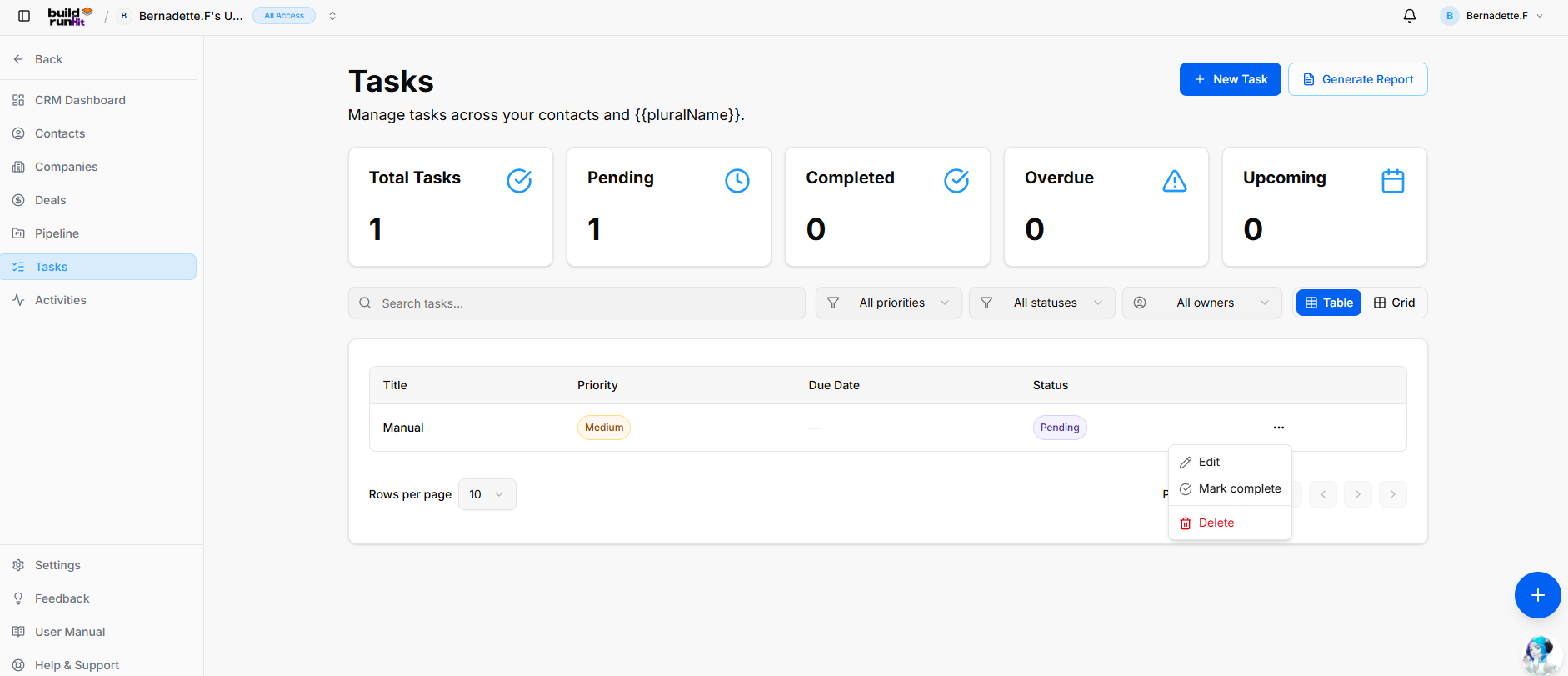
The **Tasks** sub-section helps you organize action items, set follow-up deadlines, and track execution across all CRM contact records and sales opportunities.

**Header &amp; Action Buttons**

<div _ngcontent-ng-c3922149199="" class="container" id="bkmrk-%2B-new-task%3A-direct-a"><div _ngcontent-ng-c2292009011="" aria-busy="false" aria-live="polite" class="markdown markdown-main-panel md-content enable-luminous-fast-follows enable-updated-hr-color tutor-markdown-rendering" dir="ltr" inline-copy-host="">- **+ New Task**: Direct action button to open the task creation modal.
- **Generate Report**: Opens the **CRM Tasks Report** export window:
    
    
    - **Export Count**: Indicates total targeted task entries (e.g., *Exporting 1 records*).
    - **Export Format Options**: Download task lists via **Export as PDF** or **Export as CSV**.

</div></div>[![Screenshot 2026-09-09 121757.png](https://library.buildrunkit.com/uploads/images/gallery/2026-09/scaled-1680-/screenshot-2026-09-09-121757.png)](https://library.buildrunkit.com/uploads/images/gallery/2026-09/screenshot-2026-09-09-121757.png)

**Task Summary Metrics** Top KPI cards highlight workload and deadline urgency:

<div _ngcontent-ng-c3922149199="" class="container" id="bkmrk-total-tasks%3A-display"><div _ngcontent-ng-c2292009011="" aria-busy="false" aria-live="polite" class="markdown markdown-main-panel md-content enable-luminous-fast-follows enable-updated-hr-color tutor-markdown-rendering" dir="ltr" inline-copy-host="">- **Total Tasks**: Displays the cumulative count of all logged task records.
- **Pending**: Tracks open action items awaiting action.
- **Completed**: Counts resolved tasks marked as done.
- **Overdue**: Highlights past-due action items requiring immediate attention.
- **Upcoming**: Displays scheduled future tasks with approaching target dates.

</div></div>**Directory Controls &amp; Search Bar**

<div _ngcontent-ng-c3922149199="" class="container" id="bkmrk-search-tasks...%3A-tex"><div _ngcontent-ng-c2292009011="" aria-busy="false" aria-live="polite" class="markdown markdown-main-panel md-content enable-luminous-fast-follows enable-updated-hr-color tutor-markdown-rendering" dir="ltr" inline-copy-host="">- **Search tasks...**: Text input field to locate task items by title or keyword.
- **All priorities Dropdown**: Filter tasks by urgency level (e.g., High, Medium, Low).
- **All statuses Dropdown**: Filter by execution state (e.g., Pending, In Progress, Completed).
- **All owners Dropdown**: Filter tasks by assigned team member.
- **View Switches**: Toggle display format between **Table** (list view) and **Grid** (card view).
- **Rows per page &amp; Pagination**: Adjust visible items per page and step through task lists.

</div></div>**Tasks Table Data Columns**

<div _ngcontent-ng-c3922149199="" class="container" id="bkmrk-title%3A-name-and-summ"><div _ngcontent-ng-c2292009011="" aria-busy="false" aria-live="polite" class="markdown markdown-main-panel md-content enable-luminous-fast-follows enable-updated-hr-color tutor-markdown-rendering" dir="ltr" inline-copy-host="">- **Title**: Name and summary of the action item.
- **Priority**: Visual urgency badge (e.g., *Medium*).
- **Due Date**: Targeted completion deadline.
- **Status**: Current progress indicator (e.g., *Pending*).
- **Row Actions Menu (`...`)**: Quick management options for individual rows:
    
    
    - **Edit**: Opens the setup editor to adjust task details, deadlines, or priority.
    - **Mark complete**: Instantly toggles status to completed.
    - **Delete**: Removes the task entry from your workspace.

</div></div>### **BuildRunKit CRM: Creating a New Task**

**[![Screenshot 2026-09-09 122033.png](https://library.buildrunkit.com/uploads/images/gallery/2026-09/scaled-1680-/screenshot-2026-09-09-122033.png)](https://library.buildrunkit.com/uploads/images/gallery/2026-09/screenshot-2026-09-09-122033.png)**

Clicking the **+ New Task** button opens a setup modal to log and assign individual action items:

- **Title \***: Required text field to enter the task name or core action.
- **Due Date**: Date picker input to assign a completion deadline.
- **Status**: Dropdown selector to set current progress state (*Todo*, *In Progress*, *Complete*, or *Cancelled*).
- **Priority**: Dropdown selector to set urgency (*Low*, *Medium*, *High*).
- **Contact**: Dropdown menu to link the task to a specific client record.
- **Deal**: Dropdown menu to associate the task with a specific sales opportunity (requires selecting a contact first).
- **Owner**: Dropdown selector to assign task responsibility to a team member in your workspace.
- **Description**: Multi-line text field for additional context, steps, or execution notes.
- **Modal Actions**: Click **Cancel** to discard or **Save** to create the task record.

<div _ngcontent-ng-c3922149199="" class="container" id="bkmrk--3"><div _ngcontent-ng-c2292009011="" aria-busy="false" aria-live="polite" class="markdown markdown-main-panel md-content enable-luminous-fast-follows enable-updated-hr-color tutor-markdown-rendering" dir="ltr" id="bkmrk--4" inline-copy-host=""></div></div><div _ngcontent-ng-c2811658299="" class="container" id="bkmrk--5"></div>