# BuildRunKit Invoice

# BuildRunKit Invoice: Invoice Dashboard Overview

## **BuildRunKit Invoice: Invoice Dashboard Overview**

**[![Screenshot 2026-09-15 114023.png](https://library.buildrunkit.com/uploads/images/gallery/2026-09/scaled-1680-/screenshot-2026-09-15-114023.png)](https://library.buildrunkit.com/uploads/images/gallery/2026-09/screenshot-2026-09-15-114023.png)**
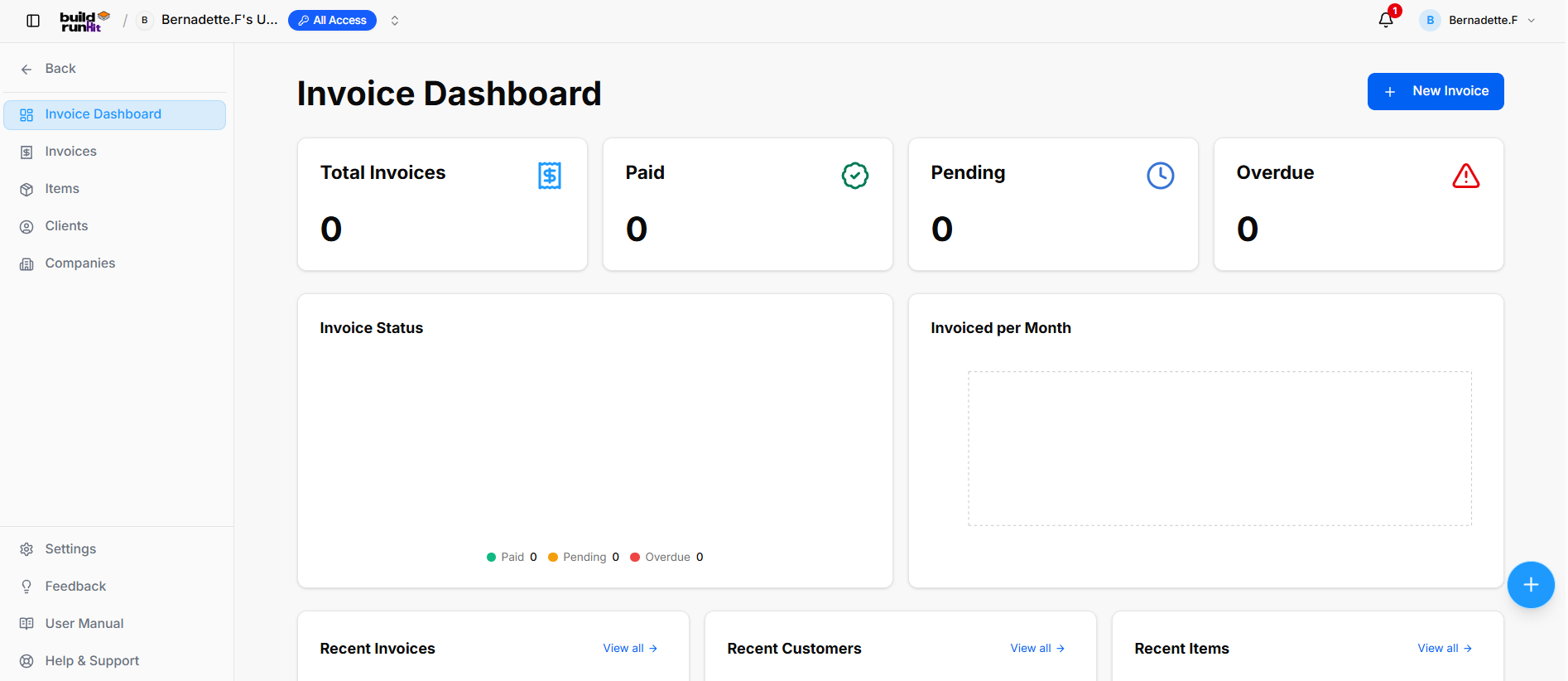
#### **Location &amp; Navigation Sidebar**

- **Top Left Action**: **&lt;- Back** button to return to main workspace navigation.
- **Module Views**:
    
    
    - **Invoice Dashboard** (Currently Active)
    - **Invoices**
    - **Items**
    - **Clients**
    - **Companies**
- **Bottom Sidebar Links**: **Settings**, **Feedback**, **User Manual**, **Help &amp; Support**.

#### **Header Actions**

- **Page Title**: **Invoice Dashboard**
- **Primary Action**: **+ New Invoice** button.

#### **Top Metric Summary Cards**

- **Total Invoices**: Tracks total generated billing records (e.g., `0`).
- **Paid**: Tracks successfully settled invoices (e.g., `0`).
- **Pending**: Tracks outstanding invoices awaiting payment (e.g., `0`).
- **Overdue**: Highlights unpaid invoices past their due date with an alert icon (e.g., `0`).

#### **Analytics &amp; Visual Chart Panels**

- **Invoice Status**: Donut breakdown chart monitoring payment states (*Paid 0*, *Pending 0*, *Overdue 0*).
- **Invoiced per Month**: Visual timeline chart displaying historical revenue volume.

#### **Recent Activity Panels (Lower Dashboard)**

- **Recent Invoices Section**: Displays latest generated invoice records with a **View all -&gt;** quick link.
- **Recent Customers Section**: Displays recently added client contacts with a **View all -&gt;** quick link.
- **Recent Items Section**: Displays recently created line items and services with a **View all -&gt;** quick link.

# BuildRunKit Invoices: Invoices Sub-Section

## **BuildRunKit Invoices: Invoices Sub-Section**

**[![Screenshot 2026-09-15 114635.png](https://library.buildrunkit.com/uploads/images/gallery/2026-09/scaled-1680-/screenshot-2026-09-15-114635.png)](https://library.buildrunkit.com/uploads/images/gallery/2026-09/screenshot-2026-09-15-114635.png)**
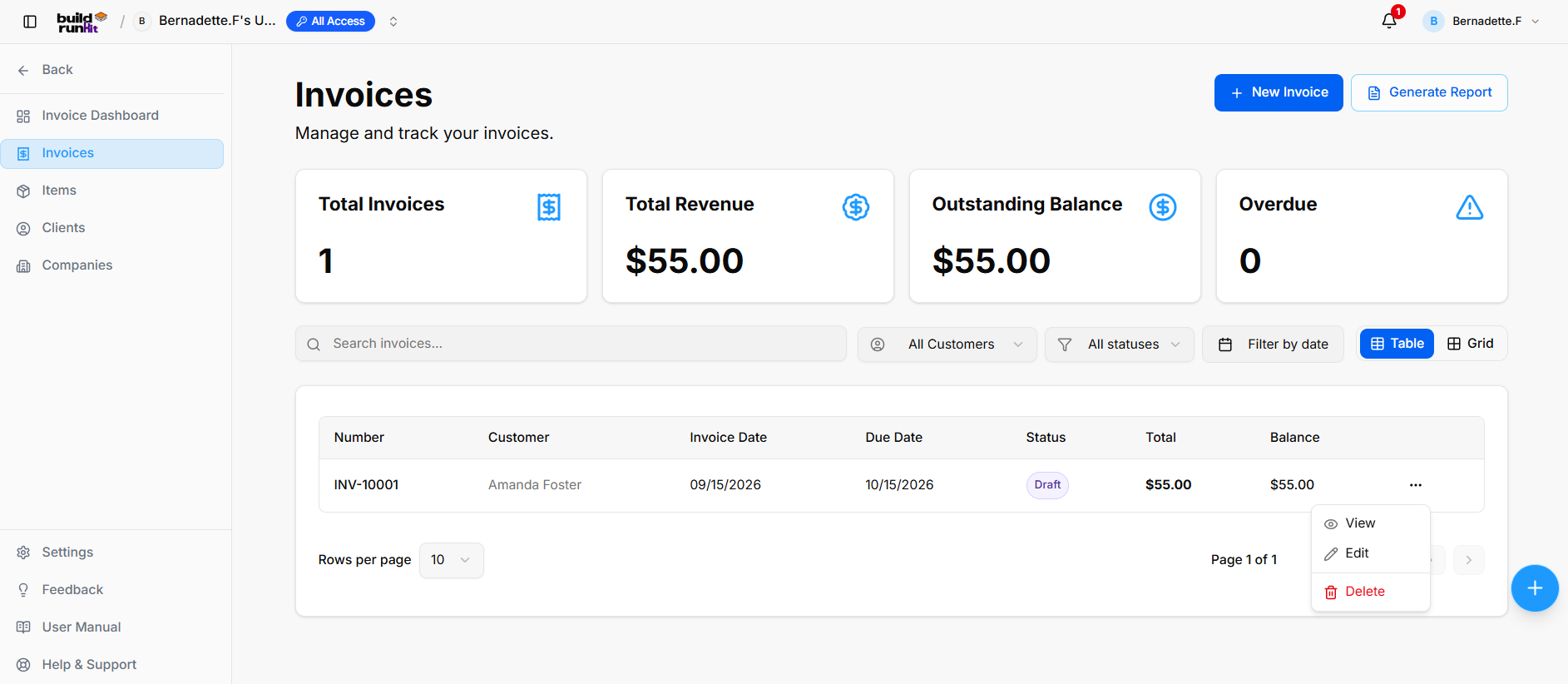
The **Invoices** sub-section provides central management for creating, tracking, filtering, and reporting on all customer billing statements and payment statuses.

#### **Invoice Summary Metrics**

Top KPI cards display key billing breakdown totals:

- **Total Invoices**: Tracks the overall number of registered invoice records.
- **Total Revenue**: Displays total gross revenue collected across paid invoices.
- **Outstanding Balance**: Displays total unpaid balances across active invoices.
- **Overdue**: Highlights past-due invoices requiring immediate collection.

#### **Directory Controls &amp; Search Bar**

- **Search invoices...**: Global filter input for locating records by number, customer, or details keywords.
- **All Customers**: Dropdown menu to filter records by specific client.
- **All statuses**: Dropdown menu to filter records by status (*Draft*, *Sent*, *Paid*, *Overdue*).
- **Filter by date**: Date picker control to isolate billing records within specific date ranges.
- **View Switcher**: Toggle viewing modes between **Table** (list layout) and **Grid** (card layout).
- **Rows per page**: Dropdown selector to control row density per page (e.g., 10 rows).
- **Pagination**: Standard directional controls to step through invoice pages.

#### **Invoices Table Data Columns**

- **Number**: Unique system invoice tracking code.
- **Customer**: Name of the billed client or organization.
- **Invoice Date**: Date of invoice issuance.
- **Due Date**: Payment deadline date.
- **Status**: Badge displaying current state.
- **Total**: Full invoice amount billed.
- **Balance**: Remaining unpaid balance due.

#### **Row Actions Menu (`...`)** 

Clicking the three dots icon on any invoice row displays quick record management actions:

- **View**: Opens the dedicated invoice preview and line item details.
- **Edit**: Opens the setup editor to update billing details, line items, or customer assignment.
- **Delete**: Removes the invoice record from the Invoices directory.

#### **Header &amp; Action Buttons**

- **+ New Invoice**: Direct action button to open the invoice setup modal.
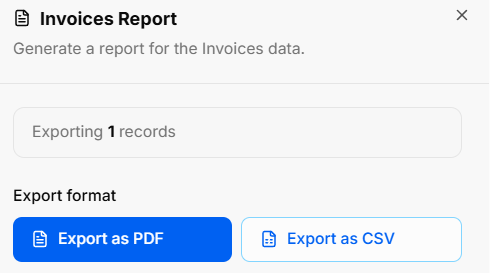
- **Generate Report**: Opens the **Invoices Report** export modal:
    
    
    - **Export Count**: Displays total targeted invoice records (e.g., *Exporting 1 records*).
    - **Export Format Options**: Allows instant downloads via **Export as PDF** or **Export as CSV**.

[![Screenshot 2026-09-15 115907.png](https://library.buildrunkit.com/uploads/images/gallery/2026-09/scaled-1680-/screenshot-2026-09-15-115907.png)](https://library.buildrunkit.com/uploads/images/gallery/2026-09/screenshot-2026-09-15-115907.png)
### **BuildRunKit Invoices: Creating a New Invoice**

**[![Screenshot 2026-09-15 120037.png](https://library.buildrunkit.com/uploads/images/gallery/2026-09/scaled-1680-/screenshot-2026-09-15-120037.png)](https://library.buildrunkit.com/uploads/images/gallery/2026-09/screenshot-2026-09-15-120037.png)**
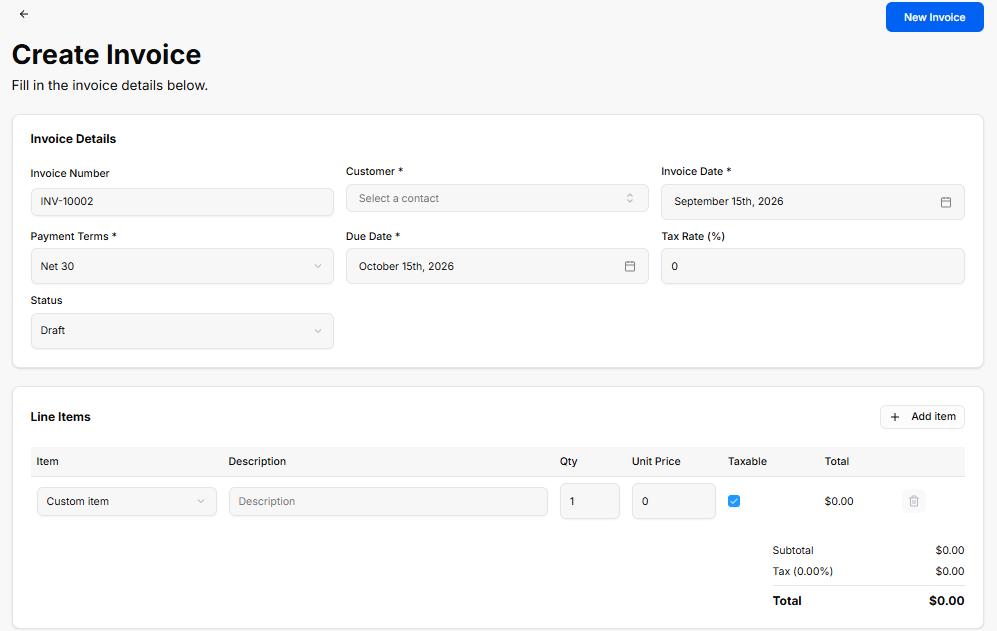
The **Create Invoice** view provides a setup interface for generating custom client invoices, configuring payment terms, applying tax rates, and adding line items.

#### **Invoice Details Panel**

- **Invoice Number**: Auto-generated tracking code (e.g., *INV-10002*).
- **Customer \***: Required dropdown selector to assign a contact profile (*Select a contact*).
- **Invoice Date \***: Date picker field for the issue date (e.g., *September 15th, 2026*).
- **Payment Terms \***: Dropdown selector for payment terms (e.g., *Net 30*).
- **Due Date \***: Date picker field for the payment deadline (e.g., *October 15th, 2026*).
- **Tax Rate (%)**: Numeric input field to specify applicable tax percentage (e.g., `0`).
- **Status**: Dropdown selector to set the initial state (*Draft*).

#### **Line Items Panel**

- **+ Add item**: Action button to add additional row items to the invoice.
- **Item Table Columns &amp; Inputs**:
    
    
    - **Item**: Dropdown selector to choose a pre-saved item or custom entry (*Custom item*).
    - **Description**: Text field for line item details or notes.
    - **Qty**: Numeric input for quantity ordered (e.g., `1`).
    - **Unit Price**: Numeric input for price per unit (e.g., `0`).
    - **Taxable**: Checkbox toggle to apply tax to the line item.
    - **Total**: Calculated row total (e.g., *$0.00*).
    - **Delete (Trash Icon)**: Action button to remove the line item row.
- **Totals Summary**:
    
    
    - **Subtotal**: Calculated sum of all line items before tax (e.g., *$0.00*).
    - **Tax (0.00%)**: Calculated tax amount based on selected rate (e.g., *$0.00*).
    - **Total**: Final calculated invoice total (e.g., *$0.00*).

#### **Header &amp; Action Buttons**

- **Back Arrow (`<-`)**: Returns to the main Invoices list view.
- **New Invoice**: Primary blue button to save and generate the invoice record.

# BuildRunKit Invoices: Items Sub-Section

## **BuildRunKit Invoices: Items Sub-Section**

**[![Screenshot 2026-09-15 120339.png](https://library.buildrunkit.com/uploads/images/gallery/2026-09/scaled-1680-/screenshot-2026-09-15-120339.png)](https://library.buildrunkit.com/uploads/images/gallery/2026-09/screenshot-2026-09-15-120339.png)**
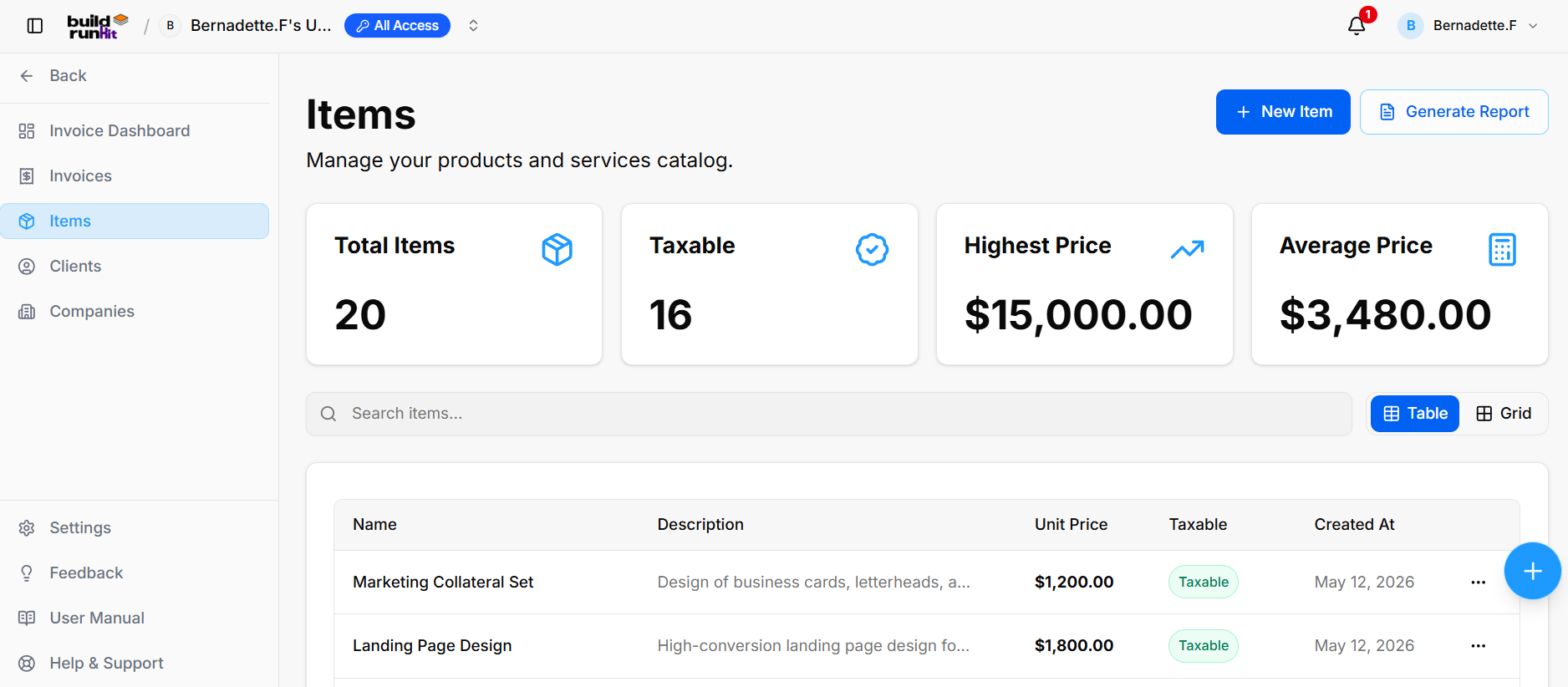
The **Items** sub-section provides central management for your products and services catalog used across billing records.

#### **Item Summary Metrics**

Top KPI cards display key catalog breakdown totals:

<div _ngcontent-ng-c3804843358="" class="container" id="bkmrk-total-items%3A-tracks-"><div _ngcontent-ng-c3047769669="" aria-busy="false" aria-live="polite" class="markdown markdown-main-panel md-content enable-luminous-fast-follows enable-updated-hr-color tutor-markdown-rendering" dir="ltr" inline-copy-host="">- **Total Items**: Tracks the overall number of registered product/service entries (e.g., `20`).
- **Taxable**: Displays total count of taxable catalog items (e.g., `16`).
- **Highest Price**: Highlights the maximum unit price recorded in the catalog (e.g., `$15,000.00`).
- **Average Price**: Calculates the average price across all catalog entries (e.g., `$3,480.00`).

</div></div>#### **Directory Controls &amp; Search Bar**

<div _ngcontent-ng-c3804843358="" class="container" id="bkmrk-search-items...%3A-glo"><div _ngcontent-ng-c3047769669="" aria-busy="false" aria-live="polite" class="markdown markdown-main-panel md-content enable-luminous-fast-follows enable-updated-hr-color tutor-markdown-rendering" dir="ltr" inline-copy-host="">- **Search items...**: Global filter input for locating products or services by name and description.
- **View Switcher**: Toggle viewing modes between **Table** (list layout) and **Grid** (card layout).

</div></div>#### **Items Table Data Columns**

<div _ngcontent-ng-c3804843358="" class="container" id="bkmrk-name%3A-title-of-the-p"><div _ngcontent-ng-c3047769669="" aria-busy="false" aria-live="polite" class="markdown markdown-main-panel md-content enable-luminous-fast-follows enable-updated-hr-color tutor-markdown-rendering" dir="ltr" inline-copy-host="">- **Name**: Title of the product or service entry (e.g., *Marketing Collateral Set*, *Landing Page Design*).
- **Description**: High-level details of the offering (e.g., *Design of business cards, letterheads...*, *High-conversion landing page design...*).
- **Unit Price**: Standard billing cost per unit (e.g., *$1,200.00*, *$1,800.00*).
- **Taxable**: Badge indicating tax status (*Taxable*).
- **Created At**: Date when the item entry was added to the catalog (e.g., *May 12, 2026*).

</div></div>#### **Row Actions Menu (`...`)**

Clicking the three dots icon on any item row displays quick record management actions:

<div _ngcontent-ng-c3804843358="" class="container" id="bkmrk-view%3A-opens-full-ite"><div _ngcontent-ng-c3047769669="" aria-busy="false" aria-live="polite" class="markdown markdown-main-panel md-content enable-luminous-fast-follows enable-updated-hr-color tutor-markdown-rendering" dir="ltr" inline-copy-host="">- **View**: Opens full item details.
- **Edit**: Opens the item editor to adjust pricing, tax status, or description.
- **Delete**: Removes the item from the catalog.

</div></div>#### **Header &amp; Action Buttons**

<div _ngcontent-ng-c3804843358="" class="container" id="bkmrk-%2B-new-item%3A-direct-a"><div _ngcontent-ng-c3047769669="" aria-busy="false" aria-live="polite" class="markdown markdown-main-panel md-content enable-luminous-fast-follows enable-updated-hr-color tutor-markdown-rendering" dir="ltr" inline-copy-host="">- **+ New Item**: Direct action button to open the product/service setup modal.
- **Generate Report**: Opens the **Invoice Items Report** export modal:
    
    
    - **Export Count**: Displays total targeted item records (e.g., *Exporting 20 records*).
    - **Export Format Options**: Allows instant downloads via **Export as PDF** or **Export as CSV**.

</div></div>[![Screenshot 2026-09-15 120406.png](https://library.buildrunkit.com/uploads/images/gallery/2026-09/scaled-1680-/screenshot-2026-09-15-120406.png)](https://library.buildrunkit.com/uploads/images/gallery/2026-09/screenshot-2026-09-15-120406.png)

### **BuildRunKit Invoices: Creating a New Item**

**[![Screenshot 2026-09-15 120706.png](https://library.buildrunkit.com/uploads/images/gallery/2026-09/scaled-1680-/screenshot-2026-09-15-120706.png)](https://library.buildrunkit.com/uploads/images/gallery/2026-09/screenshot-2026-09-15-120706.png)**

The **New Item** modal provides a creation interface for adding products or services to the catalog for invoice line item selection.

#### **Input Fields &amp; Form Controls**

- **Name \***: Required text field to enter the item name (placeholder: `e.g., Consulting Hour`).
- **Description**: Optional text area to provide detailed item specifications (placeholder: `Optional description`).
- **Unit Price \***: Required numeric input field to set default item pricing (default: `0`).
- **Taxable**: Checkbox control to specify whether tax applies to this product/service (checked by default).

#### **Header &amp; Action Buttons**

- **Close (`x`)**: Top-right button to dismiss the modal without saving changes.
- **Cancel**: Outline button to close the setup modal and discard inputs.
- **Save Item**: Primary blue action button to save the new entry to the catalog directory.

<div _ngcontent-ng-c3804843358="" class="container" id="bkmrk--3"><div _ngcontent-ng-c3047769669="" aria-busy="false" aria-live="polite" class="markdown markdown-main-panel md-content enable-luminous-fast-follows enable-updated-hr-color tutor-markdown-rendering" dir="ltr" id="bkmrk--4" inline-copy-host=""></div></div>

# BuildRunKit Invoices: Clients Sub-Section

## **BuildRunKit Invoices: Clients Sub-Section**

[![Screenshot 2026-09-15 121913.png](https://library.buildrunkit.com/uploads/images/gallery/2026-09/scaled-1680-/screenshot-2026-09-15-121913.png)](https://library.buildrunkit.com/uploads/images/gallery/2026-09/screenshot-2026-09-15-121913.png)

The **Clients** sub-section provides central directory management for client profiles, contact information, associated companies, and billing accounts.

#### **Client Summary Metrics**

Top KPI cards display key directory breakdown totals:

<div _ngcontent-ng-c3804843358="" class="container" id="bkmrk-total-contacts%3A-trac"><div _ngcontent-ng-c3047769669="" aria-busy="false" aria-live="polite" class="markdown markdown-main-panel md-content enable-luminous-fast-follows enable-updated-hr-color tutor-markdown-rendering" dir="ltr" inline-copy-host="">- **Total Contacts**: Tracks the overall number of registered client profiles (e.g., `10`).
- **With Email**: Displays total count of client profiles with attached email addresses (e.g., `10`).
- **With Company**: Highlights client profiles linked to specific company records (e.g., `10`).

</div></div>#### **Directory Controls &amp; Search Bar**

<div _ngcontent-ng-c3804843358="" class="container" id="bkmrk-search-clients...%3A-g"><div _ngcontent-ng-c3047769669="" aria-busy="false" aria-live="polite" class="markdown markdown-main-panel md-content enable-luminous-fast-follows enable-updated-hr-color tutor-markdown-rendering" dir="ltr" inline-copy-host="">- **Search clients...**: Global filter input for locating clients by name, company, email, or details.
- **View Switcher**: Toggle viewing modes between **Table** (list layout) and **Grid** (card layout).

</div></div>#### **Clients Table Data Columns**

<div _ngcontent-ng-c3804843358="" class="container" id="bkmrk-name%3A-primary-contac"><div _ngcontent-ng-c3047769669="" aria-busy="false" aria-live="polite" class="markdown markdown-main-panel md-content enable-luminous-fast-follows enable-updated-hr-color tutor-markdown-rendering" dir="ltr" inline-copy-host="">- **Name**: Primary contact name and title/role.
- **Company**: Associated organization or business entity (e.g., *Summit Logistics*, *Creative Spark Agency*).
- **Email**: Primary contact email address.
- **Phone**: Contact phone number (e.g., *5555678901*, *5557890123*).
- **Created At**: Date when the client profile was created (e.g., *May 12, 2026*).

</div></div>#### **Row Actions Menu (`...`)**

Clicking the three dots icon on any client row displays quick record management actions:

- **View**: Opens full client profile and details.
- **Edit**: Opens the setup editor to update contact information or company assignment.
- **See / Edit Statement**: Opens the billing statement management interface for the client.
- **Delete**: Removes the client profile from the directory.

#### **Header &amp; Action Buttons**

<div _ngcontent-ng-c3804843358="" class="container" id="bkmrk-%2B-new-client%3A-direct"><div _ngcontent-ng-c3047769669="" aria-busy="false" aria-live="polite" class="markdown markdown-main-panel md-content enable-luminous-fast-follows enable-updated-hr-color tutor-markdown-rendering" dir="ltr" inline-copy-host="">- **+ New Client**: Direct action button to open the client creation modal.
- **Generate Report**: Opens the **Invoice Clients Report** export modal:
    
    
    - **Export Count**: Displays total targeted client records (e.g., *Exporting 10 records*).
    - **Export Format Options**: Allows instant downloads via **Export as PDF** or **Export as CSV**.

</div></div>[![Screenshot 2026-09-15 121035.png](https://library.buildrunkit.com/uploads/images/gallery/2026-09/scaled-1680-/screenshot-2026-09-15-121035.png)](https://library.buildrunkit.com/uploads/images/gallery/2026-09/screenshot-2026-09-15-121035.png)

### **BuildRunKit Invoices: Creating a New Client**

**[![Screenshot 2026-09-15 121430.png](https://library.buildrunkit.com/uploads/images/gallery/2026-09/scaled-1680-/screenshot-2026-09-15-121430.png)](https://library.buildrunkit.com/uploads/images/gallery/2026-09/screenshot-2026-09-15-121430.png)**

The **New Contact** modal provides a multi-tab interface for adding customer profiles to the Clients directory.

#### **Details Tab**

<div _ngcontent-ng-c3804843358="" class="container" id="bkmrk-first-name-%2A%3A-requir"><div _ngcontent-ng-c3047769669="" aria-busy="false" aria-live="polite" class="markdown markdown-main-panel md-content enable-luminous-fast-follows enable-updated-hr-color tutor-markdown-rendering" dir="ltr" inline-copy-host="">- **First Name \***: Required field to enter the client's first name.
- **Last Name \***: Required field to enter the client's last name.
- **Email**: Text field for primary email address.
- **Company**: Dropdown menu (*Select or search company*) to assign an existing company, or click **+** to quick-add a new organization.
- **Position**: Text field to enter job title or role.
- **Website**: Text field for organization URL.
- **Owner**: Dropdown menu to assign an internal account manager (*No owner*).
- **Billing Info**: Text area for client-specific invoicing instructions or billing addresses.
- **Notes**: Text area for general internal account comments.

</div></div>#### **Contact Tab**

**[![Screenshot 2026-09-15 121452.png](https://library.buildrunkit.com/uploads/images/gallery/2026-09/scaled-1680-/screenshot-2026-09-15-121452.png)](https://library.buildrunkit.com/uploads/images/gallery/2026-09/screenshot-2026-09-15-121452.png)**

<div _ngcontent-ng-c3804843358="" class="container" id="bkmrk-address%3A-text-area-f"><div _ngcontent-ng-c3047769669="" aria-busy="false" aria-live="polite" class="markdown markdown-main-panel md-content enable-luminous-fast-follows enable-updated-hr-color tutor-markdown-rendering" dir="ltr" inline-copy-host="">- **Address**: Text area for primary physical or mailing address.
- **Phone**: Numeric text field for landline contact.
- **Mobile Phone**: Numeric text field for cell phone contact.
- **Other Phone**: Numeric text field for secondary contact numbers.
- **Additional Contact Methods**: **+ Add Contact Method** button to record alternate communication channels.
- **Social &amp; External Links**: **+ Add Social / External Link** button to attach online profiles (e.g., LinkedIn, X).

</div></div>#### **Custom Fields Tab**

**[![Screenshot 2026-09-15 121522.png](https://library.buildrunkit.com/uploads/images/gallery/2026-09/scaled-1680-/screenshot-2026-09-15-121522.png)](https://library.buildrunkit.com/uploads/images/gallery/2026-09/screenshot-2026-09-15-121522.png)**

<div _ngcontent-ng-c3804843358="" class="container" id="bkmrk-manual%3A-configured-t"><div _ngcontent-ng-c3047769669="" aria-busy="false" aria-live="polite" class="markdown markdown-main-panel md-content enable-luminous-fast-follows enable-updated-hr-color tutor-markdown-rendering" dir="ltr" inline-copy-host="">- **Manual**: Configured text input field generated from global Custom Field settings (e.g., *Manual*).

</div></div>#### **Tags Tab**

**[![Screenshot 2026-09-15 121545.png](https://library.buildrunkit.com/uploads/images/gallery/2026-09/scaled-1680-/screenshot-2026-09-15-121545.png)](https://library.buildrunkit.com/uploads/images/gallery/2026-09/screenshot-2026-09-15-121545.png)**

<div _ngcontent-ng-c3804843358="" class="container" id="bkmrk-type-a-new-tag-name."><div _ngcontent-ng-c3047769669="" aria-busy="false" aria-live="polite" class="markdown markdown-main-panel md-content enable-luminous-fast-follows enable-updated-hr-color tutor-markdown-rendering" dir="ltr" inline-copy-host="">- **Type a new tag name...**: Input field with **+ Add Tag** button to create new tags on the fly.
- **Pre-set Tag Selection**: Checkbox toggles to assign color-coded client categories (*Hot Lead*, *Cold Lead*, *Customer*, *Prospect*, *Partner*, *Vendor*, *Lead*, *Investor*, *VIP*).

</div></div>#### **Header &amp; Action Buttons**

<div _ngcontent-ng-c3804843358="" class="container" id="bkmrk-close-%28x%29%3A-top-right"><div _ngcontent-ng-c3047769669="" aria-busy="false" aria-live="polite" class="markdown markdown-main-panel md-content enable-luminous-fast-follows enable-updated-hr-color tutor-markdown-rendering" dir="ltr" id="bkmrk-close-%28x%29%3A-top-right-1" inline-copy-host="">- **Close (`x`)**: Top-right button to exit overlay without saving.
- **Cancel**: Outline button to discard entries and close the modal.
- **Save**: Primary blue button to create the client record.

</div></div><div _ngcontent-ng-c3804843358="" class="container" id="bkmrk--6"><div _ngcontent-ng-c3047769669="" aria-busy="false" aria-live="polite" class="markdown markdown-main-panel md-content enable-luminous-fast-follows enable-updated-hr-color tutor-markdown-rendering" dir="ltr" id="bkmrk--7" inline-copy-host=""></div></div>

# BuildRunKit Invoices: Companies Sub-Section

## **BuildRunKit Invoices: Companies Sub-Section**

**[![Screenshot 2026-09-15 122236.png](https://library.buildrunkit.com/uploads/images/gallery/2026-09/scaled-1680-/screenshot-2026-09-15-122236.png)](https://library.buildrunkit.com/uploads/images/gallery/2026-09/screenshot-2026-09-15-122236.png)**

The **Companies** sub-section provides central directory management for client businesses, partner organizations, and associated company accounts.

#### **Company Summary Metrics**

Top KPI cards display key organization breakdown totals:

- **Total Companies**: Tracks the overall number of registered company profiles (e.g., `1`).
- **Linked Contacts**: Counts individual contact records attached across all company profiles (e.g., `0`).
- **Companies w/o Contacts**: Identifies orphaned company records requiring contact assignment (e.g., `1`).
- **Average Contacts/Co**: Displays the mean contact ratio per parent organization profile (e.g., `0`).

#### **Directory Controls &amp; Search Bar**

- **Search companies...**: Global filter input for locating accounts by name or description keywords.
- **View Switcher**: Toggle viewing modes between **Table** (list layout) and **Grid** (card layout).
- **Rows per page**: Dropdown selector to control row density per page (e.g., `10`).
- **Pagination**: Directional controls to step through company directory pages.

#### **Companies Table Data Columns**

- **Name**: Primary registered company or trading entity name (e.g., *Manual*).
- **Description**: High-level summary of the company's business focus or internal account notes (e.g., *Manual*).
- **Contacts**: Total linked contact profiles associated with the organization (e.g., `—`).
- **Created At**: Date when the company record was added (e.g., *Sep 9, 2026*).

#### **Row Actions Menu (`...`)**

Clicking the three dots icon on any company row displays quick record management actions:

- **View**: Opens the dedicated company profile view showing linked contacts and account details.
- **Edit Company**: Opens the setup editor to update organization details or descriptions.
- **Delete Company**: Removes the organization record from the directory.

#### **Header &amp; Action Buttons**

- **+ New Company**: Direct action button to open the company setup modal.
- **Generate Report**: Opens the **Invoice Companies Report** export modal:
    
    
    - **Export Count**: Displays total targeted organization records (e.g., *Exporting 1 records*).
    - **Export Format Options**: Allows instant downloads via **Export as PDF** or **Export as CSV**.

[![Screenshot 2026-09-15 122455.png](https://library.buildrunkit.com/uploads/images/gallery/2026-09/scaled-1680-/screenshot-2026-09-15-122455.png)](https://library.buildrunkit.com/uploads/images/gallery/2026-09/screenshot-2026-09-15-122455.png)

### **BuildRunKit Invoices: Creating a New Company**

**[![Screenshot 2026-09-15 122533.png](https://library.buildrunkit.com/uploads/images/gallery/2026-09/scaled-1680-/screenshot-2026-09-15-122533.png)](https://library.buildrunkit.com/uploads/images/gallery/2026-09/screenshot-2026-09-15-122533.png)**

The **New Company** modal provides a setup interface for creating and registering organization profiles in the Companies directory.

#### **Input Fields &amp; Form Controls**

- **Name \***: Required text field to enter the official company or business entity name.
- **Description**: Optional text area to provide company details, business overview, or internal account notes.
- **Owner**: Dropdown menu to assign an internal team member or account manager (*No owner*).

#### **Header &amp; Action Buttons**

- **Close (`x`)**: Top-right icon to dismiss the modal without saving changes.
- **Cancel**: Outline button to close the modal and discard entered information.
- **Save**: Primary blue action button to register and save the new company profile.

# BuildRunKit Invoices: Settings

## **BuildRunKit Invoices: Settings (Company Tab)**

**[![Screenshot 2026-09-15 122801.png](https://library.buildrunkit.com/uploads/images/gallery/2026-09/scaled-1680-/screenshot-2026-09-15-122801.png)](https://library.buildrunkit.com/uploads/images/gallery/2026-09/screenshot-2026-09-15-122801.png)**

The **Invoice Settings** panel allows configuration of core billing parameters, business identification details, invoice styling templates, currencies, and data management options.

#### **Navigation Tabs**

- **Company**: Selected active tab for primary organization details.
- **Invoices**: Tab for invoice configuration and formatting.
- **Finances**: Tab for financial parameters and currency settings.
- **Import / Export**: Tab for data import and backup utilities.

#### **Company Information Card**

This information populates the 'Bill From' details across generated invoices and client billing statements.

- **Logo**: Image upload control (**Select Image** button) for branding invoices.
    
    
    - **File Limits**: Max size: 5MB. Supported formats: JPG, PNG, GIF, WebP.
- **Company Name**: Text field to define the billing entity name (e.g., *My Company*).
- **Street**: Text input for the primary street address (e.g., *123 Main St*).
- **Number**: Text input for building or suite number (e.g., *20*).
- **ZIP Code**: Text input for postal routing (e.g., *90210*).
- **City**: Text input for municipality (e.g., *Beverly Hills*).
- **State**: Text input for region/state (e.g., *California*).
- **Country**: Text input for billing country (e.g., *United States of America*).

#### **Header &amp; Action Buttons**

- **Save**: Primary blue button to confirm and save updated company settings.

## **BuildRunKit Invoices: Settings (Invoices Tab)**

**[![Screenshot 2026-09-15 123120.png](https://library.buildrunkit.com/uploads/images/gallery/2026-09/scaled-1680-/screenshot-2026-09-15-123120.png)](https://library.buildrunkit.com/uploads/images/gallery/2026-09/screenshot-2026-09-15-123120.png)**

The **Invoices** tab allows configuration of automatic invoice numbering conventions and default billing terms.

#### **Invoice Settings Card**

This section controls how newly generated invoices are numbered and formatted:

- **Invoice Number Prefix**: Text field to set the standard prefix for invoice identifiers (e.g., `INV` creates `INV-10001`).
- **Next Invoice Number**: Text input field setting the starting sequential integer for the upcoming invoice (e.g., `10002`).
- **Default Payment Terms**: Dropdown selector to set baseline payment due dates for new invoices (e.g., *Net 30*).

#### **Header &amp; Action Buttons**

- **Save**: Primary blue button to confirm and apply updated invoice formatting rules.

## **BuildRunKit Invoices: Settings (Finances Tab)**

**[![Screenshot 2026-09-15 123254.png](https://library.buildrunkit.com/uploads/images/gallery/2026-09/scaled-1680-/screenshot-2026-09-15-123254.png)](https://library.buildrunkit.com/uploads/images/gallery/2026-09/screenshot-2026-09-15-123254.png)**

The **Finances** tab allows configuration of monetary parameters and tax calculations applied across line items and reports.

#### **Financial Settings Card**

This section controls default currencies and tax rates:

- **Default Currency**: Dropdown menu used to set the baseline currency for item prices, invoice totals, and financial reporting (currently showing *USD - US Dollar*).
- **Default Tax Rate (%)**: Numeric input field to specify the default percentage applied to taxable items (e.g., `0`, or `8.25` for 8.25%).

#### **Header &amp; Action Buttons**

- **Save**: Primary blue button to confirm and update financial preferences.

## **BuildRunKit Invoices: Settings (Import / Export Tab)**

**[![Screenshot 2026-09-15 123453.png](https://library.buildrunkit.com/uploads/images/gallery/2026-09/scaled-1680-/screenshot-2026-09-15-123453.png)](https://library.buildrunkit.com/uploads/images/gallery/2026-09/screenshot-2026-09-15-123453.png)**

The **Import / Export** tab provides data portability tools for downloading system backups or bulk-importing entity records using structured CSV files.

#### **Export Invoice Data Card**

Allows batch downloading of module records into a single compressed ZIP file containing CSVs:

- **Selection Checkboxes**:
    
    
    - **Select All / Deselect All**: Global toggle for all dataset selections.
    - **Invoices**: Includes invoice records and line items.
    - **Clients**: Includes customer directory profiles.
    - **Items**: Includes saved line-item catalog products/services.
    - **Payments**: Includes logged transaction records.
- **Download Data**: Primary blue button to execute the ZIP export.

#### **Import Data Card &amp; Import Assistant**

Provides guided step-by-step importing of system records via CSV files:

- **Upload Files Button**: Opens the **Import Assistant** modal overlay.

## **Import Assistant Modal**

**[![Screenshot 2026-09-15 123523.png](https://library.buildrunkit.com/uploads/images/gallery/2026-09/scaled-1680-/screenshot-2026-09-15-123523.png)](https://library.buildrunkit.com/uploads/images/gallery/2026-09/screenshot-2026-09-15-123523.png)**

- **4-Step Wizard Steps**:
    
    
    1. **CONTACTS** (Current active step: *Step 1: Bring in your Customers*).
    2. **ITEMS**.
    3. **INVOICES**.
    4. **PAYMENTS**.
- **Download Templates**: Action button to download formatted CSV template files.
- **File Drag &amp; Drop Area**: Upload box supporting `.csv` files up to 5MB (*Upload CSV* button).
- **Customers Template Columns Reference Panel**: Displays required column header formatting rules and data types:
    
    
    - **company**: Optional text (Example: *Acme Corp*).
    - **position**: Optional text (Example: *Manager*).
    - **address**: Optional text (Example: *123 Main St, New York, NY*).
    - **notes**: Optional text (Example: *VIP customer*).
- **Close (`x`)**: Discards import progress and returns to the Settings screen.

<div _ngcontent-ng-c4166715710="" class="container" id="bkmrk--15"><div _ngcontent-ng-c872397921="" aria-busy="false" aria-live="polite" class="markdown markdown-main-panel enable-updated-hr-color" dir="ltr" id="bkmrk--16" inline-copy-host=""></div></div>