BuildRunKit Invoice
- BuildRunKit Invoice: Invoice Dashboard Overview
- BuildRunKit Invoices: Invoices Sub-Section
- BuildRunKit Invoices: Items Sub-Section
- BuildRunKit Invoices: Clients Sub-Section
- BuildRunKit Invoices: Companies Sub-Section
- BuildRunKit Invoices: Settings
BuildRunKit Invoice: Invoice Dashboard Overview
BuildRunKit Invoice: Invoice Dashboard Overview
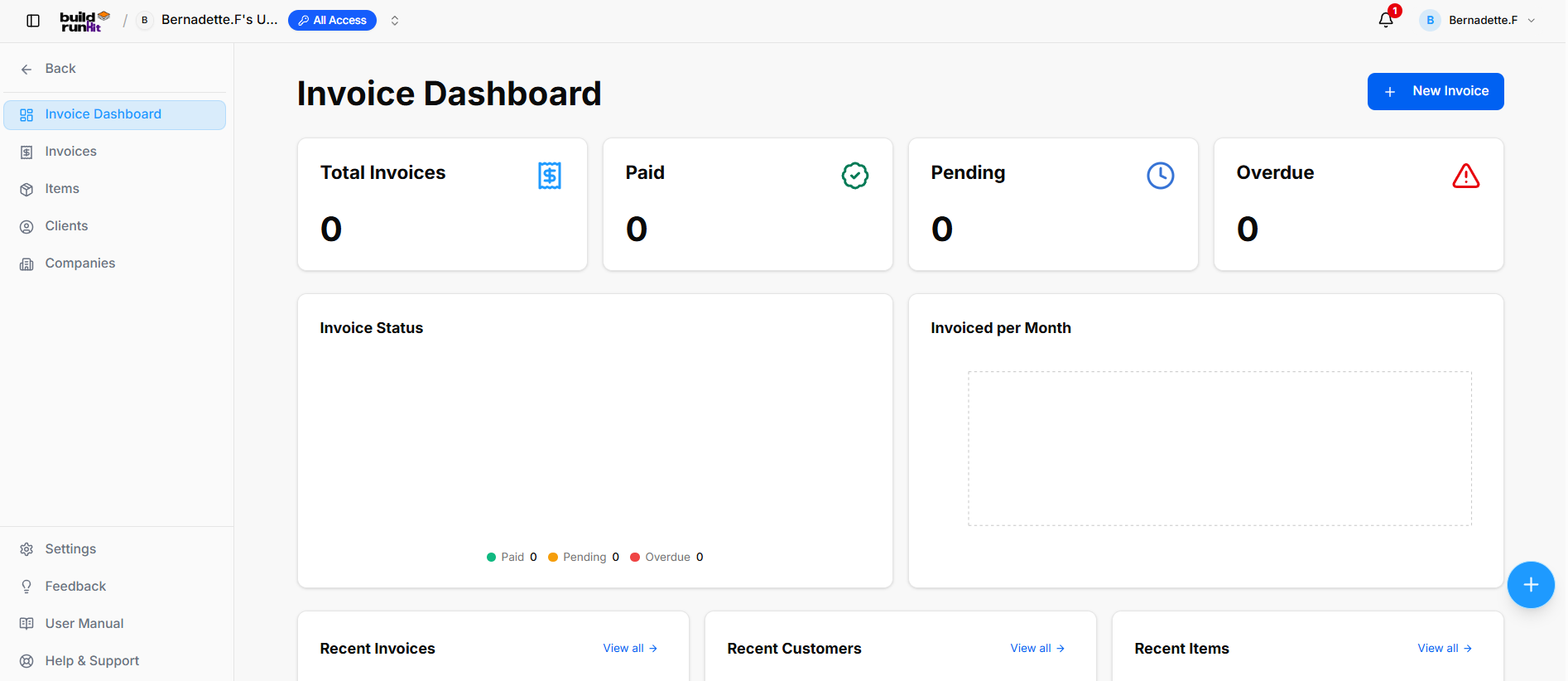
Location & Navigation Sidebar
-
Top Left Action: <- Back button to return to main workspace navigation.
-
Module Views:
-
Invoice Dashboard (Currently Active)
-
Invoices
-
Items
-
Clients
-
Companies
-
-
Bottom Sidebar Links: Settings, Feedback, User Manual, Help & Support.
Header Actions
-
Page Title: Invoice Dashboard
-
Primary Action: + New Invoice button.
Top Metric Summary Cards
-
Total Invoices: Tracks total generated billing records (e.g.,
0). -
Paid: Tracks successfully settled invoices (e.g.,
0). -
Pending: Tracks outstanding invoices awaiting payment (e.g.,
0). -
Overdue: Highlights unpaid invoices past their due date with an alert icon (e.g.,
0).
Analytics & Visual Chart Panels
-
Invoice Status: Donut breakdown chart monitoring payment states (Paid 0, Pending 0, Overdue 0).
-
Invoiced per Month: Visual timeline chart displaying historical revenue volume.
Recent Activity Panels (Lower Dashboard)
-
Recent Invoices Section: Displays latest generated invoice records with a View all -> quick link.
-
Recent Customers Section: Displays recently added client contacts with a View all -> quick link.
-
Recent Items Section: Displays recently created line items and services with a View all -> quick link.
BuildRunKit Invoices: Invoices Sub-Section
BuildRunKit Invoices: Invoices Sub-Section
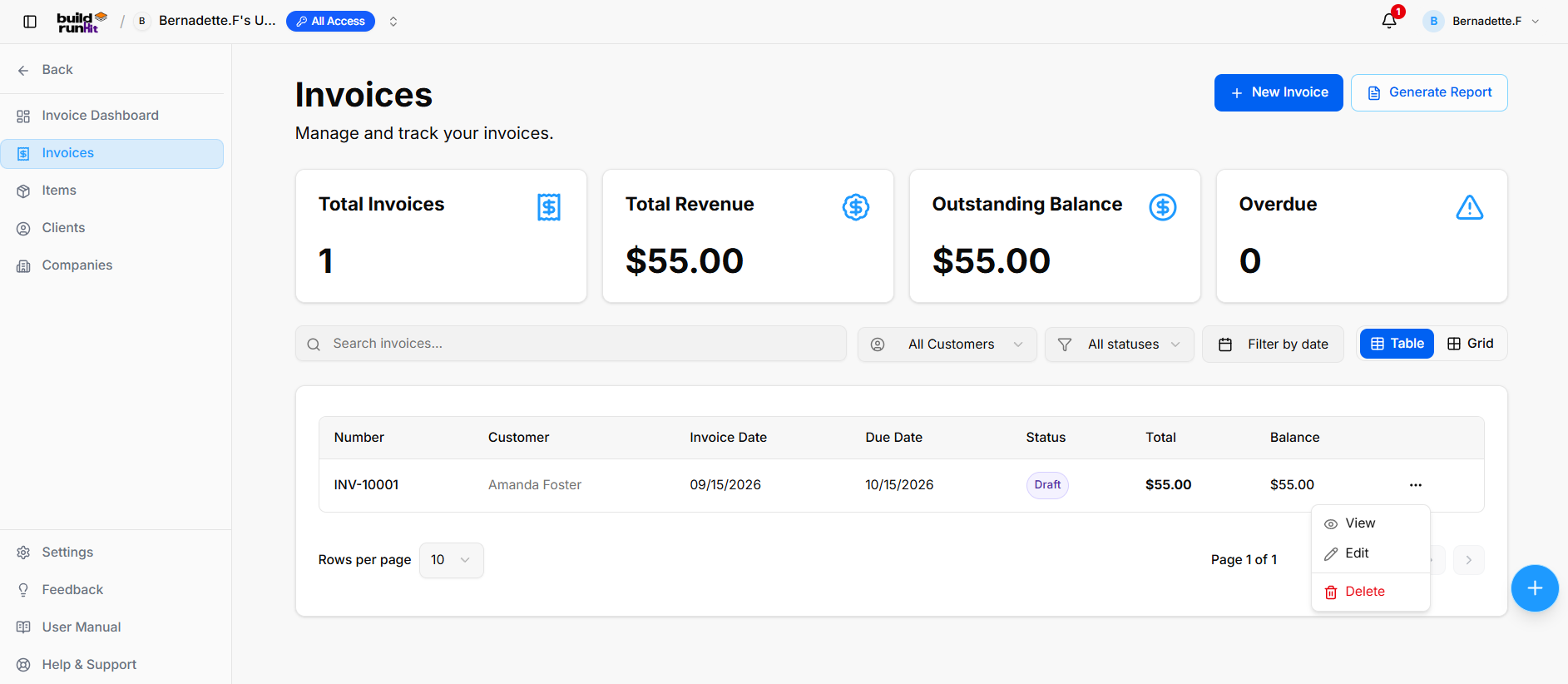
The Invoices sub-section provides central management for creating, tracking, filtering, and reporting on all customer billing statements and payment statuses.
Invoice Summary Metrics
Top KPI cards display key billing breakdown totals:
-
Total Invoices: Tracks the overall number of registered invoice records.
-
Total Revenue: Displays total gross revenue collected across paid invoices.
-
Outstanding Balance: Displays total unpaid balances across active invoices.
-
Overdue: Highlights past-due invoices requiring immediate collection.
Directory Controls & Search Bar
-
Search invoices...: Global filter input for locating records by number, customer, or details keywords.
-
All Customers: Dropdown menu to filter records by specific client.
-
All statuses: Dropdown menu to filter records by status (Draft, Sent, Paid, Overdue).
-
Filter by date: Date picker control to isolate billing records within specific date ranges.
-
View Switcher: Toggle viewing modes between Table (list layout) and Grid (card layout).
-
Rows per page: Dropdown selector to control row density per page (e.g., 10 rows).
-
Pagination: Standard directional controls to step through invoice pages.
Invoices Table Data Columns
-
Number: Unique system invoice tracking code.
-
Customer: Name of the billed client or organization.
-
Invoice Date: Date of invoice issuance.
-
Due Date: Payment deadline date.
-
Status: Badge displaying current state.
-
Total: Full invoice amount billed.
-
Balance: Remaining unpaid balance due.
Row Actions Menu (...)
Clicking the three dots icon on any invoice row displays quick record management actions:
-
View: Opens the dedicated invoice preview and line item details.
-
Edit: Opens the setup editor to update billing details, line items, or customer assignment.
-
Delete: Removes the invoice record from the Invoices directory.
Header & Action Buttons
-
+ New Invoice: Direct action button to open the invoice setup modal.
-
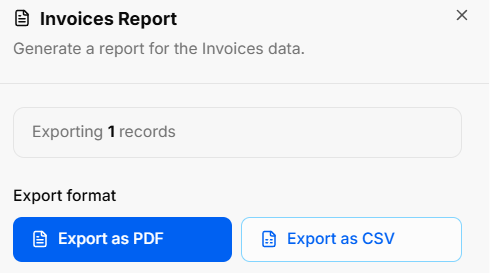
Generate Report: Opens the Invoices Report export modal:
-
Export Count: Displays total targeted invoice records (e.g., Exporting 1 records).
-
Export Format Options: Allows instant downloads via Export as PDF or Export as CSV.
-
BuildRunKit Invoices: Creating a New Invoice
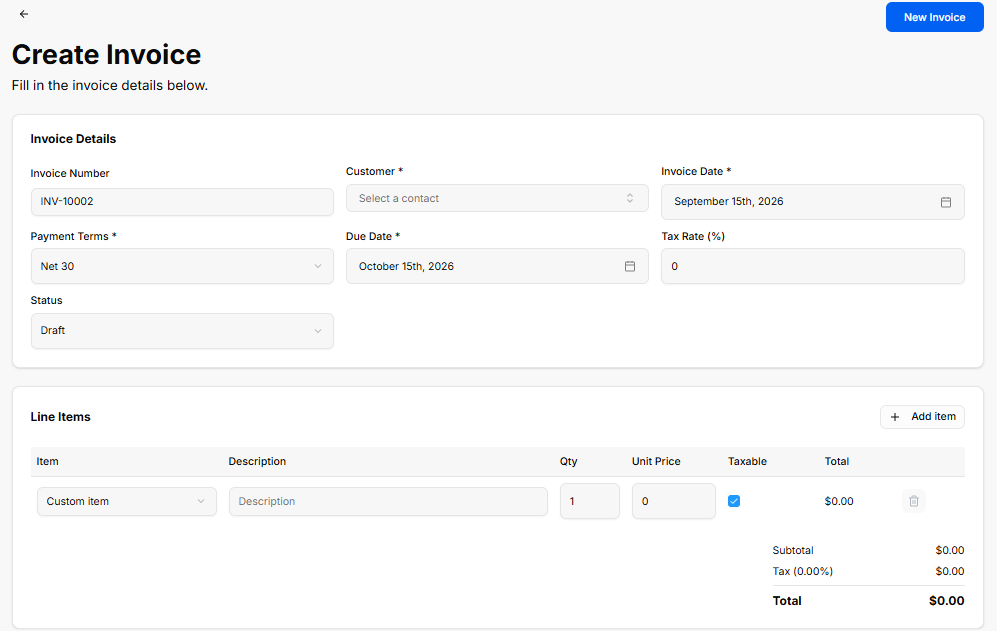
The Create Invoice view provides a setup interface for generating custom client invoices, configuring payment terms, applying tax rates, and adding line items.
Invoice Details Panel
-
Invoice Number: Auto-generated tracking code (e.g., INV-10002).
-
Customer *: Required dropdown selector to assign a contact profile (Select a contact).
-
Invoice Date *: Date picker field for the issue date (e.g., September 15th, 2026).
-
Payment Terms *: Dropdown selector for payment terms (e.g., Net 30).
-
Due Date *: Date picker field for the payment deadline (e.g., October 15th, 2026).
-
Tax Rate (%): Numeric input field to specify applicable tax percentage (e.g.,
0). -
Status: Dropdown selector to set the initial state (Draft).
Line Items Panel
-
+ Add item: Action button to add additional row items to the invoice.
-
Item Table Columns & Inputs:
-
Item: Dropdown selector to choose a pre-saved item or custom entry (Custom item).
-
Description: Text field for line item details or notes.
-
Qty: Numeric input for quantity ordered (e.g.,
1). -
Unit Price: Numeric input for price per unit (e.g.,
0). -
Taxable: Checkbox toggle to apply tax to the line item.
-
Total: Calculated row total (e.g., $0.00).
-
Delete (Trash Icon): Action button to remove the line item row.
-
-
Totals Summary:
-
Subtotal: Calculated sum of all line items before tax (e.g., $0.00).
-
Tax (0.00%): Calculated tax amount based on selected rate (e.g., $0.00).
-
Total: Final calculated invoice total (e.g., $0.00).
-
Header & Action Buttons
-
Back Arrow (
<-): Returns to the main Invoices list view. -
New Invoice: Primary blue button to save and generate the invoice record.
BuildRunKit Invoices: Items Sub-Section
BuildRunKit Invoices: Items Sub-Section
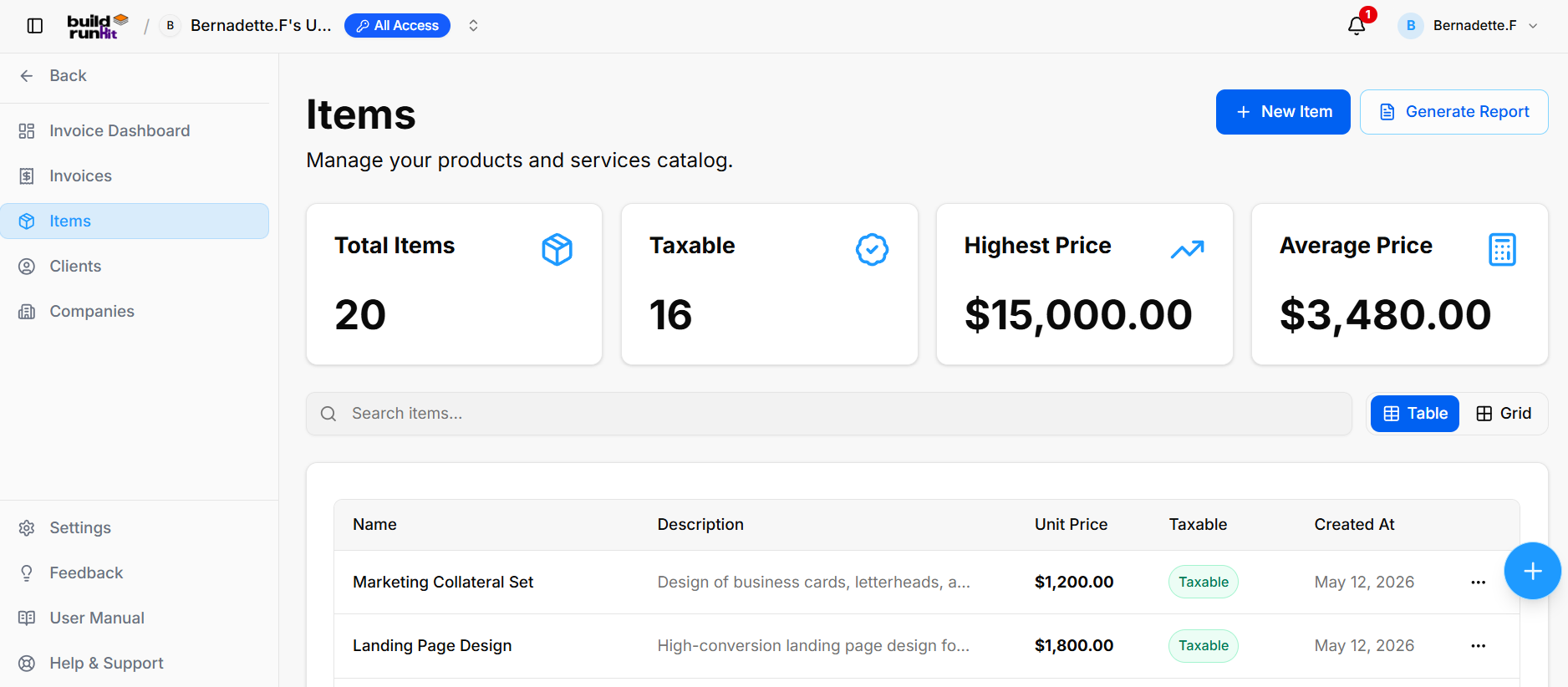
The Items sub-section provides central management for your products and services catalog used across billing records.
Item Summary Metrics
Top KPI cards display key catalog breakdown totals:
-
Total Items: Tracks the overall number of registered product/service entries (e.g.,
20). -
Taxable: Displays total count of taxable catalog items (e.g.,
16). -
Highest Price: Highlights the maximum unit price recorded in the catalog (e.g.,
$15,000.00). -
Average Price: Calculates the average price across all catalog entries (e.g.,
$3,480.00).
Directory Controls & Search Bar
-
Search items...: Global filter input for locating products or services by name and description.
-
View Switcher: Toggle viewing modes between Table (list layout) and Grid (card layout).
Items Table Data Columns
-
Name: Title of the product or service entry (e.g., Marketing Collateral Set, Landing Page Design).
-
Description: High-level details of the offering (e.g., Design of business cards, letterheads..., High-conversion landing page design...).
-
Unit Price: Standard billing cost per unit (e.g., $1,200.00, $1,800.00).
-
Taxable: Badge indicating tax status (Taxable).
-
Created At: Date when the item entry was added to the catalog (e.g., May 12, 2026).
Row Actions Menu (...)
Clicking the three dots icon on any item row displays quick record management actions:
-
View: Opens full item details.
-
Edit: Opens the item editor to adjust pricing, tax status, or description.
-
Delete: Removes the item from the catalog.
Header & Action Buttons
-
+ New Item: Direct action button to open the product/service setup modal.
-
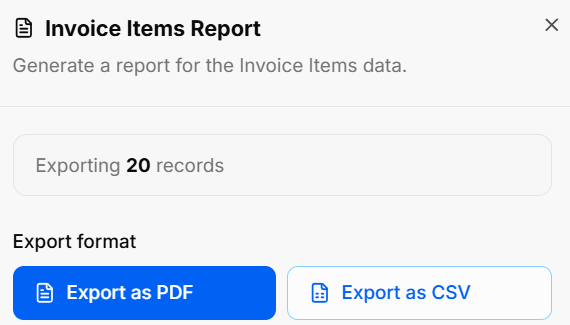
Generate Report: Opens the Invoice Items Report export modal:
-
Export Count: Displays total targeted item records (e.g., Exporting 20 records).
-
Export Format Options: Allows instant downloads via Export as PDF or Export as CSV.
-
BuildRunKit Invoices: Creating a New Item
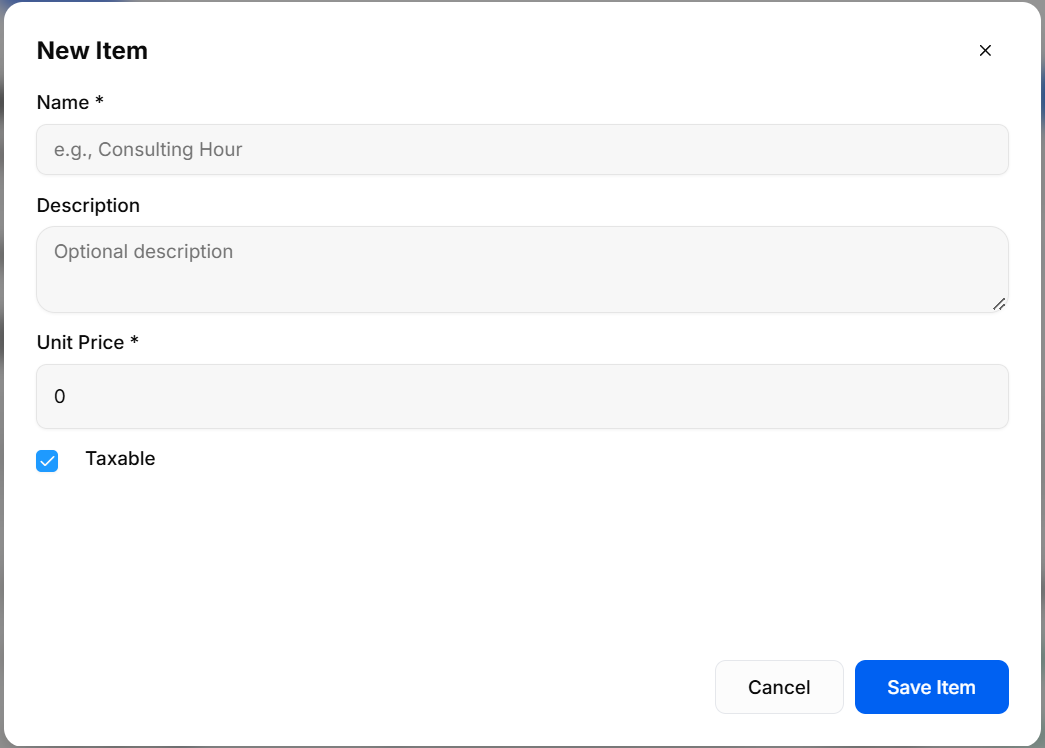
The New Item modal provides a creation interface for adding products or services to the catalog for invoice line item selection.
Input Fields & Form Controls
-
Name *: Required text field to enter the item name (placeholder:
e.g., Consulting Hour). -
Description: Optional text area to provide detailed item specifications (placeholder:
Optional description). -
Unit Price *: Required numeric input field to set default item pricing (default:
0). -
Taxable: Checkbox control to specify whether tax applies to this product/service (checked by default).
Header & Action Buttons
-
Close (
x): Top-right button to dismiss the modal without saving changes. -
Cancel: Outline button to close the setup modal and discard inputs.
-
Save Item: Primary blue action button to save the new entry to the catalog directory.
BuildRunKit Invoices: Clients Sub-Section
BuildRunKit Invoices: Clients Sub-Section
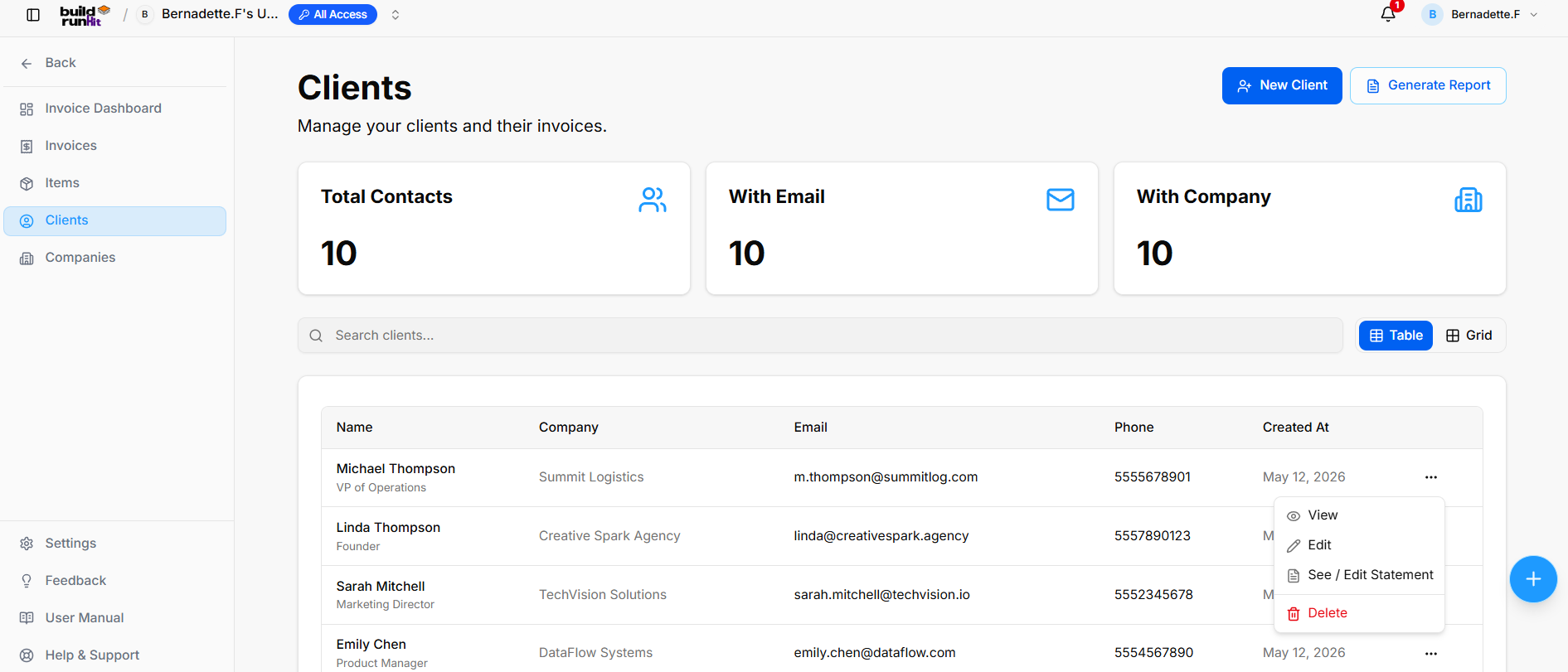
The Clients sub-section provides central directory management for client profiles, contact information, associated companies, and billing accounts.
Client Summary Metrics
Top KPI cards display key directory breakdown totals:
-
Total Contacts: Tracks the overall number of registered client profiles (e.g.,
10). -
With Email: Displays total count of client profiles with attached email addresses (e.g.,
10). -
With Company: Highlights client profiles linked to specific company records (e.g.,
10).
Directory Controls & Search Bar
-
Search clients...: Global filter input for locating clients by name, company, email, or details.
-
View Switcher: Toggle viewing modes between Table (list layout) and Grid (card layout).
Clients Table Data Columns
-
Name: Primary contact name and title/role.
-
Company: Associated organization or business entity (e.g., Summit Logistics, Creative Spark Agency).
-
Email: Primary contact email address.
-
Phone: Contact phone number (e.g., 5555678901, 5557890123).
-
Created At: Date when the client profile was created (e.g., May 12, 2026).
Row Actions Menu (...)
Clicking the three dots icon on any client row displays quick record management actions:
-
View: Opens full client profile and details.
-
Edit: Opens the setup editor to update contact information or company assignment.
-
See / Edit Statement: Opens the billing statement management interface for the client.
-
Delete: Removes the client profile from the directory.
Header & Action Buttons
-
+ New Client: Direct action button to open the client creation modal.
-
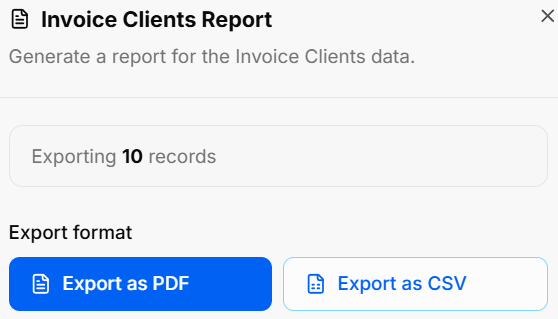
Generate Report: Opens the Invoice Clients Report export modal:
-
Export Count: Displays total targeted client records (e.g., Exporting 10 records).
-
Export Format Options: Allows instant downloads via Export as PDF or Export as CSV.
-
BuildRunKit Invoices: Creating a New Client
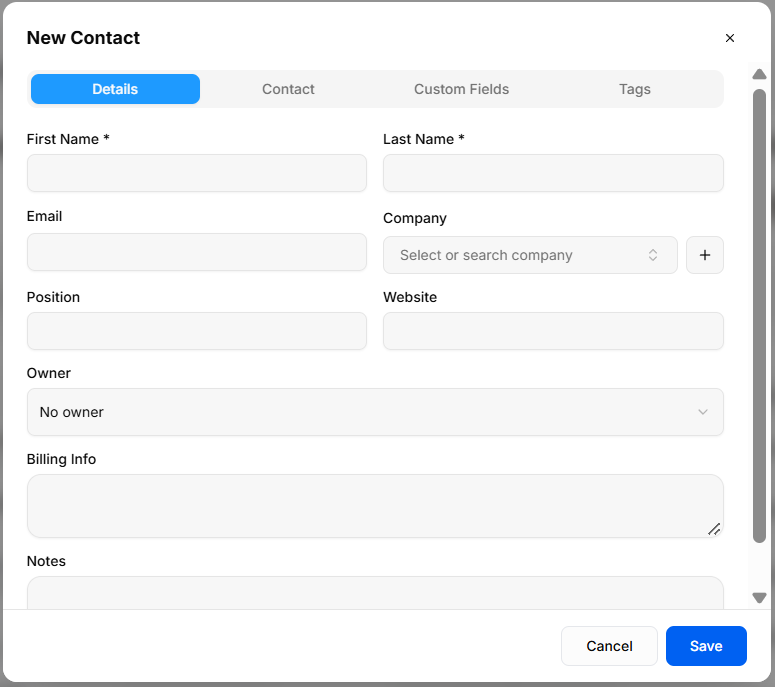
The New Contact modal provides a multi-tab interface for adding customer profiles to the Clients directory.
Details Tab
-
First Name *: Required field to enter the client's first name.
-
Last Name *: Required field to enter the client's last name.
-
Email: Text field for primary email address.
-
Company: Dropdown menu (Select or search company) to assign an existing company, or click + to quick-add a new organization.
-
Position: Text field to enter job title or role.
-
Website: Text field for organization URL.
-
Owner: Dropdown menu to assign an internal account manager (No owner).
-
Billing Info: Text area for client-specific invoicing instructions or billing addresses.
-
Notes: Text area for general internal account comments.
Contact Tab
-
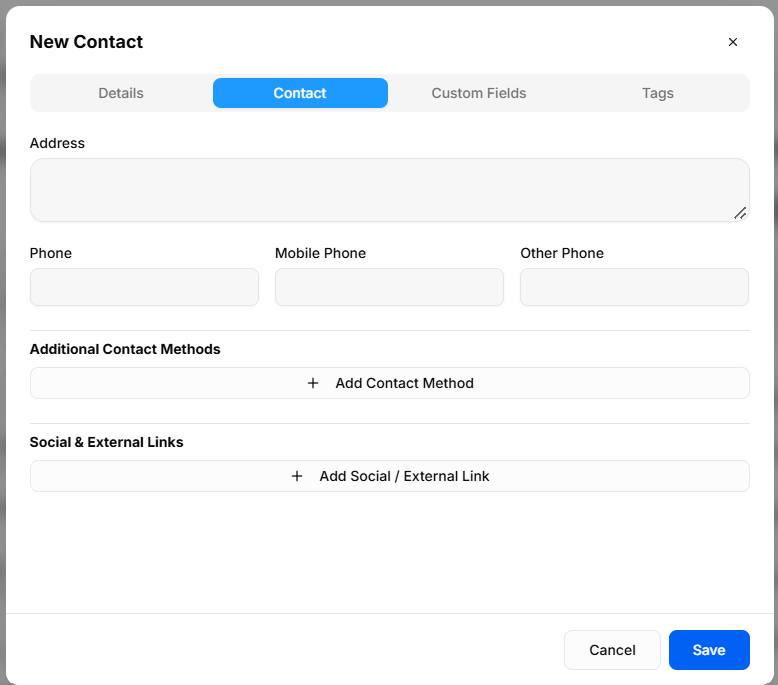
Address: Text area for primary physical or mailing address.
-
Phone: Numeric text field for landline contact.
-
Mobile Phone: Numeric text field for cell phone contact.
-
Other Phone: Numeric text field for secondary contact numbers.
-
Additional Contact Methods: + Add Contact Method button to record alternate communication channels.
-
Social & External Links: + Add Social / External Link button to attach online profiles (e.g., LinkedIn, X).
Custom Fields Tab
-
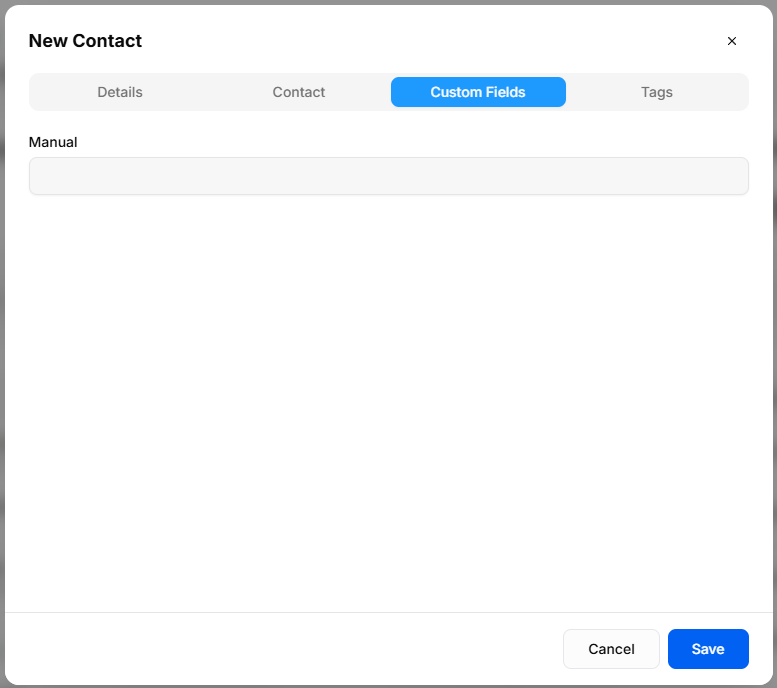
Manual: Configured text input field generated from global Custom Field settings (e.g., Manual).
Tags Tab
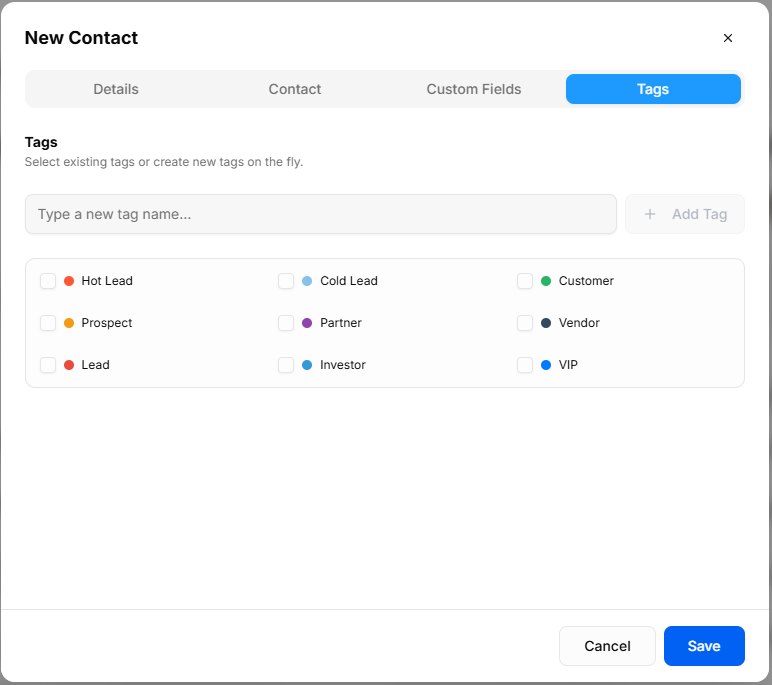
-
Type a new tag name...: Input field with + Add Tag button to create new tags on the fly.
-
Pre-set Tag Selection: Checkbox toggles to assign color-coded client categories (Hot Lead, Cold Lead, Customer, Prospect, Partner, Vendor, Lead, Investor, VIP).
Header & Action Buttons
-
Close (
x): Top-right button to exit overlay without saving. -
Cancel: Outline button to discard entries and close the modal.
-
Save: Primary blue button to create the client record.
BuildRunKit Invoices: Companies Sub-Section
BuildRunKit Invoices: Companies Sub-Section
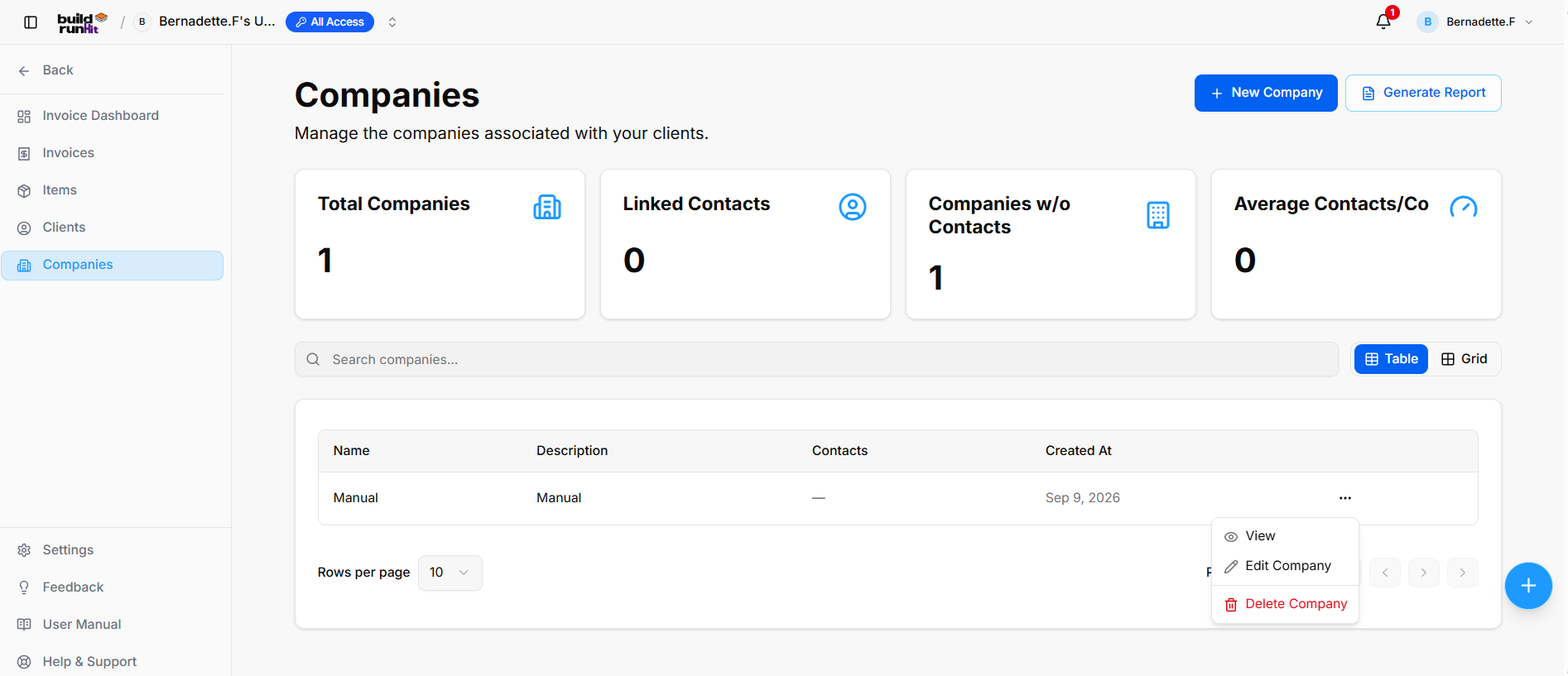
The Companies sub-section provides central directory management for client businesses, partner organizations, and associated company accounts.
Company Summary Metrics
Top KPI cards display key organization breakdown totals:
-
Total Companies: Tracks the overall number of registered company profiles (e.g.,
1). -
Linked Contacts: Counts individual contact records attached across all company profiles (e.g.,
0). -
Companies w/o Contacts: Identifies orphaned company records requiring contact assignment (e.g.,
1). -
Average Contacts/Co: Displays the mean contact ratio per parent organization profile (e.g.,
0).
Directory Controls & Search Bar
-
Search companies...: Global filter input for locating accounts by name or description keywords.
-
View Switcher: Toggle viewing modes between Table (list layout) and Grid (card layout).
-
Rows per page: Dropdown selector to control row density per page (e.g.,
10). -
Pagination: Directional controls to step through company directory pages.
Companies Table Data Columns
-
Name: Primary registered company or trading entity name (e.g., Manual).
-
Description: High-level summary of the company's business focus or internal account notes (e.g., Manual).
-
Contacts: Total linked contact profiles associated with the organization (e.g.,
—). -
Created At: Date when the company record was added (e.g., Sep 9, 2026).
Row Actions Menu (...)
Clicking the three dots icon on any company row displays quick record management actions:
-
View: Opens the dedicated company profile view showing linked contacts and account details.
-
Edit Company: Opens the setup editor to update organization details or descriptions.
-
Delete Company: Removes the organization record from the directory.
Header & Action Buttons
-
+ New Company: Direct action button to open the company setup modal.
-
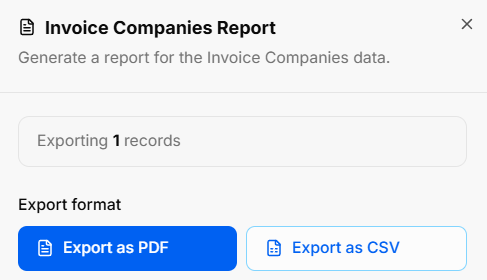
Generate Report: Opens the Invoice Companies Report export modal:
-
Export Count: Displays total targeted organization records (e.g., Exporting 1 records).
-
Export Format Options: Allows instant downloads via Export as PDF or Export as CSV.
-
BuildRunKit Invoices: Creating a New Company
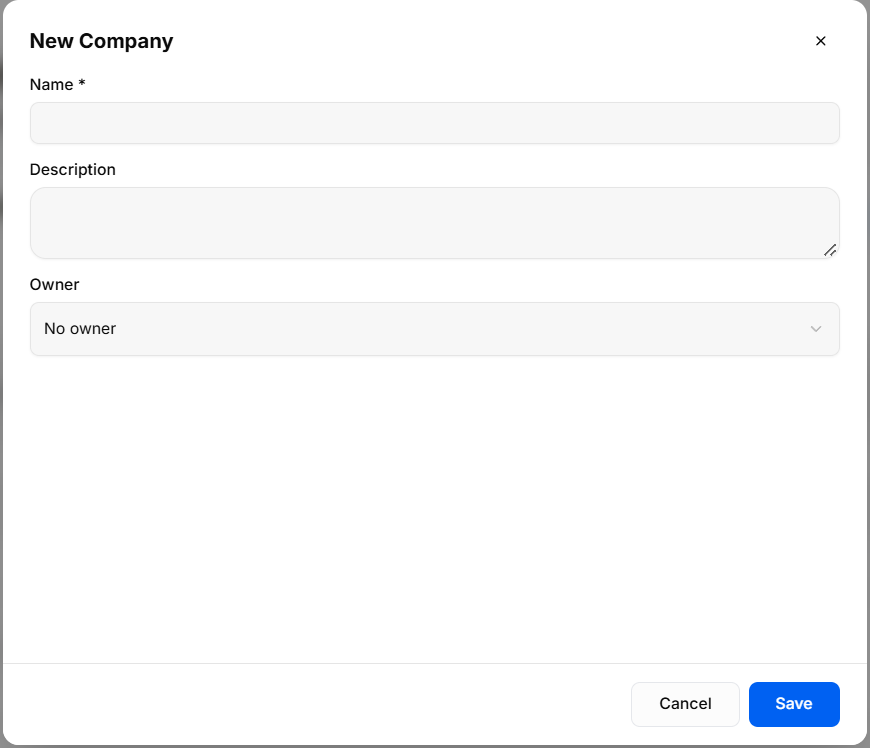
The New Company modal provides a setup interface for creating and registering organization profiles in the Companies directory.
Input Fields & Form Controls
-
Name *: Required text field to enter the official company or business entity name.
-
Description: Optional text area to provide company details, business overview, or internal account notes.
-
Owner: Dropdown menu to assign an internal team member or account manager (No owner).
Header & Action Buttons
-
Close (
x): Top-right icon to dismiss the modal without saving changes. -
Cancel: Outline button to close the modal and discard entered information.
-
Save: Primary blue action button to register and save the new company profile.
BuildRunKit Invoices: Settings
BuildRunKit Invoices: Settings (Company Tab)
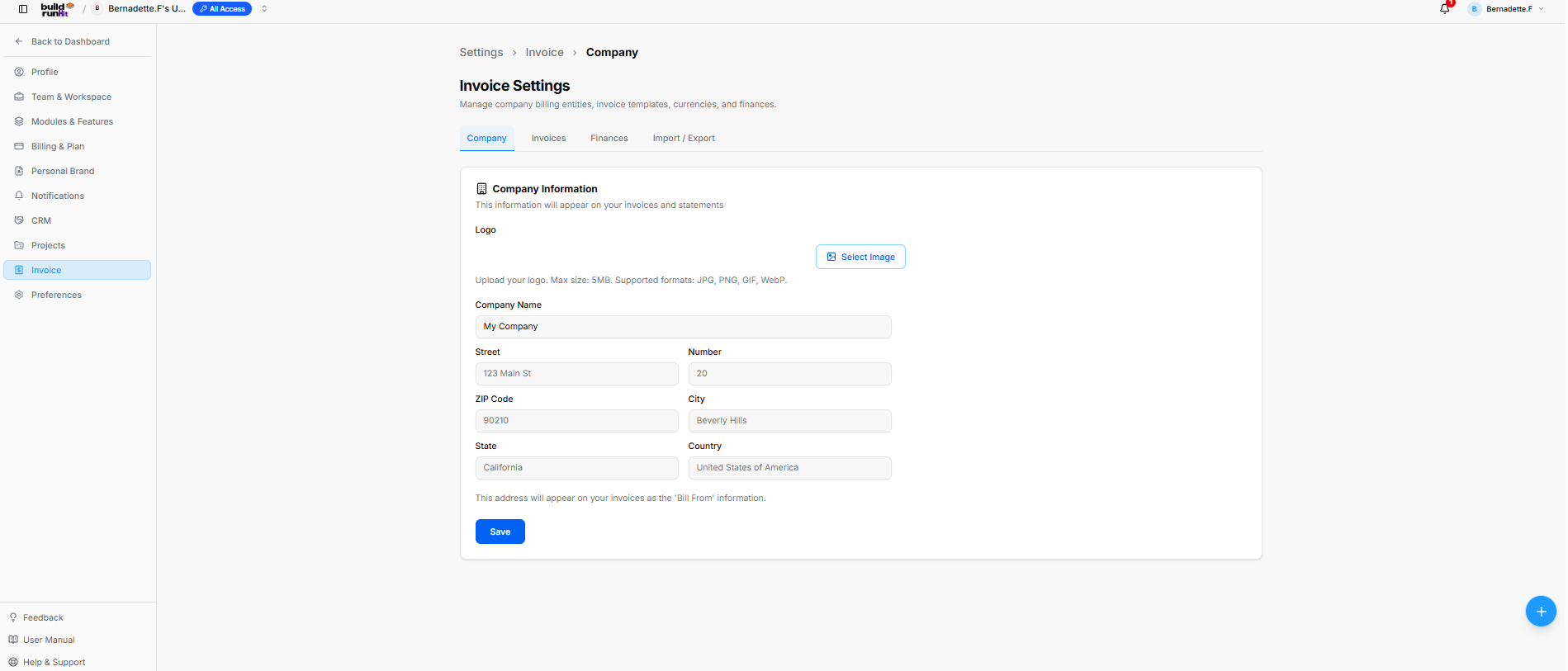
The Invoice Settings panel allows configuration of core billing parameters, business identification details, invoice styling templates, currencies, and data management options.
Navigation Tabs
-
Company: Selected active tab for primary organization details.
-
Invoices: Tab for invoice configuration and formatting.
-
Finances: Tab for financial parameters and currency settings.
-
Import / Export: Tab for data import and backup utilities.
Company Information Card
This information populates the 'Bill From' details across generated invoices and client billing statements.
-
Logo: Image upload control (Select Image button) for branding invoices.
-
File Limits: Max size: 5MB. Supported formats: JPG, PNG, GIF, WebP.
-
-
Company Name: Text field to define the billing entity name (e.g., My Company).
-
Street: Text input for the primary street address (e.g., 123 Main St).
-
Number: Text input for building or suite number (e.g., 20).
-
ZIP Code: Text input for postal routing (e.g., 90210).
-
City: Text input for municipality (e.g., Beverly Hills).
-
State: Text input for region/state (e.g., California).
-
Country: Text input for billing country (e.g., United States of America).
Header & Action Buttons
-
Save: Primary blue button to confirm and save updated company settings.
BuildRunKit Invoices: Settings (Invoices Tab)
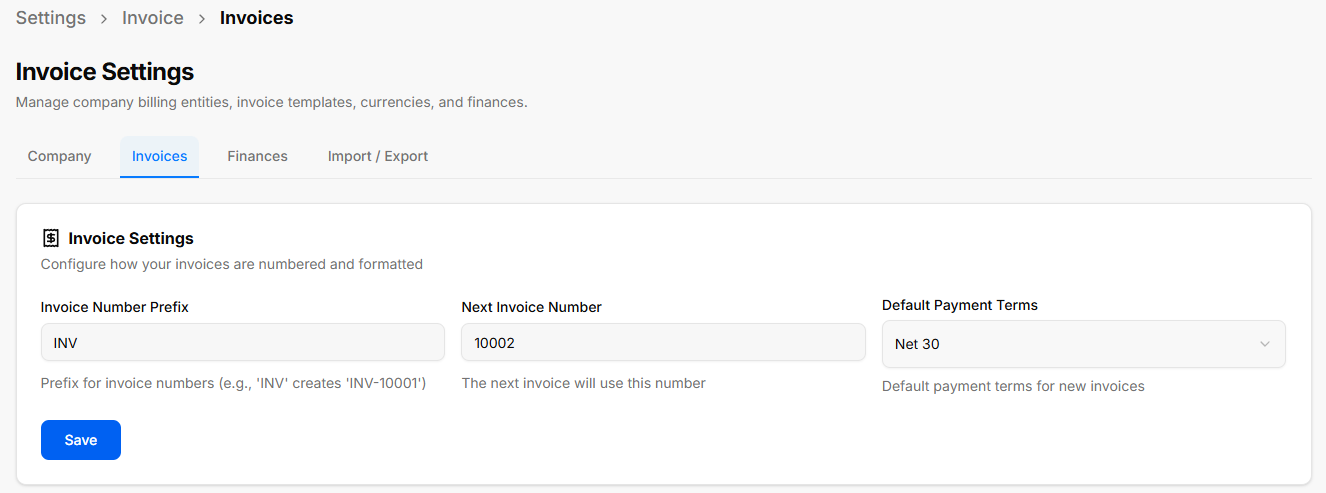
The Invoices tab allows configuration of automatic invoice numbering conventions and default billing terms.
Invoice Settings Card
This section controls how newly generated invoices are numbered and formatted:
-
Invoice Number Prefix: Text field to set the standard prefix for invoice identifiers (e.g.,
INVcreatesINV-10001). -
Next Invoice Number: Text input field setting the starting sequential integer for the upcoming invoice (e.g.,
10002). -
Default Payment Terms: Dropdown selector to set baseline payment due dates for new invoices (e.g., Net 30).
Header & Action Buttons
-
Save: Primary blue button to confirm and apply updated invoice formatting rules.
BuildRunKit Invoices: Settings (Finances Tab)
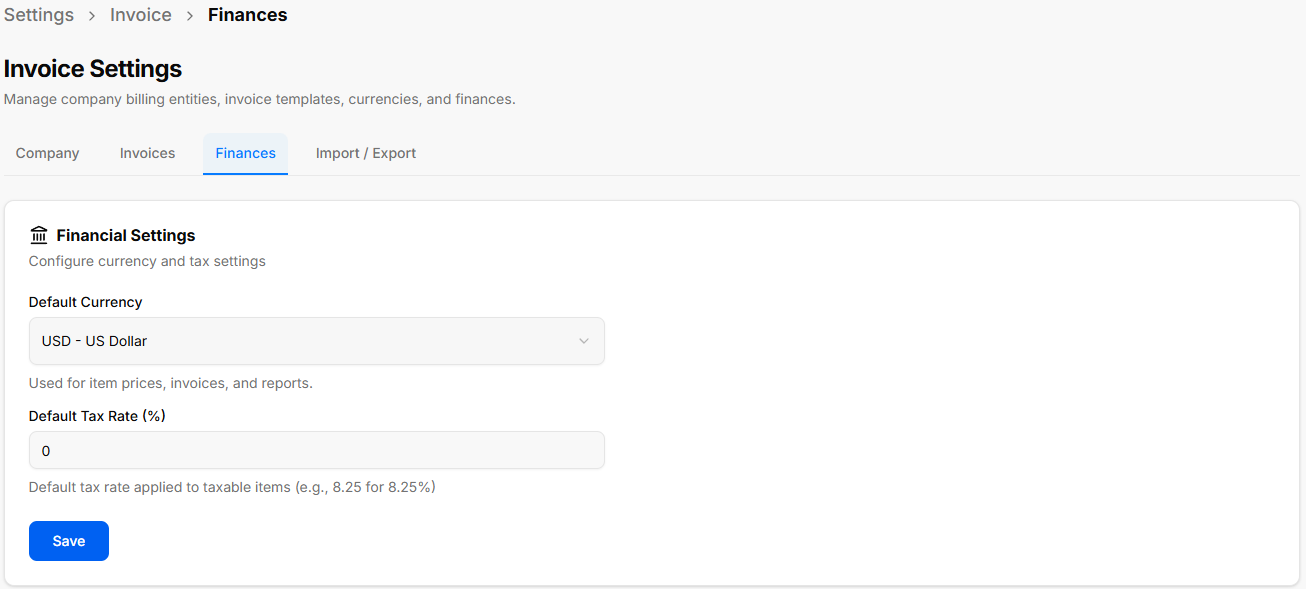
The Finances tab allows configuration of monetary parameters and tax calculations applied across line items and reports.
Financial Settings Card
This section controls default currencies and tax rates:
-
Default Currency: Dropdown menu used to set the baseline currency for item prices, invoice totals, and financial reporting (currently showing USD - US Dollar).
-
Default Tax Rate (%): Numeric input field to specify the default percentage applied to taxable items (e.g.,
0, or8.25for 8.25%).
Header & Action Buttons
-
Save: Primary blue button to confirm and update financial preferences.
BuildRunKit Invoices: Settings (Import / Export Tab)
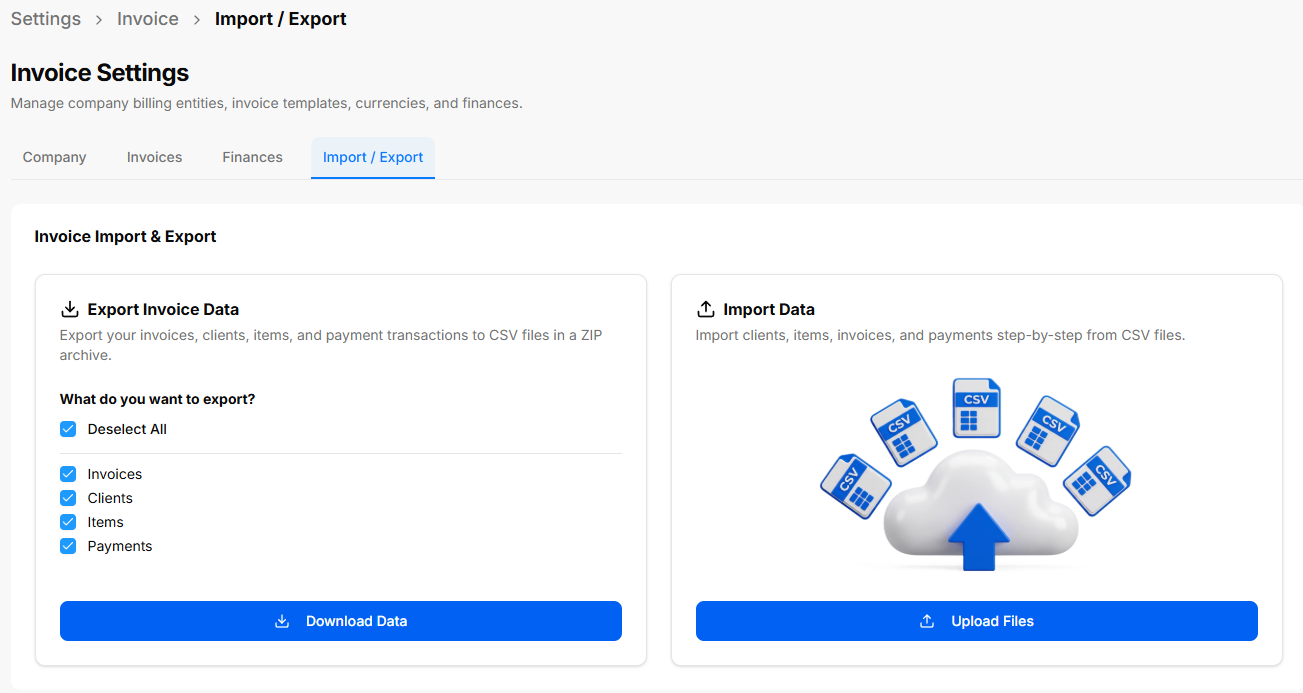
The Import / Export tab provides data portability tools for downloading system backups or bulk-importing entity records using structured CSV files.
Export Invoice Data Card
Allows batch downloading of module records into a single compressed ZIP file containing CSVs:
-
Selection Checkboxes:
-
Select All / Deselect All: Global toggle for all dataset selections.
-
Invoices: Includes invoice records and line items.
-
Clients: Includes customer directory profiles.
-
Items: Includes saved line-item catalog products/services.
-
Payments: Includes logged transaction records.
-
-
Download Data: Primary blue button to execute the ZIP export.
Import Data Card & Import Assistant
Provides guided step-by-step importing of system records via CSV files:
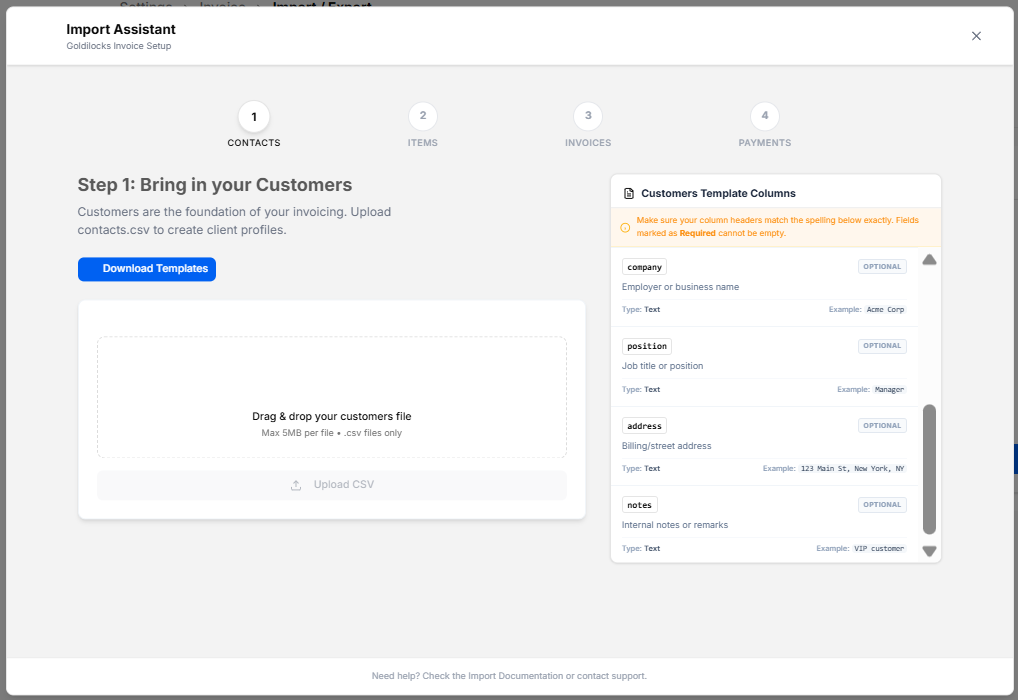
Import Assistant Modal
-
4-Step Wizard Steps:
-
CONTACTS (Current active step: Step 1: Bring in your Customers).
-
ITEMS.
-
INVOICES.
-
PAYMENTS.
-
-
Download Templates: Action button to download formatted CSV template files.
-
File Drag & Drop Area: Upload box supporting
.csvfiles up to 5MB (Upload CSV button). -
Customers Template Columns Reference Panel: Displays required column header formatting rules and data types:
-
company: Optional text (Example: Acme Corp).
-
position: Optional text (Example: Manager).
-
address: Optional text (Example: 123 Main St, New York, NY).
-
notes: Optional text (Example: VIP customer).
-
-
Close (
x): Discards import progress and returns to the Settings screen.