# BuildRunKit CRM

# BuildRunKit CRM Dashboard Overview

### **BuildRunKit CRM Dashboard Overview**

**[![Screenshot 2026-09-09 111447.png](https://library.buildrunkit.com/uploads/images/gallery/2026-09/scaled-1680-/screenshot-2026-09-09-111447.png)](https://library.buildrunkit.com/uploads/images/gallery/2026-09/screenshot-2026-09-09-111447.png)**
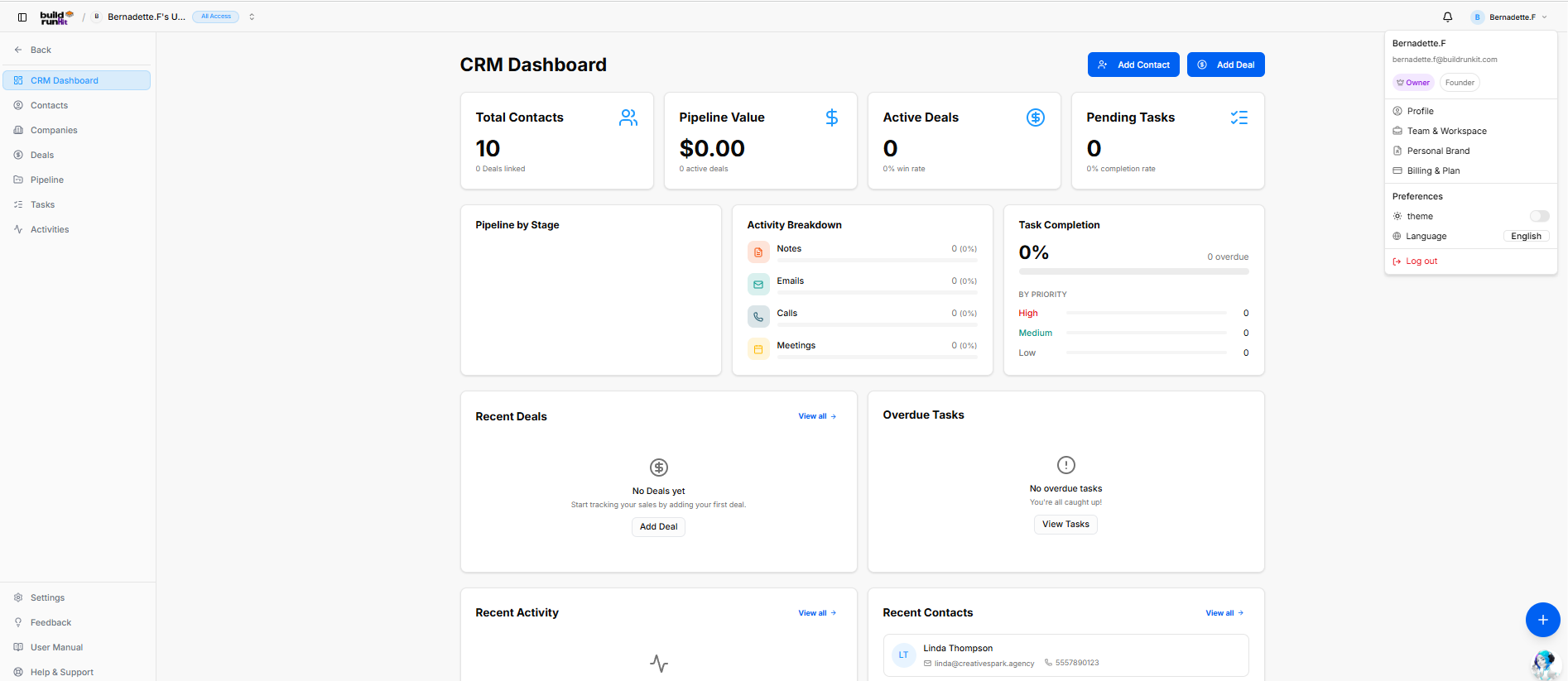
The **BuildRunKit CRM Dashboard** provides an high-level view of your sales pipeline, contact metrics, task progression, and recent client activity.

#### **Left Navigation Sidebar**

The left navigation panel gives quick access to core CRM modules and user preferences:

- **CRM Dashboard**: The main metrics and activity hub.
- **Contacts**: Manage individual client and lead records.
- **Companies**: Manage parent organization profiles and associated contact groups.
- **Deals**: Track sales opportunities and revenue targets.
- **Pipeline**: Visual pipeline stage manager.
- **Tasks**: Track and manage assigned client action items.
- **Activities**: Log and review communications (notes, emails, calls, meetings).
- **System Utilities (Bottom Bar)**: Quick links for Settings, Feedback, User Manual, and Help &amp; Support.

#### **Header &amp; Quick Action Controls**

Located at the top right of the screen layout:

- **Workspace Context Switcher**: Displays the currently active workspace name and access permissions in the top left header bar.
- **Notification Bell**: Clickable bell icon located in the top right utility area to view real-time system alerts, task assignments, and activity updates.
- **User Profile Menu**: Displays active account details, role status, and quick preferences (theme toggle, language selection, and log out options).
- **Add Contact**: Direct action button to open the contact creation modal.
- **Add Deal**: Direct action button to launch the new deal configuration window.

#### **Key Performance Indicator (KPI) Summary Cards**

The top metrics bar displays primary performance statistics:

- **Total Contacts**: Shows total active contacts and linked deal count (e.g., 10 Contacts).
- **Pipeline Value**: Tracks the cumulative monetary value of active deals in the sales pipeline.
- **Active Deals**: Displays open deal count and win-rate percentage.
- **Pending Tasks**: Tracks total open task volume and task completion percentage.

#### **Middle Analytics &amp; Tracking Panels**

- **Pipeline by Stage**: Visual breakdown showing deal distribution across active pipeline stages.
- **Activity Breakdown**: Tracks logging percentages for Notes, Emails, Calls, and Meetings.
- **Task Completion**: Displays overall completion percentage alongside priority breakdown levels (High, Medium, Low) and overdue task counters.

#### **Bottom Monitoring Grid**

- **Recent Deals**: Lists recently created deals with quick action to add new records.
- **Overdue Tasks**: Highlights urgent action items requiring immediate attention with direct link to view all tasks.
- **Recent Activity**: Logs sequential updates across contacts, deals, and communication streams.
- **Recent Contacts**: Displays recently added contacts with direct contact details (e.g., Linda Thompson).

#### **Floating Action Utility &amp; Assistant**

- **Quick Shortcuts Plus Button (+)**: Located at the bottom-right corner directly above the chatbot, providing instant floating shortcuts to create records across:
    
    
    - **CRM**
    - **Projects**
    - **Strategy Hub**
- **BuildRunKit Chatbot Assistant**: Floating AI assistant launcher positioned directly in the bottom-right corner.

# BuildRunKit CRM: Contacts Sub-Section

### **BuildRunKit CRM: Contacts Sub-Section**

**[![Screenshot 2026-09-09 112919.png](https://library.buildrunkit.com/uploads/images/gallery/2026-09/scaled-1680-/screenshot-2026-09-09-112919.png)](https://library.buildrunkit.com/uploads/images/gallery/2026-09/screenshot-2026-09-09-112919.png)**
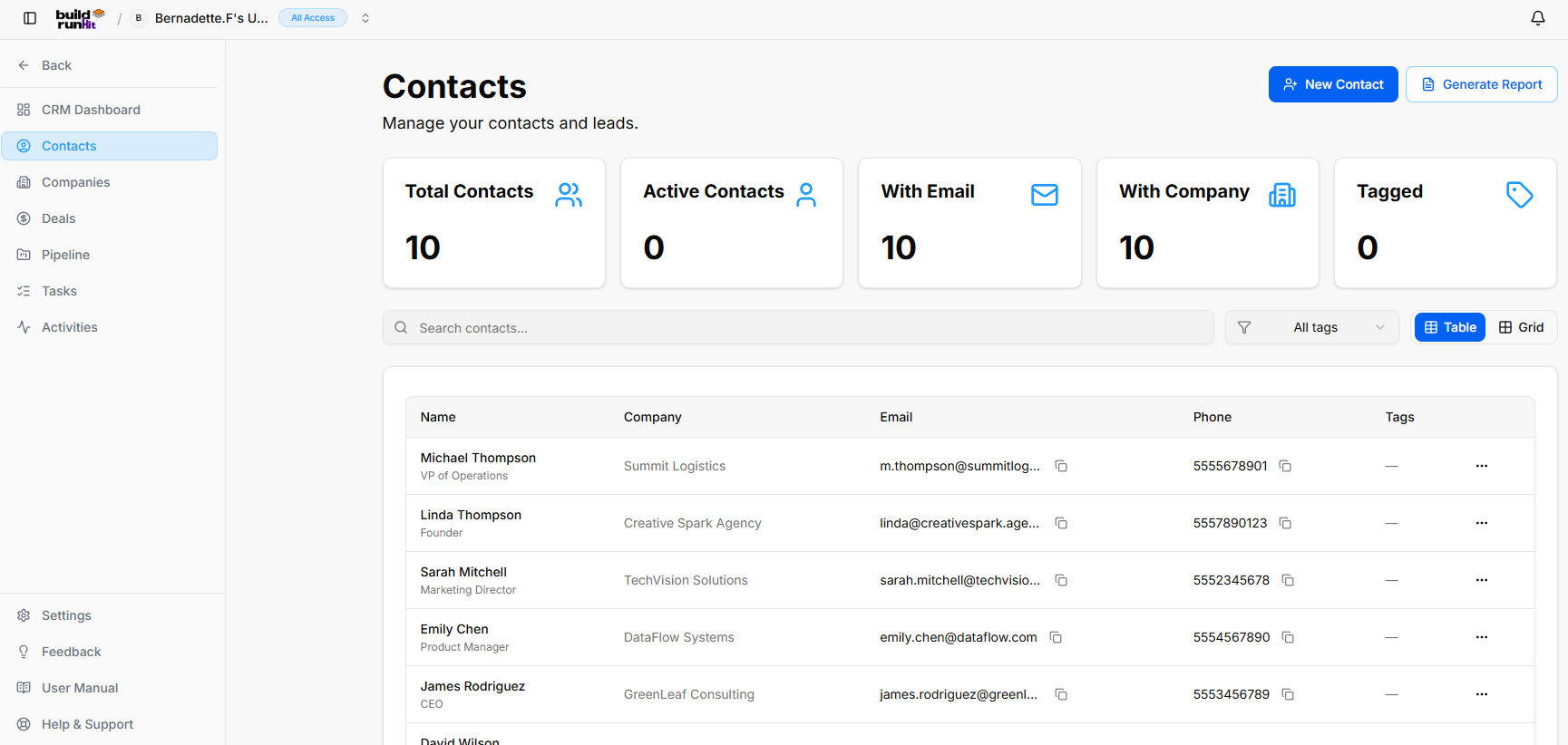
The **Contacts** sub-section provides central directory management for tracking leads, individual client representatives, and account contacts.

#### **Header &amp; Action Buttons**

- **New Contact**: Direct action button to open the contact registration modal.
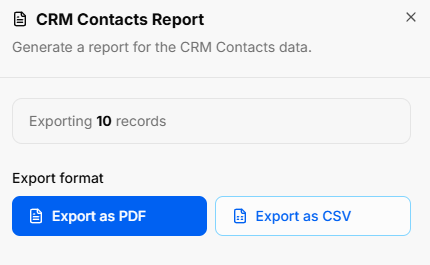
- **Generate Report**: Launches the **CRM Contacts Report** modal to export contact dataset snapshots:
    
    
    - **Export Count**: Displays total active records targeted for download (e.g., *Exporting 10 records*).
    - **Export Options**: Download file as **Export as PDF** or **Export as CSV**.

[![Screenshot 2026-09-09 113402.png](https://library.buildrunkit.com/uploads/images/gallery/2026-09/scaled-1680-/screenshot-2026-09-09-113402.png)](https://library.buildrunkit.com/uploads/images/gallery/2026-09/screenshot-2026-09-09-113402.png)
#### **Contact Summary Metrics**

Top KPI cards display real-time audience breakdowns:

- **Total Contacts**: Displays total registered contacts (e.g., 10).
- **Active Contacts**: Tracks currently active lead interactions.
- **With Email**: Displays total records with valid email addresses attached.
- **With Company**: Counts records linked to parent organization profiles.
- **Tagged**: Displays total contacts assigned custom organizational tags.

#### **Directory Controls &amp; Search Bar**

- **Search contacts...**: Input field for searching contacts by name, email, or company.
- **Filter Toggle**: Filter icon button to refine visible contacts.
- **All Tags Dropdown**: Dropdown menu to filter records based on specific tags.
- **View Switches**: Toggle between **Table** (list view) and **Grid** (card view).

#### **Contacts Table Data Columns**

- **Name**: Primary contact name alongside job title (e.g., *Michael Thompson - VP of Operations*).
- **Company**: Associated client or partner business.
- **Email**: Direct email address with quick **Copy** button.
- **Phone**: Direct contact phone number with quick **Copy** button.
- **Tags**: Applied status or categorization tags.
- **Row Actions (...)**: Action menu for editing, viewing, or deleting individual contact records.

#### **Contacts Table Row Actions Menu**

Clicking the **three dots icon (`...`)** on the far right of any contact row opens a quick-action context menu:

- **View**: Opens the complete contact record profile to review all details, communication history, linked deals, and notes.
- **Edit**: Launches the contact editor modal to update profile details, contact information, custom fields, or assigned tags.
- **Delete**: Removes the contact record from your CRM directory.

### **BuildRunKit CRM: Adding a New Contact**

Clicking the **+ New Contact** button launches the creation modal organized into four main tabs:

#### **1. Details Tab**

**[![Screenshot 2026-09-09 113626.png](https://library.buildrunkit.com/uploads/images/gallery/2026-09/scaled-1680-/screenshot-2026-09-09-113626.png)](https://library.buildrunkit.com/uploads/images/gallery/2026-09/screenshot-2026-09-09-113626.png)**
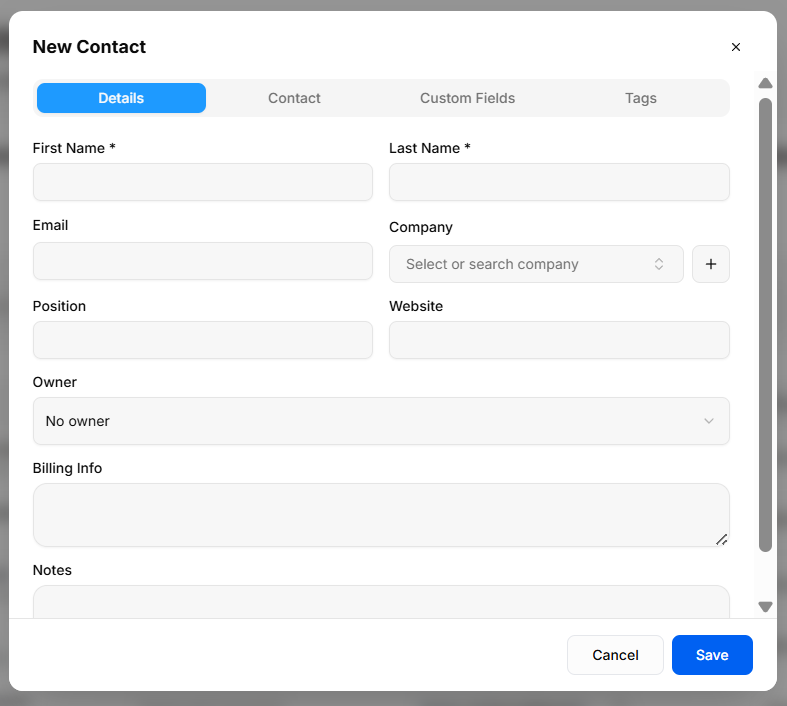
Captures core profile and organization assignment data:

- **First Name \*** &amp; **Last Name \***: Required fields for contact identification.
- **Email**: Primary electronic address.
- **Company**: Searchable dropdown to select existing organizations, or click **+** to add a new company instantly.
- **Position**: Title or role within their company.
- **Website**: Personal or company web address.
- **Owner**: Select an internal account manager or sales representative.
- **Billing Info**: Free-text field for invoice context, tax IDs, or payment notes.
- **Notes**: Additional background context regarding the contact.

#### **2. Contact Tab**

**[![Screenshot 2026-09-09 113657.png](https://library.buildrunkit.com/uploads/images/gallery/2026-09/scaled-1680-/screenshot-2026-09-09-113657.png)](https://library.buildrunkit.com/uploads/images/gallery/2026-09/screenshot-2026-09-09-113657.png)**
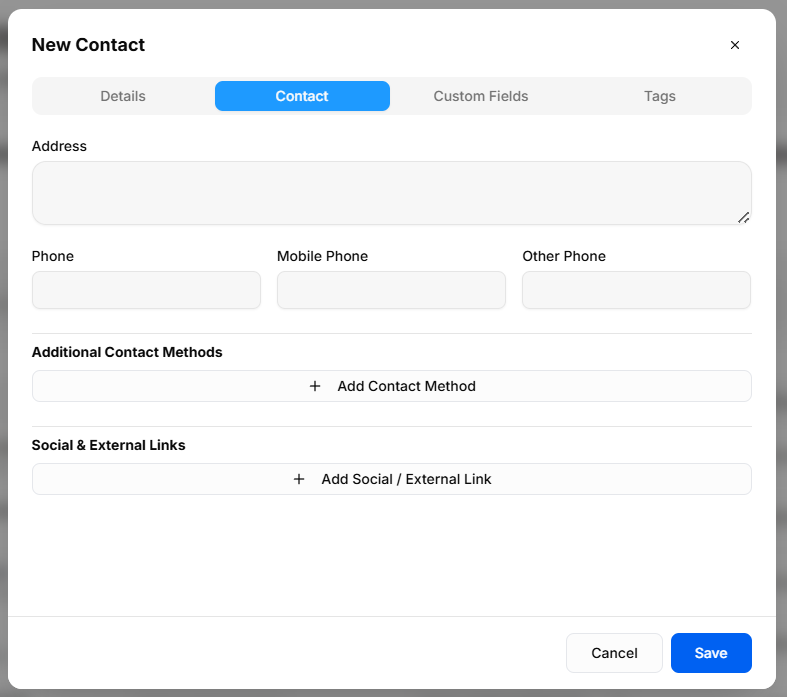
Captures physical location and additional reachability channels:

- **Address**: Multi-line physical mailing or billing address block.
- **Phone Numbers**: Dedicated inputs for primary **Phone**, **Mobile Phone**, and **Other Phone**.
- **Additional Contact Methods**: Expandable section to add non-standard communication channels (e.g., Skype, WhatsApp).
- **Social &amp; External Links**: Expandable section to attach web profiles (e.g., LinkedIn, X, personal portfolio).

#### **3. Custom Fields Tab**

**[![Screenshot 2026-09-09 113847.png](https://library.buildrunkit.com/uploads/images/gallery/2026-09/scaled-1680-/screenshot-2026-09-09-113847.png)](https://library.buildrunkit.com/uploads/images/gallery/2026-09/screenshot-2026-09-09-113847.png)**
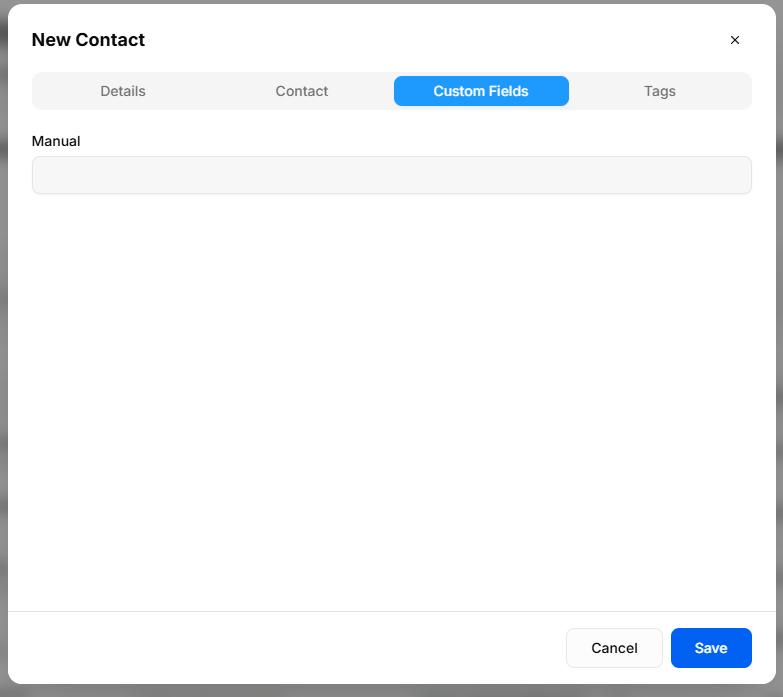
Displays tailored data fields configured specifically for your business operations:

- **Business-Specific Inputs**: Pulls directly from user-defined properties configured in **Settings &gt; Custom Fields**.
- **Dynamic Loading**: Any custom fields added via system settings automatically populate in this tab during contact creation.

#### **4. Tags Tab**

**[![Screenshot 2026-09-09 113912.png](https://library.buildrunkit.com/uploads/images/gallery/2026-09/scaled-1680-/screenshot-2026-09-09-113912.png)](https://library.buildrunkit.com/uploads/images/gallery/2026-09/screenshot-2026-09-09-113912.png)**
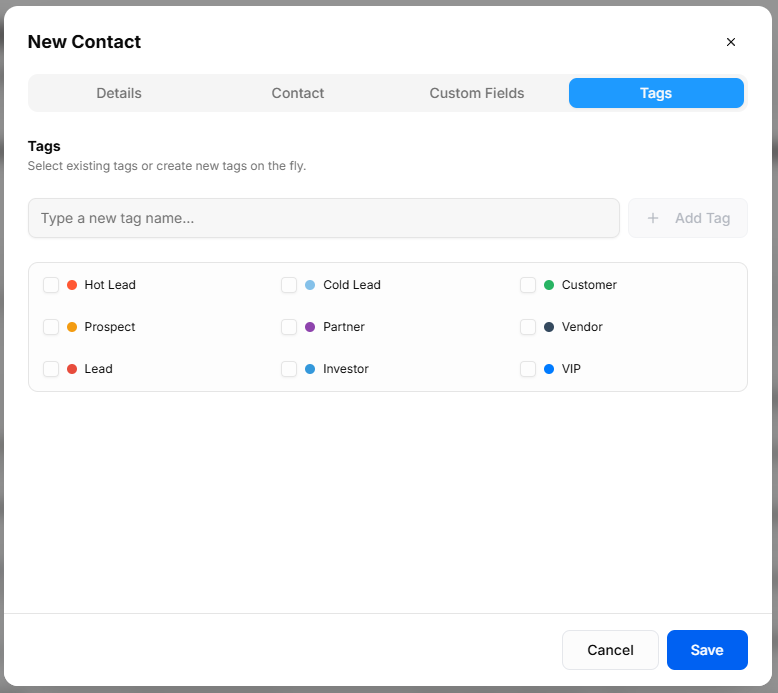
Categorizes contacts for audience segmentation and quick filtering:

- **Create New Tag**: Input box to type custom tag names and click **+ Add Tag** to create them on the fly.
- **Pre-Defined Tags**: Checkbox selection for standard stages and categories, including:
    
    
    - **Status Tags**: *Hot Lead*, *Cold Lead*, *Lead*, *Prospect*
    - **Relationship Tags**: *Customer*, *Partner*, *Vendor*, *Investor*, *VIP*

# BuildRunKit CRM: Companies Sub-Section

### **BuildRunKit CRM: Companies Sub-Section**

**[![Screenshot 2026-09-09 114706.png](https://library.buildrunkit.com/uploads/images/gallery/2026-09/scaled-1680-/screenshot-2026-09-09-114706.png)](https://library.buildrunkit.com/uploads/images/gallery/2026-09/screenshot-2026-09-09-114706.png)**
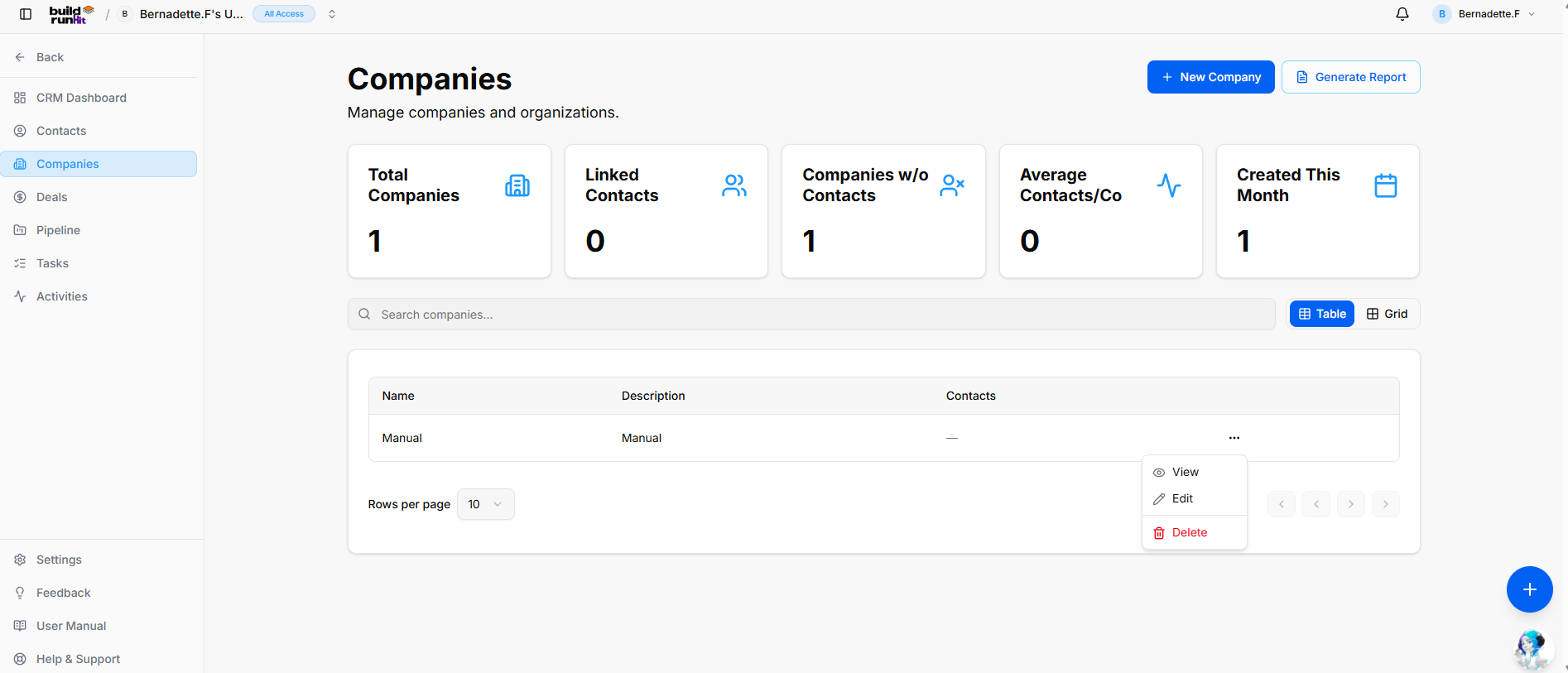
The **Companies** sub-section provides central organizational tracking for client businesses, partner organizations, and parent accounts.

#### **Header &amp; Action Buttons**

<div _ngcontent-ng-c3922149199="" class="container" id="bkmrk-%2B-new-company%3A-direc"><div _ngcontent-ng-c2292009011="" aria-busy="false" aria-live="polite" class="markdown markdown-main-panel md-content enable-luminous-fast-follows enable-updated-hr-color tutor-markdown-rendering" dir="ltr" inline-copy-host="">- **+ New Company**: Direct action button to open the company setup modal.
- **Generate Report**: Opens the **CRM Companies Report** export modal:
    
    
    - **Export Count**: Displays total targeted organization records (e.g., *Exporting 1 records*).
    - **Export Format Options**: Allows instant downloads via **Export as PDF** or **Export as CSV**.

</div></div>[![Screenshot 2026-09-09 114943.png](https://library.buildrunkit.com/uploads/images/gallery/2026-09/scaled-1680-/screenshot-2026-09-09-114943.png)](https://library.buildrunkit.com/uploads/images/gallery/2026-09/screenshot-2026-09-09-114943.png)

#### **Company Summary Metrics**

Top KPI cards display key account breakdown totals:

<div _ngcontent-ng-c3922149199="" class="container" id="bkmrk-total-companies%3A-tra"><div _ngcontent-ng-c2292009011="" aria-busy="false" aria-live="polite" class="markdown markdown-main-panel md-content enable-luminous-fast-follows enable-updated-hr-color tutor-markdown-rendering" dir="ltr" inline-copy-host="">- **Total Companies**: Tracks the overall number of registered organization profiles.
- **Linked Contacts**: Counts individual contact records attached across all company profiles.
- **Companies w/o Contacts**: Identifies orphaned company records requiring contact assignment.
- **Average Contacts/Co**: Displays the mean contact ratio per parent organization profile.
- **Created This Month**: Highlights recent client onboarding growth and newly registered companies.

</div></div>#### **Directory Controls &amp; Search Bar**

<div _ngcontent-ng-c3922149199="" class="container" id="bkmrk-search-companies...%3A"><div _ngcontent-ng-c2292009011="" aria-busy="false" aria-live="polite" class="markdown markdown-main-panel md-content enable-luminous-fast-follows enable-updated-hr-color tutor-markdown-rendering" dir="ltr" inline-copy-host="">- **Search companies...**: Global filter input for locating accounts by name or description keywords.
- **View Switches**: Toggle viewing modes between **Table** (list layout) and **Grid** (card layout).
- **Rows per page**: Dropdown selector to control row density per page (e.g., 10 rows).
- **Pagination**: Standard directional controls to step through company pages.

</div></div>#### **Companies Table Data Columns**

<div _ngcontent-ng-c3922149199="" class="container" id="bkmrk-name%3A-primary-regist"><div _ngcontent-ng-c2292009011="" aria-busy="false" aria-live="polite" class="markdown markdown-main-panel md-content enable-luminous-fast-follows enable-updated-hr-color tutor-markdown-rendering" dir="ltr" inline-copy-host="">- **Name**: Primary registered company or trading entity name.
- **Description**: High-level summary of the company's business focus or internal account notes.
- **Contacts**: Total linked contact profiles associated with the organization.

</div></div>#### **Row Actions Menu (`...`)**

Clicking the three dots icon on any company row displays quick record management actions:

<div _ngcontent-ng-c3922149199="" class="container" id="bkmrk-view%3A-opens-the-dedi"><div _ngcontent-ng-c2292009011="" aria-busy="false" aria-live="polite" class="markdown markdown-main-panel md-content enable-luminous-fast-follows enable-updated-hr-color tutor-markdown-rendering" dir="ltr" inline-copy-host="">- **View**: Opens the dedicated company profile view showing linked contacts, attached deals, and account history.
- **Edit**: Opens the setup editor to update organization details, company descriptions, or associated profiles.
- **Delete**: Removes the organization record from the CRM directory.

</div></div>### **BuildRunKit CRM: Adding a New Company**

**[![Screenshot 2026-09-09 115246.png](https://library.buildrunkit.com/uploads/images/gallery/2026-09/scaled-1680-/screenshot-2026-09-09-115246.png)](https://library.buildrunkit.com/uploads/images/gallery/2026-09/screenshot-2026-09-09-115246.png)**

Clicking the **+ New Company** button opens the creation modal to register a new organization profile:

- **Name \***: Required field to enter the company or trading name.
- **Description**: Multi-line text field to log details, business focus, or general account notes.
- **Owner**: Dropdown selector to assign account responsibility to active team members within your workspace.
- **Modal Actions**: Click **Cancel** to discard or **Save** to create the record.

<div _ngcontent-ng-c3922149199="" class="container" id="bkmrk--3"><div _ngcontent-ng-c2292009011="" aria-busy="false" aria-live="polite" class="markdown markdown-main-panel md-content enable-luminous-fast-follows enable-updated-hr-color tutor-markdown-rendering" dir="ltr" id="bkmrk-view%3A-opens-the-dedi-1" inline-copy-host=""></div></div>

# BuildRunKit CRM: Deals Sub-Section

## **BuildRunKit CRM: Deals Sub-Section**

**[![Screenshot 2026-09-09 115528.png](https://library.buildrunkit.com/uploads/images/gallery/2026-09/scaled-1680-/screenshot-2026-09-09-115528.png)](https://library.buildrunkit.com/uploads/images/gallery/2026-09/screenshot-2026-09-09-115528.png)**

The **Deals** sub-section provides central pipeline tracking to manage active sales opportunities, forecast revenue, and monitor deal conversion metrics.

#### **Header &amp; Action Buttons**

- **+ Add Deal**: Direct action button to open the new deal creation modal.
- **Generate Report**: Opens the **CRM Deals Report** export modal:
    
    
    - **Export Count**: Displays total targeted deal records (e.g., *Exporting 1 records*).
    - **Export Format Options**: Download data instantly as **Export as PDF** or **Export as CSV**.

[![Screenshot 2026-09-09 115551.png](https://library.buildrunkit.com/uploads/images/gallery/2026-09/scaled-1680-/screenshot-2026-09-09-115551.png)](https://library.buildrunkit.com/uploads/images/gallery/2026-09/screenshot-2026-09-09-115551.png)

#### **Deal Summary Metrics**

Top KPI cards display key revenue and pipeline performance metrics:

- **Total Deals**: Counts all active sales opportunities logged in the system.
- **Pipeline Value**: Displays the total unweighted monetary value of all active pipeline opportunities.
- **Weighted Value**: Calculates projected revenue weighted by win probability percentages across current stages.
- **Avg Win Rate**: Tracks the overall historical deal conversion percentage.

#### **Directory Controls &amp; Search Bar**

- **Search deals...**: Global text search input to locate opportunities by title or keyword.
- **All stages Dropdown**: Filter opportunities by pipeline status (e.g., New Lead, Proposal Sent).
- **All owners Dropdown**: Filter deals by assigned internal account managers.
- **View Switches**: Toggle view modes between **Table** (list view) and **Grid** (card view).
- **Rows per page &amp; Pagination**: Dropdown menu and directional controls to navigate multi-page lists.

#### **Deals Table Data Columns**

- **Title**: The primary name assigned to the sales opportunity.
- **Contact**: Associated primary contact name and parent organization profile.
- **Value**: Total deal monetary value alongside calculated weighted revenue value.
- **Stage**: Current pipeline status badge (e.g., *New Lead*).
- **Expected Close**: Target completion date for closing the sale.
- **Row Actions Menu (`...`)**: Context menu providing direct **View**, **Edit**, and **Delete** options for individual deal records.

### **BuildRunKit CRM: Adding a New Deal**

Clicking the **+ Add Deal** button opens the creation modal divided into two tabs:

#### **1. Details Tab**

**[![Screenshot 2026-09-09 115812.png](https://library.buildrunkit.com/uploads/images/gallery/2026-09/scaled-1680-/screenshot-2026-09-09-115812.png)](https://library.buildrunkit.com/uploads/images/gallery/2026-09/screenshot-2026-09-09-115812.png)**

Captures primary deal parameters and financial forecasts:

- **Title \***: Required field to enter the opportunity name.
- **Contact \***: Required dropdown selector to associate the deal with an existing contact record.
- **Stage \***: Required dropdown selector to set the initial position within your sales pipeline.
- **Value**: Monetary worth of the opportunity.
- **Probability (%)**: Estimated likelihood percentage of winning the deal, used to compute weighted pipeline value.
- **Expected Close Date**: Date picker input to target target contract execution or closing.
- **Owner**: Dropdown menu to assign deal management responsibility to a workspace team member.
- **Description**: Multi-line text field to enter context, negotiation notes, and opportunity details.

#### **2. Custom Fields Tab**

- **Tailored Deal Data**: Dynamic inputs populated from **Settings &gt; Custom Fields** to capture business-specific deal properties.
- **Modal Actions**: Click **Cancel** to discard inputs or **Create** to record the deal in your pipeline.

# BuildRunKit CRM: Pipeline Sub-Section

## **BuildRunKit CRM: Pipeline Sub-Section**

**[![Screenshot 2026-09-09 121224.png](https://library.buildrunkit.com/uploads/images/gallery/2026-09/scaled-1680-/screenshot-2026-09-09-121224.png)](https://library.buildrunkit.com/uploads/images/gallery/2026-09/screenshot-2026-09-09-121224.png)**

The **Pipeline** sub-section offers a Kanban-style view of your sales process, allowing you to drag and drop deals across custom stages while monitoring stage-by-stage valuations.

**Header &amp; Action Buttons**

- **Pipeline Settings**: Access stage configurations to customize, add, or reorder pipeline stages.
- **+ Add Deal**: Direct action button to open the deal creation modal.

**Pipeline Metrics Cards**

- **Pipeline Value**: Total unweighted financial value across all active pipeline stages.
- **Weighted Value**: Cumulative projected value calculated using probability percentages.
- **Active Deals**: Count of open opportunities currently moving through the pipeline.

**View Controls &amp; Search**

- **Search deals...**: Global text input to locate deal cards by title or contact.
- **All owners Dropdown**: Filter active stage columns by assigned team member.

**Pipeline Stages (Kanban Columns)** Each column summarizes stage metrics (*Total Value*, *Weighted Value*, and deal count) and supports drag-and-drop deal movement across stages:

- **New Lead**: Initial entry point for incoming prospects.
- **Discovery**: Stage for qualifying lead requirements and budget fit.
- **Proposal**: Quote or formal proposal delivered to the prospect.
- **Negotiation**: Active contract or scope terms evaluation.
- **Closed Won**: Final stage for successfully closed opportunities.
- **Closed Lost**: Archive stage for deals that did not convert.

### **BuildRunKit CRM: Pipeline Settings Modal**

**[![Screenshot 2026-09-09 121450.png](https://library.buildrunkit.com/uploads/images/gallery/2026-09/scaled-1680-/screenshot-2026-09-09-121450.png)](https://library.buildrunkit.com/uploads/images/gallery/2026-09/screenshot-2026-09-09-121450.png)**

Clicking the **Pipeline Settings** button opens a configuration modal that allows you to customize the stages and order for your sales pipeline:

- **Restore Defaults**: Resets the pipeline stages, sequence order, and color coding back to the system default configuration.
- **+ Add Stage**: Adds a new customizable stage row to your sales process.
- **Stage Controls &amp; Ordering**:
    
    
    - **Drag Handle (`::`)**: Click and drag to reorder stage sequence numbers.
    - **Sequence Indicator**: Displays the numerical order of each stage (1 through 6).
    - **Stage Name Input**: Editable text field to customize stage labels (e.g., *New Lead*, *Discovery*, *Proposal*, *Negotiation*, *Closed Won*, *Closed Lost*).
    - **Color Picker Circle**: Assigns distinct visual color indicators to each stage for quick Kanban identification.
    - **Deals Counter**: Displays the total count of active deals currently assigned to that stage.
    - **Trash Bin Icon**: Deletes individual stages from the pipeline.
- **Modal Actions**: Click **Cancel** to discard changes or **Save Pipeline** to apply the updated stage configuration.

# BuildRunKit CRM: Tasks Sub-Section

## **BuildRunKit CRM: Tasks Sub-Section**

**[![Screenshot 2026-09-09 121712.png](https://library.buildrunkit.com/uploads/images/gallery/2026-09/scaled-1680-/screenshot-2026-09-09-121712.png)](https://library.buildrunkit.com/uploads/images/gallery/2026-09/screenshot-2026-09-09-121712.png)**

The **Tasks** sub-section helps you organize action items, set follow-up deadlines, and track execution across all CRM contact records and sales opportunities.

**Header &amp; Action Buttons**

<div _ngcontent-ng-c3922149199="" class="container" id="bkmrk-%2B-new-task%3A-direct-a"><div _ngcontent-ng-c2292009011="" aria-busy="false" aria-live="polite" class="markdown markdown-main-panel md-content enable-luminous-fast-follows enable-updated-hr-color tutor-markdown-rendering" dir="ltr" inline-copy-host="">- **+ New Task**: Direct action button to open the task creation modal.
- **Generate Report**: Opens the **CRM Tasks Report** export window:
    
    
    - **Export Count**: Indicates total targeted task entries (e.g., *Exporting 1 records*).
    - **Export Format Options**: Download task lists via **Export as PDF** or **Export as CSV**.

</div></div>[![Screenshot 2026-09-09 121757.png](https://library.buildrunkit.com/uploads/images/gallery/2026-09/scaled-1680-/screenshot-2026-09-09-121757.png)](https://library.buildrunkit.com/uploads/images/gallery/2026-09/screenshot-2026-09-09-121757.png)

**Task Summary Metrics** Top KPI cards highlight workload and deadline urgency:

<div _ngcontent-ng-c3922149199="" class="container" id="bkmrk-total-tasks%3A-display"><div _ngcontent-ng-c2292009011="" aria-busy="false" aria-live="polite" class="markdown markdown-main-panel md-content enable-luminous-fast-follows enable-updated-hr-color tutor-markdown-rendering" dir="ltr" inline-copy-host="">- **Total Tasks**: Displays the cumulative count of all logged task records.
- **Pending**: Tracks open action items awaiting action.
- **Completed**: Counts resolved tasks marked as done.
- **Overdue**: Highlights past-due action items requiring immediate attention.
- **Upcoming**: Displays scheduled future tasks with approaching target dates.

</div></div>**Directory Controls &amp; Search Bar**

<div _ngcontent-ng-c3922149199="" class="container" id="bkmrk-search-tasks...%3A-tex"><div _ngcontent-ng-c2292009011="" aria-busy="false" aria-live="polite" class="markdown markdown-main-panel md-content enable-luminous-fast-follows enable-updated-hr-color tutor-markdown-rendering" dir="ltr" inline-copy-host="">- **Search tasks...**: Text input field to locate task items by title or keyword.
- **All priorities Dropdown**: Filter tasks by urgency level (e.g., High, Medium, Low).
- **All statuses Dropdown**: Filter by execution state (e.g., Pending, In Progress, Completed).
- **All owners Dropdown**: Filter tasks by assigned team member.
- **View Switches**: Toggle display format between **Table** (list view) and **Grid** (card view).
- **Rows per page &amp; Pagination**: Adjust visible items per page and step through task lists.

</div></div>**Tasks Table Data Columns**

<div _ngcontent-ng-c3922149199="" class="container" id="bkmrk-title%3A-name-and-summ"><div _ngcontent-ng-c2292009011="" aria-busy="false" aria-live="polite" class="markdown markdown-main-panel md-content enable-luminous-fast-follows enable-updated-hr-color tutor-markdown-rendering" dir="ltr" inline-copy-host="">- **Title**: Name and summary of the action item.
- **Priority**: Visual urgency badge (e.g., *Medium*).
- **Due Date**: Targeted completion deadline.
- **Status**: Current progress indicator (e.g., *Pending*).
- **Row Actions Menu (`...`)**: Quick management options for individual rows:
    
    
    - **Edit**: Opens the setup editor to adjust task details, deadlines, or priority.
    - **Mark complete**: Instantly toggles status to completed.
    - **Delete**: Removes the task entry from your workspace.

</div></div>### **BuildRunKit CRM: Creating a New Task**

**[![Screenshot 2026-09-09 122033.png](https://library.buildrunkit.com/uploads/images/gallery/2026-09/scaled-1680-/screenshot-2026-09-09-122033.png)](https://library.buildrunkit.com/uploads/images/gallery/2026-09/screenshot-2026-09-09-122033.png)**

Clicking the **+ New Task** button opens a setup modal to log and assign individual action items:

- **Title \***: Required text field to enter the task name or core action.
- **Due Date**: Date picker input to assign a completion deadline.
- **Status**: Dropdown selector to set current progress state (*Todo*, *In Progress*, *Complete*, or *Cancelled*).
- **Priority**: Dropdown selector to set urgency (*Low*, *Medium*, *High*).
- **Contact**: Dropdown menu to link the task to a specific client record.
- **Deal**: Dropdown menu to associate the task with a specific sales opportunity (requires selecting a contact first).
- **Owner**: Dropdown selector to assign task responsibility to a team member in your workspace.
- **Description**: Multi-line text field for additional context, steps, or execution notes.
- **Modal Actions**: Click **Cancel** to discard or **Save** to create the task record.

<div _ngcontent-ng-c3922149199="" class="container" id="bkmrk--3"><div _ngcontent-ng-c2292009011="" aria-busy="false" aria-live="polite" class="markdown markdown-main-panel md-content enable-luminous-fast-follows enable-updated-hr-color tutor-markdown-rendering" dir="ltr" id="bkmrk--4" inline-copy-host=""></div></div><div _ngcontent-ng-c2811658299="" class="container" id="bkmrk--5"></div>

# BuildRunKit CRM: Activities Sub-Section

## **BuildRunKit CRM: Activities Sub-Section**

**[![Screenshot 2026-09-09 122358.png](https://library.buildrunkit.com/uploads/images/gallery/2026-09/scaled-1680-/screenshot-2026-09-09-122358.png)](https://library.buildrunkit.com/uploads/images/gallery/2026-09/screenshot-2026-09-09-122358.png)**

The **Activities** sub-section tracks client interactions, including logged calls, meetings, internal notes, and email records.

**Header &amp; Action Buttons**

<div _ngcontent-ng-c3922149199="" class="container" id="bkmrk-%2B-new-activity%3A-open"><div _ngcontent-ng-c2292009011="" aria-busy="false" aria-live="polite" class="markdown markdown-main-panel md-content enable-luminous-fast-follows enable-updated-hr-color tutor-markdown-rendering" dir="ltr" inline-copy-host="">- **+ New Activity**: Opens the activity logging modal.
- **Generate Report**: Opens the **CRM Activities Report** export window:
    
    
    - **Export Count**: Displays total targeted activity records (e.g., *Exporting 1 records*).
    - **Export Format Options**: Exports data instantly using **Export as PDF** or **Export as CSV**.

</div></div>[![Screenshot 2026-09-09 122425.png](https://library.buildrunkit.com/uploads/images/gallery/2026-09/scaled-1680-/screenshot-2026-09-09-122425.png)](https://library.buildrunkit.com/uploads/images/gallery/2026-09/screenshot-2026-09-09-122425.png)

**Activity Summary Metrics** Top KPI cards display cumulative interaction counts:

<div _ngcontent-ng-c3922149199="" class="container" id="bkmrk-total-activities%3A-co"><div _ngcontent-ng-c2292009011="" aria-busy="false" aria-live="polite" class="markdown markdown-main-panel md-content enable-luminous-fast-follows enable-updated-hr-color tutor-markdown-rendering" dir="ltr" inline-copy-host="">- **Total Activities**: Counts all registered logs across categories.
- **Notes**: Displays total standalone internal notes.
- **Communications**: Tracks direct client interactions, such as calls, meetings, and emails.

</div></div>**Directory Controls &amp; Search Bar**

<div _ngcontent-ng-c3922149199="" class="container" id="bkmrk-search-activities..."><div _ngcontent-ng-c2292009011="" aria-busy="false" aria-live="polite" class="markdown markdown-main-panel md-content enable-luminous-fast-follows enable-updated-hr-color tutor-markdown-rendering" dir="ltr" inline-copy-host="">- **Search activities...**: Text input to filter logs by subject or keyword.
- **All types Dropdown**: Filters activities by log category (e.g., Note, Call, Meeting, Email).
- **All owners Dropdown**: Filters entries by assigned workspace team member.
- **All time Dropdown**: Filters records by specific date ranges.
- **View Switches**: Toggles between **Table** (list view) and **Grid** (card view) layouts.
- **Rows per page &amp; Pagination**: Controls visible row density and steps through multi-page logs.

</div></div>**Activities Table Data Columns**

<div _ngcontent-ng-c3922149199="" class="container" id="bkmrk-subject%3A-the-headlin"><div _ngcontent-ng-c2292009011="" aria-busy="false" aria-live="polite" class="markdown markdown-main-panel md-content enable-luminous-fast-follows enable-updated-hr-color tutor-markdown-rendering" dir="ltr" inline-copy-host="">- **Subject**: The headline title describing the logged interaction.
- **Type**: Visual badge categorizing the entry type (e.g., *Note*).
- **Details**: Brief text preview or full summary of the activity.
- **Date**: The logged completion date (formatted as YYYY-MM-DD).
- **Row Actions Menu (`...`)**: Quick management options for individual entries:
    
    
    - **Edit**: Opens the setup editor to update activity details, subjects, or dates.
    - **Delete**: Removes the record from the activity log.

</div></div>### **BuildRunKit CRM: Logging a New Activity**

**[![Screenshot 2026-09-09 122718.png](https://library.buildrunkit.com/uploads/images/gallery/2026-09/scaled-1680-/screenshot-2026-09-09-122718.png)](https://library.buildrunkit.com/uploads/images/gallery/2026-09/screenshot-2026-09-09-122718.png)**

Clicking the **+ New Activity** button opens a setup modal to log interactions and record updates:

- **Subject \***: Required text field to enter the activity headline or topic.
- **Type**: Dropdown selector to classify the activity (*Note*, *Call*, *Email*, or *Meeting*).
- **Date**: Date picker input to log when the interaction occurred.
- **Contact**: Dropdown menu to link the activity to a specific client record.
- **Deal**: Dropdown menu to associate the entry with a specific sales opportunity (requires selecting a contact first).
- **Task**: Dropdown menu to associate the activity with a related task item.
- **Owner**: Dropdown selector to assign activity logging responsibility to a team member in your workspace.
- **Description**: Multi-line text field for detailed meeting notes, email copies, or interaction summaries.
- **Modal Actions**: Click **Cancel** to discard or **Save** to log the activity record.

<div _ngcontent-ng-c3922149199="" class="container" id="bkmrk--3"><div _ngcontent-ng-c2292009011="" aria-busy="false" aria-live="polite" class="markdown markdown-main-panel md-content enable-luminous-fast-follows enable-updated-hr-color tutor-markdown-rendering" dir="ltr" id="bkmrk--4" inline-copy-host=""></div></div>

# BuildRunKit CRM: Settings Dashboard Overview

## **BuildRunKit CRM: Settings Dashboard Overview**

**[![Screenshot 2026-09-09 122936.png](https://library.buildrunkit.com/uploads/images/gallery/2026-09/scaled-1680-/screenshot-2026-09-09-122936.png)](https://library.buildrunkit.com/uploads/images/gallery/2026-09/screenshot-2026-09-09-122936.png)**

**Top Header Navigation**

- **Brand Logo**: BuildRunKit logo in top-left corner.
- **Workspace Selector**: Dropdown showing current workspace (*Bernadette.F's Workspace*) with access tier badge (*All Access*).
- **Top Right Actions**: Notification bell icon and user profile dropdown menu (*Bernadette.F*).

**Left Navigation Sidebar**

- **Back Control**: **&lt;- Back to Dashboard** button to exit settings.
- **Account Settings Links**:
    
    
    - **Profile**
    - **Team &amp; Workspace**
    - **Modules &amp; Features**
    - **Billing &amp; Plan**
    - **Personal Brand**
    - **Notifications**
- **Module Settings Links**:
    
    
    - **CRM** (Currently Active)
    - **Projects**
    - **Invoice**
    - **Preferences**
- **Bottom Sidebar Links**:
    
    
    - **Feedback**
    - **User Manual**
    - **Help &amp; Support**

**CRM Settings Header &amp; Location Tracking**

- **Breadcrumb Trail (Traction Navigation Path)**: `Settings > CRM > Deals` — Tracks location within the settings hierarchy and provides click-back navigation paths.
- **Page Heading**: **CRM Settings**
- **Sub-description**: "Configure deals, tags, sales pipelines, forms, custom fields, and data management."

**CRM Settings Navigation Tabs**

- **Deals** (Active Tab)
- **Tags**
- **Pipeline**
- **Webform**
- **Custom Fields**
- **Import / Export**

**Deals Tab Configuration Controls**

- **Section Title**: **Deal Naming Customization**
- **Section Subtext**: "Tailor the terminology to match your industry (e.g., 'Case' for legal, 'Project' for consulting, 'Property' for real estate)."
- **Quick Industry Presets**:
    
    
    - **Deal** (*Sales &amp; SaaS*) — Selected
    - **Case** (*Legal &amp; Law*)
    - **Project** (*Consulting &amp; Agencies*)
    - **Opportunity** (*B2B &amp; Partnerships*)
    - **Property** (*Real Estate*)
    - **Contract** (*Professional Services*)
- **Singular Name \***: Input text field showing `Deal` (Helper text: *Used for individual items (e.g. 'Add Case', 'Edit Case', 'Case Details')*).
- **Plural Name \***: Input text field showing `Deals` (Helper text: *Used for lists, headers, and tabs (e.g. 'All Cases', 'Total Cases')*).
- **Display Icon**: 14 selectable icon choices to represent deals across the UI (Dollar symbol currently selected).

**Live UI Preview Panel**

- **Preview Tab Badge**: Shows top right button preview (`Deals`).
- **Total Deals Metric Card**: Preview showing `24` with dollar icon.
- **Action Button Preview**: Shows blue **+ Add Deal** primary button.
- **Pipeline Stage Preview**: Shows stage badge with status dot (`Deal In Progress`).

**Footer &amp; Floating Actions**

- **Save Changes**: Primary action button in the bottom right of the panel to apply configuration.
- **Floating Action Button**: Blue `+` button in bottom-right corner.
- **Support Widget**: AI assistant icon in bottom-right corner.

### **BuildRunKit CRM: CRM Settings - Tags Tab**

**[![Screenshot 2026-09-09 123558.png](https://library.buildrunkit.com/uploads/images/gallery/2026-09/scaled-1680-/screenshot-2026-09-09-123558.png)](https://library.buildrunkit.com/uploads/images/gallery/2026-09/screenshot-2026-09-09-123558.png)**

**Location &amp; Header**

- **Breadcrumb Trail (Traction Navigation Path)**: `Settings > CRM > Tags`
- **Page Heading**: **CRM Settings**
- **Sub-description**: "Configure deals, tags, sales pipelines, forms, custom fields, and data management."
- **Active Tab**: **Tags**

**Contact Tag Management Section**

- **Section Header**: **Contact Tag Management**
- **Section Description**: "Create and manage tags to categorize your contacts. Use 'Restore Defaults' to add standard business tags."
- **Header Actions**:
    
    
    - **Restore Defaults**: Button to reset or populate default system tags.
    - **+ Add Tag**: Primary button to create a new contact category tag.

**Default Tag List &amp; Row Controls** Each tag item displays a custom color badge, label name, and individual management toggles/actions:

- **Hot Lead** (Red Dot)
- **Cold Lead** (Light Blue Dot)
- **Customer** (Green Dot)
- **Prospect** (Orange Dot)
- **Partner** (Purple Dot)
- **Vendor** (Dark Navy Dot)
- **Lead** (Red Dot)
- **Investor** (Medium Blue Dot)
- **VIP** (Bright Blue Dot)

**Row Action Icons (Right Side)**

- **Active Toggle Switch**: Enables or disables the tag for contact categorization across the CRM.
- **Pencil Icon**: Edits the tag name or assigned color badge.
- **Trash Bin Icon**: Deletes the tag entry from the system.

### **BuildRunKit CRM: CRM Settings - Pipeline Tab**

**[![Screenshot 2026-09-09 124040.png](https://library.buildrunkit.com/uploads/images/gallery/2026-09/scaled-1680-/screenshot-2026-09-09-124040.png)](https://library.buildrunkit.com/uploads/images/gallery/2026-09/screenshot-2026-09-09-124040.png)**

**Location &amp; Header**

- **Breadcrumb Trail (Traction Navigation Path)**: `Settings > CRM > Pipeline`
- **Page Heading**: **CRM Settings**
- **Sub-description**: "Configure deals, tags, sales pipelines, forms, custom fields, and data management."
- **Active Tab**: **Pipeline**

**Pipeline Stages Section**

- **Section Header**: **Pipeline Stages**
- **Section Description**: "Customize your sales pipeline stages. Drag to reorder."
- **Header Actions**:
    
    
    - **Restore Defaults**: Button to reset stage order, names, and color coding to default presets.
    - **+ Add Stage**: Primary button to append a new stage to the sales process.

**Configured Stages &amp; Controls** Each stage row includes drag-and-drop handles, sequence numbering, text customization, status colors, deal counters, and delete actions:

- **Stage 1**: **New Lead** (Blue Circle Dot | Deals Count: 0)
- **Stage 2**: **Discovery** (Purple Circle Dot | Deals Count: 0)
- **Stage 3**: **Proposal** (Orange Circle Dot | Deals Count: 0)
- **Stage 4**: **Negotiation** (Red Circle Dot | Deals Count: 0)
- **Stage 5**: **Closed Won** (Green Circle Dot | Deals Count: 0)
- **Stage 6**: **Closed Lost** (Grey Circle Dot | Deals Count: 0)

**Row Control Elements**

- **Drag Handle (`::`)**: Reorders the stage position in the Kanban sequence.
- **Sequence Badge**: Displays the numerical step order (1 through 6).
- **Stage Name Field**: Editable text box to update stage titles.
- **Color Picker Circle**: Assigns custom badge colors for Kanban board identification.
- **Deals Counter**: Tracks the number of open deals currently sitting in that stage.
- **Trash Bin Icon**: Removes the selected stage row.

**Footer Actions**

- **Save Pipeline**: Primary action button located at the bottom right to apply all pipeline structural changes across the CRM.

### **BuildRunKit CRM: CRM Settings - Webform Tab**

**[![Screenshot 2026-09-09 124243.png](https://library.buildrunkit.com/uploads/images/gallery/2026-09/scaled-1680-/screenshot-2026-09-09-124243.png)](https://library.buildrunkit.com/uploads/images/gallery/2026-09/screenshot-2026-09-09-124243.png)**

**Location &amp; Header**

<div _ngcontent-ng-c3922149199="" class="container" id="bkmrk-breadcrumb-trail-%28tr-3"><div _ngcontent-ng-c2292009011="" aria-busy="false" aria-live="polite" class="markdown markdown-main-panel md-content enable-luminous-fast-follows enable-updated-hr-color tutor-markdown-rendering" dir="ltr" inline-copy-host="">- **Breadcrumb Trail (Traction Navigation Path)**: `Settings > CRM > Webform`
- **Page Heading**: **CRM Settings**
- **Sub-description**: "Configure deals, tags, sales pipelines, forms, custom fields, and data management."
- **Active Tab**: **Webform**

</div></div>**Lead Capture Webforms Section**

<div _ngcontent-ng-c3922149199="" class="container" id="bkmrk-section-header%3A-lead"><div _ngcontent-ng-c2292009011="" aria-busy="false" aria-live="polite" class="markdown markdown-main-panel md-content enable-luminous-fast-follows enable-updated-hr-color tutor-markdown-rendering" dir="ltr" inline-copy-host="">- **Section Header**: **Lead Capture Webforms**
- **Section Description**: "Create and manage embeddable forms to capture leads directly into your CRM."
- **Header Actions**:
    
    
    - **+ Create Webform**: Primary button to open the webform creation wizard.

</div></div>**Configured Webform Cards** Saved lead capture forms display as individual summary cards with the following details and controls:

<div _ngcontent-ng-c3922149199="" class="container" id="bkmrk-form-title-%26-subhead"><div _ngcontent-ng-c2292009011="" aria-busy="false" aria-live="polite" class="markdown markdown-main-panel md-content enable-luminous-fast-follows enable-updated-hr-color tutor-markdown-rendering" dir="ltr" inline-copy-host="">- **Form Title &amp; Subheading**: Displays the internal form name (e.g., *Manual*) and the public heading (e.g., *Get in touch*).
- **Card Action Menu (`...`)**: Context menu containing options to **Edit Webform** or **Delete**.
- **Field Counter Badge**: Displays the total number of configured input fields (e.g., `3 fields`).
- **Card Quick Actions**:
    
    
    - **Preview**: Launches a modal showing the live public layout of the form.
    - **Embed Code**: Generates code snippets for website embedding.

</div></div>**Create Lead Capture Form Wizard**

**[![Screenshot 2026-09-09 124328.png](https://library.buildrunkit.com/uploads/images/gallery/2026-09/scaled-1680-/screenshot-2026-09-09-124328.png)](https://library.buildrunkit.com/uploads/images/gallery/2026-09/screenshot-2026-09-09-124328.png)**

Clicking **+ Create Webform** (or selecting **Edit Webform**) opens the multi-tab setup modal:

**1. General Tab**

<div _ngcontent-ng-c3922149199="" class="container" id="bkmrk-internal-form-name-%2A"><div _ngcontent-ng-c2292009011="" aria-busy="false" aria-live="polite" class="markdown markdown-main-panel md-content enable-luminous-fast-follows enable-updated-hr-color tutor-markdown-rendering" dir="ltr" inline-copy-host="">- **Internal Form Name \***: Required text field for internal workspace identification (e.g., *Manual*).
- **Public Heading \***: Required text field for the main title displayed to website visitors (e.g., *Get in touch*).
- **Form Description (Optional)**: Multi-line text field for visitor instructions (e.g., *Fill out the form and we will reach out within 24 hours.*).

</div></div>**2. Fields Tab**

<div _ngcontent-ng-c3922149199="" class="container" id="bkmrk-active-form-fields%3A-"><div _ngcontent-ng-c2292009011="" aria-busy="false" aria-live="polite" class="markdown markdown-main-panel md-content enable-luminous-fast-follows enable-updated-hr-color tutor-markdown-rendering" dir="ltr" inline-copy-host="">- **Active Form Fields**: Managed list of fields currently enabled on the form (e.g., *First Name*, *Last Name*, *Email*).
- **Available Contact Fields**: System fields that can be individually toggled on or off:
    
    
    - *First Name*
    - *Last Name*
    - *Email Address*
    - *Phone Number*
    - *Company*
    - *Address*
    - *Job Title*
    - *Message*

</div></div>**3. Style Tab**

<div _ngcontent-ng-c3922149199="" class="container" id="bkmrk-background-color%3A-co"><div _ngcontent-ng-c2292009011="" aria-busy="false" aria-live="polite" class="markdown markdown-main-panel md-content enable-luminous-fast-follows enable-updated-hr-color tutor-markdown-rendering" dir="ltr" inline-copy-host="">- **Background Color**: Color picker to set the main container background.
- **Text Color**: Color picker to set the typography shade.
- **Submit Button Text**: Custom text field for the call-to-action button (e.g., *Submit*, *Send Message*).
- **Button Background Color**: Color picker to set the primary button color.
- **Button Text Color**: Color picker to adjust text contrast inside the submit button.

</div></div>**4. Tags &amp; Assignment Tab**

<div _ngcontent-ng-c3922149199="" class="container" id="bkmrk-automatic-lead-proce"><div _ngcontent-ng-c2292009011="" aria-busy="false" aria-live="polite" class="markdown markdown-main-panel md-content enable-luminous-fast-follows enable-updated-hr-color tutor-markdown-rendering" dir="ltr" inline-copy-host="">- **Automatic Lead Processing**: Automatically assigns tags and team owners upon submission.
- **Associate Contact Tags**: Multi-select choices using active global tags (*Hot Lead*, *Cold Lead*, *Customer*, *Prospect*, *Partner*, *Vendor*, *Lead*, *Investor*, *VIP*).
- **Create Tag Action**: Inline shortcut button to create a new category tag directly from this tab.
- **Default Lead Owner**: Dropdown selector to automatically assign newly captured leads to a designated team member.

</div></div>**Wizard Modal Actions**

<div _ngcontent-ng-c3922149199="" class="container" id="bkmrk-cancel%3A-discards-cha"><div _ngcontent-ng-c2292009011="" aria-busy="false" aria-live="polite" class="markdown markdown-main-panel md-content enable-luminous-fast-follows enable-updated-hr-color tutor-markdown-rendering" dir="ltr" inline-copy-host="">- **Cancel**: Discards changes and exits the modal.
- **Create Webform / Save Changes**: Saves the setup and generates/updates the lead capture form.

</div></div>### **BuildRunKit CRM: CRM Settings - Custom Fields Tab**

**[![59cd4a46-7ffb-4539-9e84-59a70da46f0c.png](https://library.buildrunkit.com/uploads/images/gallery/2026-09/scaled-1680-/59cd4a46-7ffb-4539-9e84-59a70da46f0c.png)](https://library.buildrunkit.com/uploads/images/gallery/2026-09/59cd4a46-7ffb-4539-9e84-59a70da46f0c.png)**

**Location &amp; Header**

<div _ngcontent-ng-c3922149199="" class="container" id="bkmrk-breadcrumb-trail-%28tr-4"><div _ngcontent-ng-c2292009011="" aria-busy="false" aria-live="polite" class="markdown markdown-main-panel md-content enable-luminous-fast-follows enable-updated-hr-color tutor-markdown-rendering" dir="ltr" inline-copy-host="">- **Breadcrumb Trail (Traction Navigation Path)**: `Settings > CRM > Custom Fields`
- **Page Heading**: **CRM Settings**
- **Sub-description**: "Configure deals, tags, sales pipelines, forms, custom fields, and data management."
- **Active Tab**: **Custom Fields**

</div></div>**Custom Fields Management Section**

<div _ngcontent-ng-c3922149199="" class="container" id="bkmrk-section-header%3A-cust"><div _ngcontent-ng-c2292009011="" aria-busy="false" aria-live="polite" class="markdown markdown-main-panel md-content enable-luminous-fast-follows enable-updated-hr-color tutor-markdown-rendering" dir="ltr" inline-copy-host="">- **Section Header**: **Custom Fields**
- **Section Description**: "Define custom attributes for contacts and deals."
- **Header Actions**:
    
    
    - **+ Add Custom Field**: Primary button to open the field creation modal.
- **Module Scope Switches**:
    
    
    - **Contact (Count)**: Switch to view and manage attributes applied to client contact records (e.g., `Contact (1)`).
    - **Deal (Count)**: Switch to view and manage attributes applied to sales opportunities (e.g., `Deal (0)`).
- **Search Field**: Text input (`Search...`) to quickly filter created fields by label.

</div></div>**Custom Fields Data Table**

<div _ngcontent-ng-c3922149199="" class="container" id="bkmrk-label%3A-display-title"><div _ngcontent-ng-c2292009011="" aria-busy="false" aria-live="polite" class="markdown markdown-main-panel md-content enable-luminous-fast-follows enable-updated-hr-color tutor-markdown-rendering" dir="ltr" inline-copy-host="">- **Label**: Display title of the field (e.g., *Manual*).
- **Type**: Input format assigned to the field (e.g., *Input*).
- **Order**: Up/Down arrow buttons (`↑` `↓`) to reorder field positioning on record forms.
- **Actions**:
    
    
    - **Pencil Icon**: Edits existing field label, placeholder, or options.
    - **Trash Bin Icon**: Deletes the custom field attribute.

</div></div>**Add / Edit Custom Field Modal**

**[![Screenshot 2026-09-09 125022.png](https://library.buildrunkit.com/uploads/images/gallery/2026-09/scaled-1680-/screenshot-2026-09-09-125022.png)](https://library.buildrunkit.com/uploads/images/gallery/2026-09/screenshot-2026-09-09-125022.png)**

Clicking **+ Add Custom Field** opens a modal to configure tailored data fields:

<div _ngcontent-ng-c3922149199="" class="container" id="bkmrk-modal-header%3A-add-cu"><div _ngcontent-ng-c2292009011="" aria-busy="false" aria-live="polite" class="markdown markdown-main-panel md-content enable-luminous-fast-follows enable-updated-hr-color tutor-markdown-rendering" dir="ltr" inline-copy-host="">- **Modal Header**: **Add Custom Field**
- **Modal Description**: "Create a custom field including types, input kind, and select a form."
- **Applies To \***: Dropdown selector to choose the target record type (*Contact* or *Deal*).
- **Field Type \***: Dropdown selector to define input behavior:
    
    
    - *Text Input*
    - *Long Text*
    - *Number*
    - *Date Picker*
    - *Dropdown Select*
    - *Checkbox*
    - *Switch*
    - *Radio Group*
    - *Color*
- **Field Label \***: Required text field for the visible field title (e.g., *Target Demographic*).
- **Placeholder**: Text field for prompt text inside empty inputs (e.g., *Enter target demographic...*).
- **Modal Actions**:
    
    
    - **Cancel**: Discards changes and closes modal.
    - **Save**: Stores and deploys the custom field across selected records.

</div></div>### **BuildRunKit CRM: CRM Settings - Import / Export Tab**

**[![4ef45013-c458-4a59-83b1-ba4b50f16664.png](https://library.buildrunkit.com/uploads/images/gallery/2026-09/scaled-1680-/4ef45013-c458-4a59-83b1-ba4b50f16664.png)](https://library.buildrunkit.com/uploads/images/gallery/2026-09/4ef45013-c458-4a59-83b1-ba4b50f16664.png)**

**Location &amp; Header**

- **Breadcrumb Trail (Traction Navigation Path)**: `Settings > CRM > Import / Export`
- **Page Heading**: **CRM Settings**
- **Sub-description**: "Configure deals, tags, sales pipelines, forms, custom fields, and data management."
- **Active Tab**: **Import / Export**

**CRM Import &amp; Export Dashboard**

The dashboard provides side-by-side modules for exporting system backups and importing bulk data:

- **Export CRM Data Panel**:
    
    
    - **Description**: "Choose what to export. You can select multiple types and optionally filter by a tag. Files are packaged as a ZIP archive."
    - **Select All / Deselect All Toggle**: Master checkbox to select or deselect all record categories.
    - **Export Categories Checkboxes**: Selectable data sets (*Contacts*, *Deals*, *Pipeline Stages*, *Tasks*, *Activities*).
    - **Filter by Tag Checkbox**: Optional toggle to scope exports to specific contact tags.
    - **Download Data Button**: Primary action button to generate and export the compressed ZIP archive.
- **Import Data Panel**:
    
    
    - **Description**: "Import contacts, deals, tasks, activities, and notes from CSV files."
    - **Upload Files Button**: Primary action button to open the step-by-step **Import Assistant** modal.

**Import Assistant Wizard**

**[![Screenshot 2026-09-09 130026.png](https://library.buildrunkit.com/uploads/images/gallery/2026-09/scaled-1680-/screenshot-2026-09-09-130026.png)](https://library.buildrunkit.com/uploads/images/gallery/2026-09/screenshot-2026-09-09-130026.png)**

Clicking **Upload Files** launches the 4-step guided import tool:

**Progress Indicator Steps**

1. **CONTACTS** (Currently Active)
2. **SYNC IDS**
3. **DEALS**
4. **TASKS**

**Step 1: Bring in your People Panel**

- **Heading &amp; Subtext**: "Step 1: Bring in your People — Contacts are the heart of Goldilocks CRM. Import them first so we can link everything else to them."
- **Download Templates Button**: Downloads pre-formatted CSV template files to ensure correct column matching.
- **File Drag &amp; Drop Zone**: Target area supporting file uploads up to 5MB per file (`.csv` files only).
- **Upload CSV Button**: Primary button to select and process local `.csv` files.

**Contacts Template Columns Reference Sidebar** A reference guide detailing exact column mapping requirements:

- **Notice Callout**: "Make sure your column headers match the spelling below exactly. Fields marked as Required cannot be empty."
- **Field Schema List**:
    
    
    - `first_name` (**REQUIRED**): Contact first name | Type: Text | Example: *John*
    - `last_name` (**REQUIRED**): Contact last name | Type: Text | Example: *Doe*
    - `email` (**REQUIRED**): Primary contact email address | Type: Email | Example: *john.doe@example.com*
    - `phone` (**OPTIONAL**): Phone number | Type: Text | Example: *+1-555-0199*

**Footer Link**

- **Documentation Access**: "Need help? Check the Import Documentation or contact support."

<div _ngcontent-ng-c3922149199="" class="container" id="bkmrk--9"><div _ngcontent-ng-c2292009011="" aria-busy="false" aria-live="polite" class="markdown markdown-main-panel md-content enable-luminous-fast-follows enable-updated-hr-color tutor-markdown-rendering" dir="ltr" id="bkmrk--10" inline-copy-host=""></div></div><div _ngcontent-ng-c3922149199="" class="container" id="bkmrk--11"><div _ngcontent-ng-c2292009011="" aria-busy="false" aria-live="polite" class="markdown markdown-main-panel md-content enable-luminous-fast-follows enable-updated-hr-color tutor-markdown-rendering" dir="ltr" id="bkmrk--12" inline-copy-host=""></div></div><div _ngcontent-ng-c2203452768="" class="container" id="bkmrk-select-records%3A-choo"></div><div _ngcontent-ng-c2811658299="" class="container" id="bkmrk--26"><div _ngcontent-ng-c1029391613="" aria-busy="false" aria-live="polite" class="markdown markdown-main-panel enable-updated-hr-color" dir="ltr" id="bkmrk-light%3A-a-bright-inte-1" inline-copy-host=""></div></div>